Live data from Hacker News

CotEditor – Text Editor for OS X

coteditor.com

171–180 of 198 posts

Re: CotEditor – Text Editor for OS X

#171

This is awesome, but I wish developers would charge for polished, full-featured software like this. The people who made this probably have full-time jobs; meanwhile, independent developers who want to break into this niche now have to compete with "free". This results in a market ruled by large corporations that can "subsidize" free software via the spare time of their employees. Maybe I'm just being too grouchy. Thi…

Welcome to the free market. If the price decreases, it means the offer is too large and it should happen.

I'm very afraid the government would one day impose a minimum price for everything, and poor families will never have a shot at any productive activity and will just stay poor forever.

In my country, they voted a law that bans free newspapers and imposes a minimum cost of about 50 cents. Why limit access to knowledge and the effects of a free market? This is the whole "job creator" logic all over again.

Re: CotEditor – Text Editor for OS X

#172
post #137
post #123

Earlier quoted context omitted.

Well technically Emacs is just a Lisp interpreter with some text editing facilities by default. With evil-mode it is just as modal as vim throughout.

> Well technically Emacs is just a Lisp interpreter with some text editing facilities by default. With evil-mode it is just as modal as vim throughout. I don't mean to suggest that Emacs can't be made into a modal editor—saying "Emacs can't do that" is good only as a reverse-psychology tactic to convince someone to make Emacs do that—but rather that it is not "by its nature" such; that is, that someone is unlikely to…

Emacs can make Vim a subset of it. You should check spacemacs: https://github.com/syl20bnr/spacemacs. It was made by Vimmers and is ambitious: it wants to replace not only the "editor" inside Emacs, but also rebind everything else to Vim's convention. Evil-mode can do everything in Practical Vim, I was told by a Vim user switched to Emacs.

Re: CotEditor – Text Editor for OS X

#173
post #5

I'm pretty effective with vim, so much that other 'normal' editors like sublime & other modern gui editors make me feel a little crippled. That is a problem, because you need to be flexible about things in life. Has anyone succeeded in deliberately changing editors, even when not feeling like it's necessary? I'm especially curious how I could start using emacs, and actually get up to speed with it instead of using it…

My progression was Vim -> Emacs -> Sublime. Funnily enough, on systems with no Sublime I still tend to use Vim. It took me about a month of consciously making myself work in Emacs to get a hang of it. But I don't use any major features, like macros. Emacs is awesome for Python indenting, for example, but when I switched to a less elaborate indenting convention, I kind of just drifted away from Emacs.

You should see my other answer to see what Emacs is capable of: https://news.ycombinator.com/item?id=8639804

Definitely not less than Sublime.

Re: CotEditor – Text Editor for OS X

#174
post #5

I'm pretty effective with vim, so much that other 'normal' editors like sublime & other modern gui editors make me feel a little crippled. That is a problem, because you need to be flexible about things in life. Has anyone succeeded in deliberately changing editors, even when not feeling like it's necessary? I'm especially curious how I could start using emacs, and actually get up to speed with it instead of using it…

I'm in the process of switching from vim to atom as my primary editor. Loving atom so far. The command palette makes it easy to be productive when you don't know the shortcuts yet, and it's also a very hackable editor.

I'll still use vim for quick tasks since it doesn't make me switch out of terminal context.

Re: CotEditor – Text Editor for OS X

#175
post #89
post #5

I'm pretty effective with vim, so much that other 'normal' editors like sublime & other modern gui editors make me feel a little crippled. That is a problem, because you need to be flexible about things in life. Has anyone succeeded in deliberately changing editors, even when not feeling like it's necessary? I'm especially curious how I could start using emacs, and actually get up to speed with it instead of using it…

I didn't so much change editors as start using multiple editors. On OS X, I regularly use vim, TextMate, and BBEdit. I find that TextMate looks the best. I simply enjoy typing code into TextMate more than I do in vim or BBEdit. Thus, when I'm doing a stretch of writing new code, or straightforward modification of existing code, I'll probably do it in TextMate (although some days it just feels like it is a vim day or…

Ah I'm the same. I used Komodo IDE for big projects, Vim for stuff when I'm in a terminal or for Hack work (until I finish my Hack plugin for Sublime, anyway) and TextAdept for super quick text editing on big files.

Re: CotEditor – Text Editor for OS X

#176

This is awesome, but I wish developers would charge for polished, full-featured software like this. The people who made this probably have full-time jobs; meanwhile, independent developers who want to break into this niche now have to compete with "free". This results in a market ruled by large corporations that can "subsidize" free software via the spare time of their employees. Maybe I'm just being too grouchy. Thi…

There's great piece from Ben Thompson on the inevitable trend of apps' price going to zero, worth a read: http://stratechery.com/2013/open-source-apps/

Re: CotEditor – Text Editor for OS X

#177
post #107

Earlier quoted context omitted.

BBEdit's multi-file search and replace (and it's compare) alone are worth it. I keep coming back to BBEdit for search and replace, even if I prefer other editors for other things. I use a lot of different editors too, rotating among favorites. The one thing I do not consistently use are modal keyboard-centric editors like vim and emacs. I get that some people like them, but they've never done much for me. (And yes, I…

> The one thing I do not consistently use are modal keyboard-centric editors like vim and emacs. As a vim-er and not an Emacs-er, asking genuinely and not out of snark, surely Emacs is eminently non- modal (at least, not modal in the same way that vim is)?

https://www.gnu.org/software/emacs/manual/html_node/emacs/Ma...

emacs has plenty of modes, although actually that's not really my big problem with emacs (or vim) when I think more about it. It's needing to remember stuff rather than recognize and select (which is the fundamental advantage of GUI, if you don't like remembering things).

Most of the stuff I see vim/emacs-ers boast about are easily achievable by me with a mouse or so obscure that I'd never remember them when I needed them. But that's me. Some people are good at and/or like remembering shortcuts.

Re: CotEditor – Text Editor for OS X

#178

Earlier quoted context omitted.

Off-topic response: w.r.t. code completion plugins in Chocolat, the hard part is already done. With v3, the plugin API is now process-separated, and communication is over mach ports. Now that there's a stable, non-blocking and low-latency foundation for plugins, all I need to do is figure out a good API for it. My advice to aspiring text editor authors would be: do development on the slowest most outdated computer yo…

The auto complete in Chocolat is just mind-blowing. Unfortunately I really miss all the keyboard friendly features in Sublime (CMD+P then write the name of a file; CMD+SHIFT+P and write a command). I think if you had those implemented many Sublime users may consider switching to Chocolat. (then there are also features that may be harder to implement, like Sublime's search and multi-cursor selection)

CMD-P is CMD-D

CMD-SHIFT-P is CMD-SHIFT-D

Multicursor find is CTRL-F, CTRL-SHIFT-F and CTRL-ALT-F

I guess what it really needs are a set of sublime keybindings.

Re: CotEditor – Text Editor for OS X

#179
post #107

Earlier quoted context omitted.

> The one thing I do not consistently use are modal keyboard-centric editors like vim and emacs. As a vim-er and not an Emacs-er, asking genuinely and not out of snark, surely Emacs is eminently non- modal (at least, not modal in the same way that vim is)?

https://www.gnu.org/software/emacs/manual/html_node/emacs/Ma... emacs has plenty of modes, although actually that's not really my big problem with emacs (or vim) when I think more about it. It's needing to remember stuff rather than recognize and select (which is the fundamental advantage of GUI, if you don't like remembering things). Most of the stuff I see vim/emacs-ers boast about are easily achievable by me with…

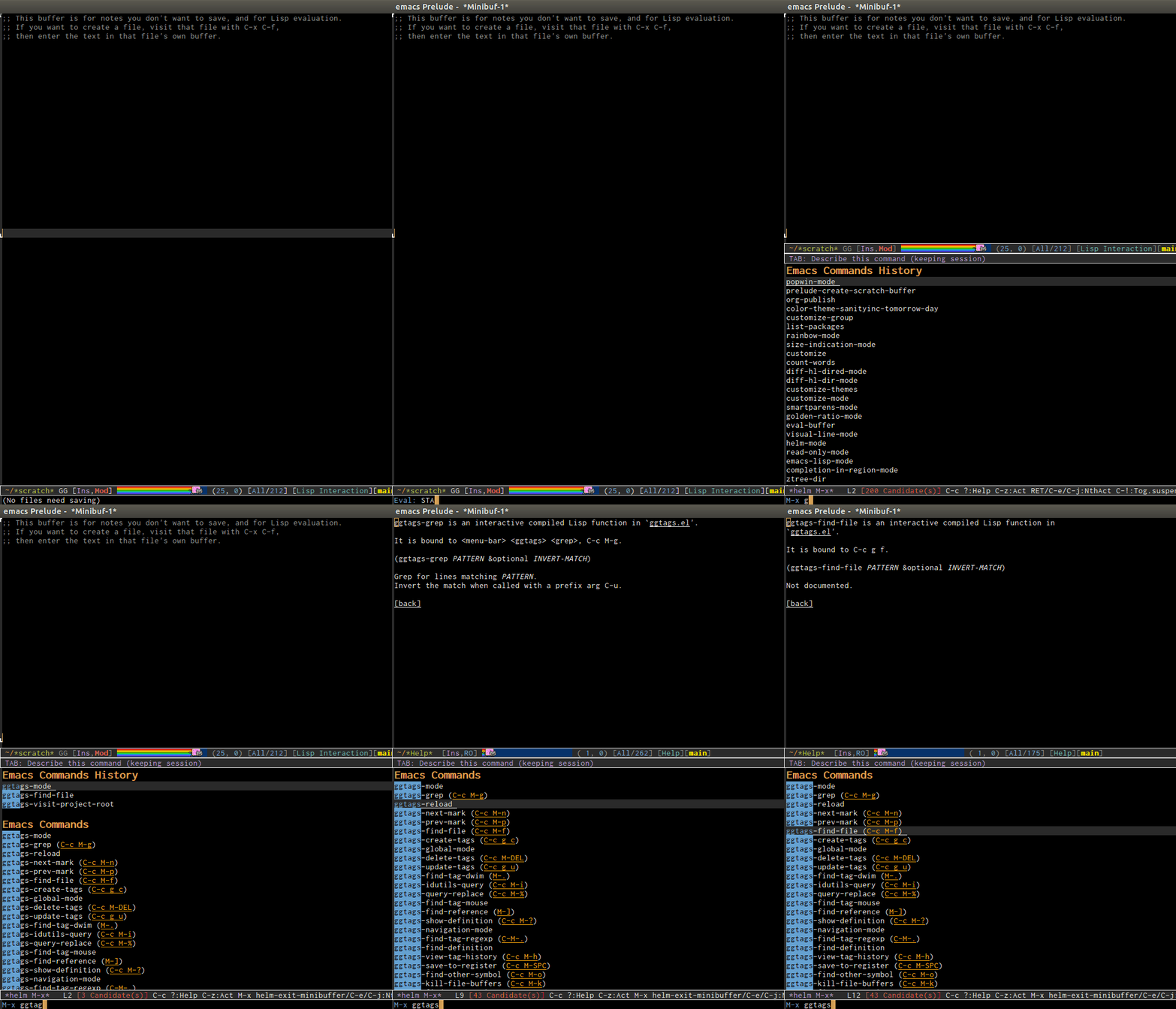
You never need to remember keyboard shortcuts for major modes. When you forget, you can always bring a "cheatsheet" using "C-h m" which lists all key bindings of current major modes and minor modes. Every time I'm new to a major mode, I always use this table. If you forget any key binding but remember prefix key, I press + C-h to bring all the key bindings that start with that . If you ever forget key binding but remember the command, use helm-M-x that list key bindings along side with the commands. DEMO: http://tuhdo.github.io/static/part3/helm-m-x.gif . In Emacs, I NEVER remember things consciously; I keep using something until it is recalled effortlessly. On the other hand, it's not like you don't have to remember things with those fancy GUIs. Take Eclipse as an example. You would have to steps through meaningless GUIs to configure something to work, and you have to remember those steps mechanically the next time you setup something. I would rather learn a consistent programming language with actual easy to remember rules to first configure simple things, and later extend my editor, rather than stepping through those meaningless GUIs.

And what you said that most of the stuff that are easily achievable with a mouse, try to do equivalent things like this in SECONDS: http://emacsrocks.com/. Well, that's why my co-workers work so hard why I have time to enjoy other things during my daily work.

What you said, like many other people who didn't learn Emacs properly or left it for so long that don't know what Emacs is currently capable of, is seriously outdated.

You should have a look at my post in this thread: https://news.ycombinator.com/item?id=8639804 to see what Emacs is capable of that I could never find in any other editors, and even IDEs.
Re: CotEditor – Text Editor for OS X

#180
post #5

I'm pretty effective with vim, so much that other 'normal' editors like sublime & other modern gui editors make me feel a little crippled. That is a problem, because you need to be flexible about things in life. Has anyone succeeded in deliberately changing editors, even when not feeling like it's necessary? I'm especially curious how I could start using emacs, and actually get up to speed with it instead of using it…

I'm in the intermediate to advanced level of Vim user and I switched to emacs. It's easier than you might think thanks to evil-mode.

My emacs acts just like vim thanks to that mode. Literally every keybinding and combination I used works. I switched because configuring vim with vimscript is a pain and at the time of my switchover using other languages to configure was even worse. I like elisp as the config language. That's probably not exactly the question you were asking though since It's less like I switched editors and more like I upgraded ViM's configuration language.

Post reply on HN