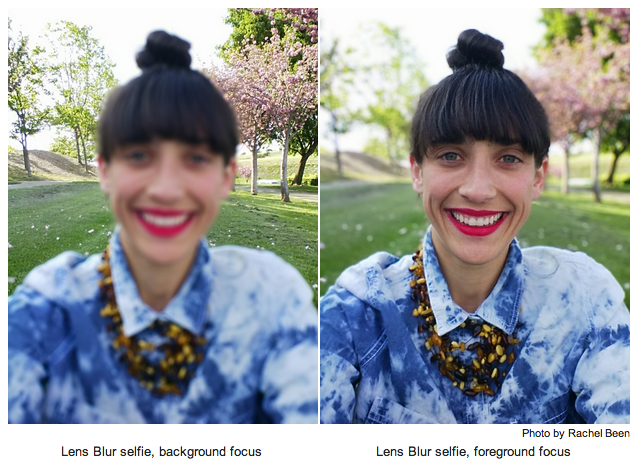
So Google basically took what Lytro has been using hardware to achieve, and did it entirely in software. Pretty impressive.
The difference is that Lytro actually does it, instead of simulating it. It'd be fun to play around with the software to see in which cases it breaks (perhaps taking a photo of a framed landscape photo with another landscape behind, for example)
Lens Blur in the new Google Camera app
21–30 of 249 posts
Re: Lens Blur in the new Google Camera app
#22Regarding the technology (achieving shallow depth of field through an algorithm), not Google's specific implementation ... Up until now, a decently shallow depth of field was pretty much only achievable in DSLR cameras (and compacts with sufficiently large sensor sizes, which typically cost as much as a DSLR). You can simulate it in Photoshop, but generally it takes a lot of work and the results aren't great. The "sh…
It does similar things, and in fact I could believe it if the Google app was just a dumbed down version of the functionality intended to be usable by a wider audience.
Re: Lens Blur in the new Google Camera app
#23I find it funny that this was one of the "exclusive features" of the HTC One M8 thanks to the double camera, and days after it's release Google is giving the same ability to every Android phones. I'm sure the HTC implementation works better, but this is still impressive.
Re: Lens Blur in the new Google Camera app
#24If only they had not confused shallow depth of field with Bokeh (which is not the shallowness of the depth of field, but, rather, how out-of-focus areas are rendered), this writeup would have been much better. http://en.wikipedia.org/wiki/Bokeh Cool technology, though.
The author isn't the one confused.
Re: Lens Blur in the new Google Camera app
#25Regarding the technology (achieving shallow depth of field through an algorithm), not Google's specific implementation ... Up until now, a decently shallow depth of field was pretty much only achievable in DSLR cameras (and compacts with sufficiently large sensor sizes, which typically cost as much as a DSLR). You can simulate it in Photoshop, but generally it takes a lot of work and the results aren't great. The "sh…
I don't know for sure but the code may be derived from or related to Marc Levoy's SynthCam: https://sites.google.com/site/marclevoy/ It does similar things, and in fact I could believe it if the Google app was just a dumbed down version of the functionality intended to be usable by a wider audience.
Edit: below mentions the HTC "double camera" phones, and in fact it's also possible to create synthetic aperture photography with multiple cameras instead of moving a single camera to multiple positions. Then you have the added advantage of not needing to assume a static scene! But a single-camera algorithm is great for rolling out to the common devices most of us have in our pockets.
Marc Levoy's SynthCam used a circular wiping motion, and attempted to "paint" the 3d space occupied by your theoretical processed aperture.
This Google Camera only requires a single linear move, and processes the rest!
Re: Lens Blur in the new Google Camera app
#26For example, if you look at the left example photo by Rachel Been[1], the hair is blurred together with the distant tree details. If instead the algorithm detected the large depth separation there and applied the foreground blur edge against an alpha mask, I believe the results would look a lot more natural.
[1] http://4.bp.blogspot.com/-bZJNDZGLS_U/U03bQE2VzKI/AAAAAAAAAR...
Re: Lens Blur in the new Google Camera app
#27The real problem with things like this is the effect became cool by virtue of the fact it needed dedicated equipment. Take that away and the desire people will have to apply the effect will be greatly diminished.
Re: Lens Blur in the new Google Camera app
#28I may be wrong because I don't know much about image based algorithms, but this seems to be a pretty successful new approach to achieving this effect. Are there any other existing "lens blur" or depth of field tricks that phone makers or apps are using? I'd love to see their code open sourced.
Re: Lens Blur in the new Google Camera app
#29Re: Lens Blur in the new Google Camera app
#30Are there more samples somewhere?