Live data from Hacker News

Screenshots from Windows 95

guidebookgallery.org

41–50 of 85 posts

Re: Screenshots from Windows 95

#41
post #12

This site makes some weird choices. Calendar: "This GUI doesn't have this feature" -- yes it does. Double click the clock. Clock: The old clock application is still part of Windows 95, but it's also in the corner. Address book: Depends on the version of Windows 95. Ones that came with IE3 or IE4 have an address book. CD player: maybe the floppy version lacked it? But Windows 95 definitely has a CD player. Browser: CD…

Double clicking opens the date & time preferences (which already has a screenshot), not a calendar program. 9x did not ship with a clock or calendar program unless you upgraded from 3.x. The article mentions the clock in the taskbar explicitly. And unlike 98, 95 doesn't have a separate logout screen; it is always just another entry in the regular shutdown screen.

The only glaring omission I see is the CD player, but I'd hardly call it glaring considering it is a non-default component, and many countries did not even get a CD version of 95 in the first place (or only OEM).
Re: Screenshots from Windows 95

#42
post #38

The biggest downside of Windows GUIs was that it all was tiny non-resizable dialogs and non-copyable text labels. Did they fix this? I don't use Windows anymore.

Phone apps continue that with the lack of being able to select on screen text.

At least on the iPhone you can get around it by taking a screenshot, then selecting the text

Re: Screenshots from Windows 95

#44
post #36
post #20

Earlier quoted context omitted.

Aqua (in early versions of OS X) did a fantastic job of combining all this clear usability with a lot of fun visual flair. Even the old Qt/GTK themes which emulated that look were pretty good. It really is incredible how flat and boring modern macOS is.

At some point "skeuomorph" design went out of fashion, and everything had to be flat and simple. I think it all started with the Microsoft Zune (an MP3 player), which influenced Windows Phone, which influenced Windows 8. Then came iOS 7, and finally Android 5. I actually don't know when Mac OS went "flat". I only know ever since that time it is regularly unclear what a "button" is, as it doesn't look like a button.

If you're interested, see https://hn.algolia.com/?dateEnd=1388534400&dateRange=custom&...

Ironically, back in 2012 I remember people were expressing their distaste for the skeuomorphic design of iOS and macOS.

Re: Screenshots from Windows 95

#45

Earlier quoted context omitted.

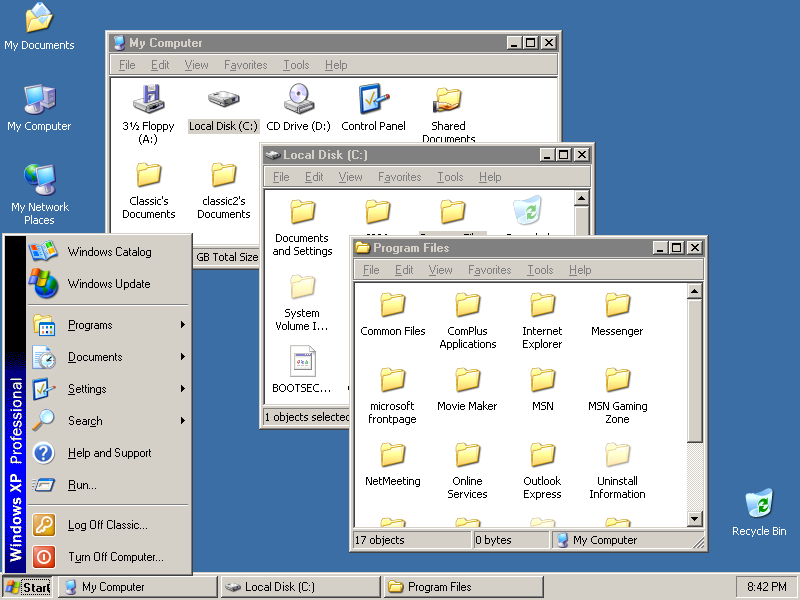
Win XP with classic look was pretty decent and useable. There was an option in system settings to disable all theming, 3D stuff, animations etc. just the basic look of that time and a lot more snappy UX.

Do you have a picture of what that looked like? I'm curious. When I search for it, I can only find pictures of normal Windows XP and older versions of Windows. I can only imagine it looking like Windows 95 again.

It looked like Windows 2000.

https://guidebookgallery.org/screenshots/win2000pro

Re: Screenshots from Windows 95

#46
post #14

Earlier quoted context omitted.

Windows 2000 might be the actual peak. It took the good parts of Windows 95 and 98 and combined them into something quite excellent. All downhill ever since.

Got an old Dell running Windows 2000. Its remarkable how responsive the UI is. I open an Explorer window, it paints instantly. The Start Menu pops up completely drawn in a fraction of a second. Windows 11 on a monster machine is sluggish by comparison -- I can feel it drawing each window I open.

I was just having the argument the other that dragging windows on Haiku on a plain old unaccelerated framebuffer just feels an order of magnitude faster than dragging windows around on Windows 11 with all acceleration enabled. On a 5K monitor. Windows is not setting a very high bar these days.

Re: Screenshots from Windows 95

#48

Earlier quoted context omitted.

Win XP with classic look was pretty decent and useable. There was an option in system settings to disable all theming, 3D stuff, animations etc. just the basic look of that time and a lot more snappy UX.

Do you have a picture of what that looked like? I'm curious. When I search for it, I can only find pictures of normal Windows XP and older versions of Windows. I can only imagine it looking like Windows 95 again.

Not easy to find, anyway here is a small one: http://toastytech.com/guis/wxpclassic.png

Here is a blog post that explains how and why: http://softwaretracker.blogspot.com/2007/08/improve-windows-...

Re: Screenshots from Windows 95

#49
post #12

This site makes some weird choices. Calendar: "This GUI doesn't have this feature" -- yes it does. Double click the clock. Clock: The old clock application is still part of Windows 95, but it's also in the corner. Address book: Depends on the version of Windows 95. Ones that came with IE3 or IE4 have an address book. CD player: maybe the floppy version lacked it? But Windows 95 definitely has a CD player. Browser: CD…

>Calendar: "This GUI doesn't have this feature" -- yes it does. Double click the clock.

https://devblogs.microsoft.com/oldnewthing/20050621-04/?p=35...

Post reply on HN