Live data from Hacker News

Apple passwords deserve an app

cabel.com

221–230 of 414 posts

Re: Apple passwords deserve an app

#221

I don’t personally care much whether Passwords is in Settings or a separate app. But I do have one problem with it. As far as I can tell, you must save a password for a site in order to use the TOTP 2FA feature. I don’t want my device filling in passwords for me because it defeats the purpose of a password being “something I know”. The 2FA code is more like “something I have” and I’m okay with the device filling that…

The “something you know” is your devices pincode/passcode/iCloud password, not the password to the website. If you know the password to a website it means you’re reusing passwords or using a pattern to generate passwords, both of which are less secure than randomly generated passwords (especially the former).

Of course, nothing is stopping you from saving a bogus password either.
Re: Apple passwords deserve an app

#223
Gimme something to make family passwords easy (eliminate passwords!) Enable Apple ID logins for kids. Throw your weight around to move safety settings into some sort of open web standard. I’ve got 1Password but the daily pain of managing a family of users with various accounts is just too much right now and I would pay almost any amount of money to have a simple solution that I never had to think about.

Re: Apple passwords deserve an app

#224

Earlier quoted context omitted.

> 1. The experience on Windows is terrible. They can claim it's cross-platform but it's truly a sub-par product. Like a lot of other Apple stuff, I'm only able to use it because I don't use anything non-Apple for anything "serious" that involves a GUI. Windows is for gaming, Linux is my file storage and docker-service-running server that I only interact with over SSH and Web. Ditto Notes, all their Office-type progra…

> The fucking name of the screen is "passwords"! I shouldn't have to get farther than "pas" for it to be the first entry on the list, "pass" in the worst-case! Weird. "pas" and it was top of the list for me.

In Spotlight, I need “passw” to see it. In the actual Settings search, I also need “passw”, and that only gets it to #5 in the list.

Also, Spotlight is bizarrely slow finding even local apps and things like Passwords. WTF

Re: Apple passwords deserve an app

#225

Earlier quoted context omitted.

Funny situation, there's another thread I was replying to someone who wanted to shift back to native apps instead of cross plat electron apps (for performance reasons). Well, Apple Passwords on Windows is a good example of how that turns out in reality. I believe it's using WinUI. While the performance is nice, the experience is entirely unlike what you get on Mac and winds up making you wish you were using another s…

> Apple Passwords on Windows is a good example [...] the experience is entirely unlike what you get on Mac If you were a Windows user, why would you want an app that acts like a Mac app? Surely the benefit of having a dedicated Windows app is that the experience should be like other Windows apps.

You're not really thinking about it as a "mac app", but rather "the service". You expect it to act like the service you use on other platforms with all the features you rely on.

If I'm using Spotify, I don't think "oh this doesn't use windows navigation component from winUI", I immediately know where the genre categories are because I've already used it on android or linux and expect it to be there. I know exactly how to add a song to my library, to shift around playlists, to manage folders, everything is as I learned it on [other platform].

Design development becomes this duplicated burden where every feature now has to go through the ringer twice (or more) to fit native components for their respective platforms. When you hit limitations on those native components, you're now having to make the decision to either hold back the feature entirely, or create fragile workarounds.

In an alternate timeline native components would have had far greater appeal, where people actually hate and boycott apps designed otherwise. But we don't. Even on iOS or mac, people regularly rely on apps that only vaguely interpret their native components. The situation is even worse on windows past 7, where the idea of a "windows app" is so jumbled there is nothing to "expect" from the experience - which is actually part of why I think these unified app designs have really taken off.

Re: Apple passwords deserve an app

#226
post #118
post #17

Earlier quoted context omitted.

There seems to be a Google Chrome extension called "iCloud Passwords" but it only has two stars, so I don't think you'll be positively surprised. Also, on iPhone it's ok-ish but on Mac the experience is a subpar too: Keychain, the app you use to view your passwords, feels like a 90s Visual Basic application. Plus you can't organize your accounts, and even if you prefix them to "sort by name", the special name you giv…

What's wrong with Keychain Access? It hasn't changed its appearance since more than a decade. That's a good thing for familiarity. Early Mac OS X apps have incredibly good design that doesn't waste space.

But it does waste a lot of space... there's a lot of duplication of keys (which are deduplicated in the iPhone app), and with other information (somehow I have hundreds of "com.apple.cloudd.deviceIdentifier.Production" in there). And I already mentioned organization fails. Plus it's kinda insecure as it enumerates your accounts exhaustively without asking for a password like iPhone/Safari (granted, not a problem specific to this app). And the interface to view the passwords is terrible. Old and familiar is not synonyms with "good".

However now that comex pointed me to the Password in the "System Settings" app, I at least can use it and it's fine if Keychain is left as is.

Re: Apple passwords deserve an app

#227
post #4

I tried going all-in on using iCloud Keychain (correct term?) for my passwords from having previously used LastPass. In short. 1. The experience on Windows is terrible. They can claim it's cross-platform but it's truly a sub-par product. 2. On Mac it's tied specifically to Safari. I use Safari a lot but if I'm in a different browser then my passwords are unavailable. 3. The GUI is buried in System Settings. Heaven fo…

> 3. The GUI is buried in System Settings. Heaven forbid you need search it's only a simple 37 clicks away! I just learned that this GUI exists. I have been using /System/Applications/Utilities/Keychain Access.app for years to deal with passwords.

Me too. Now to try and figure out if I can create a Macro to launch this.

Re: Apple passwords deserve an app

#228

Earlier quoted context omitted.

> 1. The experience on Windows is terrible. They can claim it's cross-platform but it's truly a sub-par product. Like a lot of other Apple stuff, I'm only able to use it because I don't use anything non-Apple for anything "serious" that involves a GUI. Windows is for gaming, Linux is my file storage and docker-service-running server that I only interact with over SSH and Web. Ditto Notes, all their Office-type progra…

> Yeah, this is super fucking weird. You'd think this would be connected in some fashion to "keychain", but nope. Other browsers used to be able to use it. I do think it’s a really thorny issue—“allow this application to access all saved passwords?” is a pretty damn scary permission to include. Up there with the “allow this application to control your computer” permission that is used for accessibility apps (which ap…

Yeah, I a think other browsers want to be able to test whether there is a saved password or not, and get the corresponding username, which is quite a big permission to give away. For actually filling in the password they could maybe offer a pop up where the user must authorise the app using biometrics or some other OS-level action. That’s already the experience with safari.

Re: Apple passwords deserve an app

#229
post #4

I tried going all-in on using iCloud Keychain (correct term?) for my passwords from having previously used LastPass. In short. 1. The experience on Windows is terrible. They can claim it's cross-platform but it's truly a sub-par product. 2. On Mac it's tied specifically to Safari. I use Safari a lot but if I'm in a different browser then my passwords are unavailable. 3. The GUI is buried in System Settings. Heaven fo…

It's not great, but the app you are looking for on macOS is Keychain Access

Re: Apple passwords deserve an app

#230

Earlier quoted context omitted.

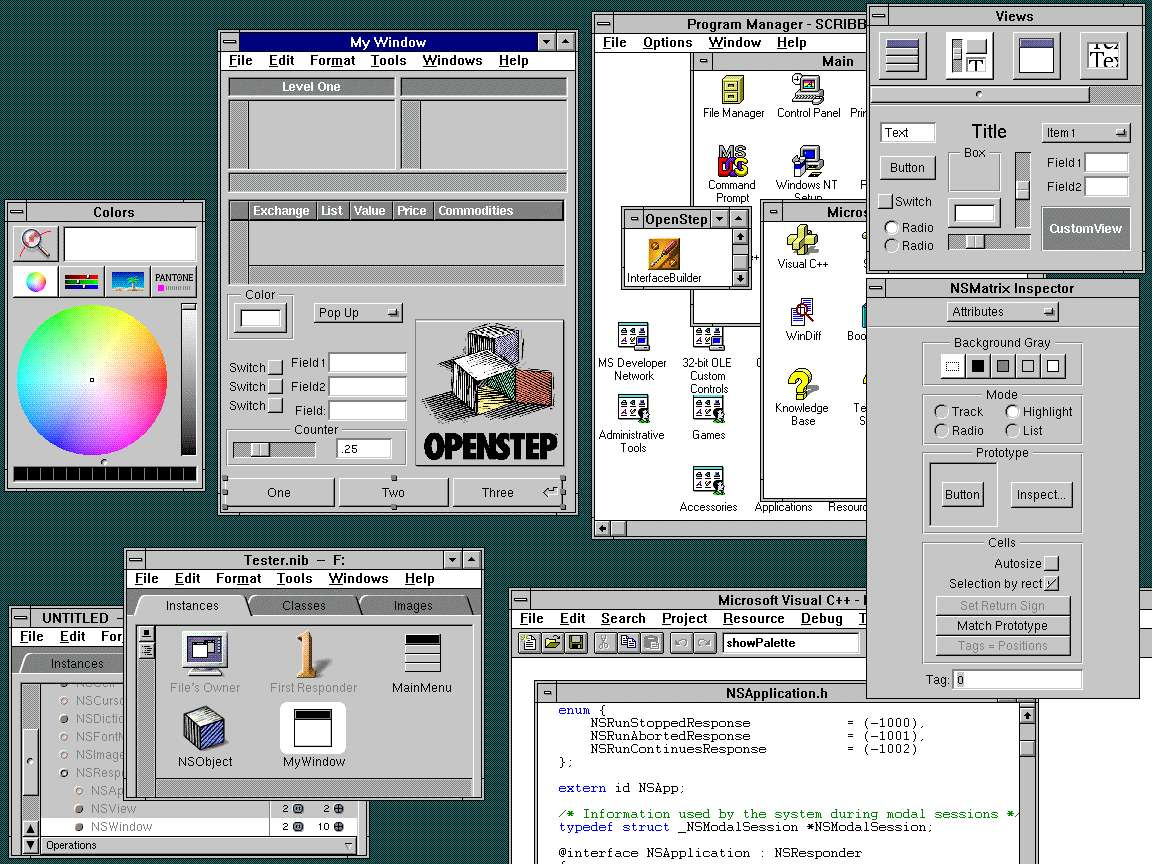
Any link to the port of Cooca to Windows?

Looking at the Apple Music app for Windows quickly, it does appear Apple has done some porting of their APIs to Windows. https://i.imgur.com/tdr6XTO.png

https://forum.winworldpc.com/uploads/editor/82/fnzv4nyssemk....
Post reply on HN