Live data from Hacker News

USB Cheat Sheet

fabiensanglard.net

141–150 of 174 posts

Re: USB Cheat Sheet

#141

Earlier quoted context omitted.

I don't know where you get "1 byte per pixel" from. At minimum, raw 4:2:0 video would be two bytes per pixel, and RGB would be three bytes per pixel with 8-bit color depth.

You're talking about processed color frames. The GP was suggesting that the camera stream the raw sensor data, which doesn't have individual color channels, just a monochrome grid with 10 or 12 bits of usable data per pixel. A bayer filter[0] is placed in front of the sensor so that a given color of light falls on each cell. The USB host would be responsible for applying a demosaicing[0] algorithm to create the color…

> it has a native resolution of 2304H x 1296V

Seems to me like that kills the idea dead? GGP assumed 8bpp and that the raw resolution matched the output, and came out... well wrong (the effective bulk transfer rate of USB 2.0 is 53MB/s on a good day), but by just a few megs.

However the raw resolution is 40% higher than the final output, meaning even at 8bpp you're at 85MB/s and you've blown way past any hope of recovering via a few tricks. At 10 bpp you're above 100MB/s.
Re: USB Cheat Sheet

#142
post #116
post #68

Earlier quoted context omitted.

There was a period of time where a google engineer was producting review on amazon about which usb-c cable would make your laptop burn. That was fun, and totally not the sign of an overbloated standard.

IIRC, that particular cable was one which had its power wired to the ground pin and ground wired to the power pin. No standard can help you if the cable is that badly made. (The effect of that miswiring is to apply a negative voltage, around -5V, to a chip most probably designed for a range of -0.5V to 20.5V; which results in a short circuit through at least the ESD protection diodes within the chip, and possibly oth…

Yep, a batch of cables having the super basic power pins wired backwards tells you basically nothing about the standard, no matter how often people try to use it as evidence of complication.

And the docks that were frying switches were putting 9 volts on a signal pin, also obviously wrong.

Re: USB Cheat Sheet

#143
post #131

Earlier quoted context omitted.

Thank you for noticing these issues, I have updated the table. I would be happy to improve it and add encoding. I am surprised by some of the summary entries on Wikipedia ( https://en.wikipedia.org/wiki/USB4 ). Looks like USB4 "reverted" to 128b/132b. It is accurate?

128b/132b is the more efficient coding. The closer to 1 the fraction is, the less coding overhead it has, and 128/132 is larger than 8/10.

Actually, I just noticed that 128/132 is the same fraction as 66/64 so both scheme has the same encoding efficiency. So USB-4 did no "revert in terms of efficiency.

Re: USB Cheat Sheet

#144
post #87

Fun fact: USB 2.0 webcams have been existing for over 10 years. USB 2.0 is 60 MB/s. A pixel of an image is 3 Bytes. A 1920x1080 FullHD image is 6.2 MB. At 30 frames per second, second of a FullHD video is 186 MB. How did they do that? Answer: frames are transferred as JPEG files. Even a cheap $15 webcam is a tiny computer (with a CPU, RAM, etc), which runs a JPEG encoder program.

Hm. But then wouldn't it make more sense to just stream the raw sensor data, which is 1 byte per pixel (or up to 12 bits if you want to get fancy), and then demosaic it on the host? Full HD at 30 fps would be 59.33 MB/s, barely but still fitting into that limit. But then also I think some webcams use H264? I remember reading that somewhere.

> Full HD at 30 fps would be 59.33 MB/s, barely but still fitting into that limit.

It's not fitting into anything I fear, best case scenario the effective bulk transfer rate of USB2 is 53MB/s.

60 is the signaling rate, but that doesn't account for the framing or the packet overhead.

Re: USB Cheat Sheet

#145

So on the next versions of USB, the cable length will get shorter and shorter until the max gets to 5cm? While I get the technical reasoning about high frequency/attenuation etc that limits cable length as speeds go higher, there are obviously some practical limits to how short cables can be. How would that be solved, I don't know.

Keep the same speeds, add more wires.

[deleted]

Re: USB Cheat Sheet

#146
post #124

Earlier quoted context omitted.

AFAIK, according to the standard you still cannot use the B port as a host, it should instead be an AB port (a socket in which both A and B plugs fit).

It is one of these connectors: https://en.wikipedia.org/wiki/USB_hardware#USB_On-The-Go_con... But every OTG device I have ever used has just used the USB-A port.

[deleted]

Re: USB Cheat Sheet

#147
post #124

Earlier quoted context omitted.

Yeah it just allows you to use a B port as a host (if supported). It's still the USB protocol.

AFAIK, according to the standard you still cannot use the B port as a host, it should instead be an AB port (a socket in which both A and B plugs fit).

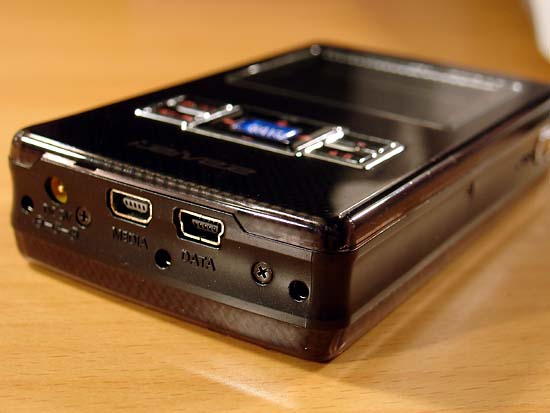
I had an iRiver H320 with USB-OTG support. At the time I thought it was just a straight-up mini-B port but you're right, that's actually a mini-AB port!

https://www.guru3d.com/miraserver/images/reviews/soundcards/...

I am not sure I have ever seen mini-A anywhere.

God, what a wacky standard. (USB-OTG specifically but really USB plugs in general)

Re: USB Cheat Sheet

#148
post #124

Earlier quoted context omitted.

AFAIK, according to the standard you still cannot use the B port as a host, it should instead be an AB port (a socket in which both A and B plugs fit).

i cannot find any examples of this kind of port, can you share a link?

iriver h320

https://www.guru3d.com/miraserver/images/reviews/soundcards/...

Re: USB Cheat Sheet

#149

Earlier quoted context omitted.

I guess at some point optical will be the only way forward. Having more data lines in a serial bus is interesting, as the whole reasoning to go from parallel lines (e.g. Centronics, ATA/SCSI or ISA/PCI buses) to serial (SATA/SAS, PCIe, USB) was that coordinating multiple data lines got impossible due to physical limitations where e.g. minimal differences in cable lengths started to matter).

> I guess at some point optical will be the only way forward. Maybe. Though Infiniband's currently at 100Gbps per lane on a 1.5 meter passive cable. And active cables can give you a moderate boost while still on copper.

that's a giant QSFP+ cable (I think mine are at least 3/8") with tons of shielding and a terrible bend radius though.

And my cables all have a "10 plug/unplug cycle lifespan" sticker on them - it undoubtedly will go for longer in practice but it's not designed for USB-style usage where you might plug and unplug your phone a dozen times a day as you charge it.

Commercial design concerns are very different from consumer design concerns, basically. Phones would probably be easier if we had a 1/2" x 1/2" x 1.5" connector with a shielded connector body! ;)

Re: USB Cheat Sheet

#150
There's something about the naming of USB that is great. I love how there are now something like a dozen 'universal' standards, and how the serial bus now has multiple lanes.
Post reply on HN