Live data from Hacker News

iPhone remains findable after power off

twitter.com

151–160 of 336 posts

Re: iPhone remains findable after power off

#151
post #3

Earlier quoted context omitted.

Maybe you don't want to be tracked sometimes, and you expect turning off your device to turn it off.

What situation are you going, "I don't want big tech to be tracking me right now"?

The Find My network is designed to not allow Apple to track you using it.
Re: iPhone remains findable after power off

#152
post #126

Earlier quoted context omitted.

The police in my country wouldn't even bother to check, they have rapists and drug dealers to deal with.

Yeah I'm baffled by all of the comments saying that this is great as an anti-theft feature. I don't know where people live that that's the case, but I sure as heck have never known police in the US to give a damn about $1000 property crimes. They don't care about $20000 home robberies and car thefts, even with strong video or other evidence. I can't imagine they're going to start chasing down criminals to get a used…

In my country, I've seen a person enter a police station asking for his phone, which he knew to be there because of a finder feature (not sure if it was Find my Phone in an iPhone specifically). The police must had taken the phone from someone who was caught stealing in a different incident or something.

Re: iPhone remains findable after power off

#153
post #88

But if they actually turned off power, they'd lose track of where you are. They'd lose the tracking information needed for marketing. Can't have that. Does "airplane mode" still shut off all transmitters?

Airplane mode definitely does not disable Bluetooth - especially if you are using airpods or other Bluetooth headsets. BT radio will stay on so you can keep listening through the flight. WiFi is also able to be toggled on while airplane mode is enabled. The only thing that airplane mode does is ostensibly turn off the mobile network connectivity

Re: iPhone remains findable after power off

#154
"The voice came from an oblong metal plaque like a dulled mirror which formed part of the surface of the right-hand wall. . . The instrument (the telescreen, it was called) could be dimmed, but there was no way of shutting it off completely." - 1984.

It is best to treat electronics as always on and always recording and transmitting everything.

Re: iPhone remains findable after power off

#155

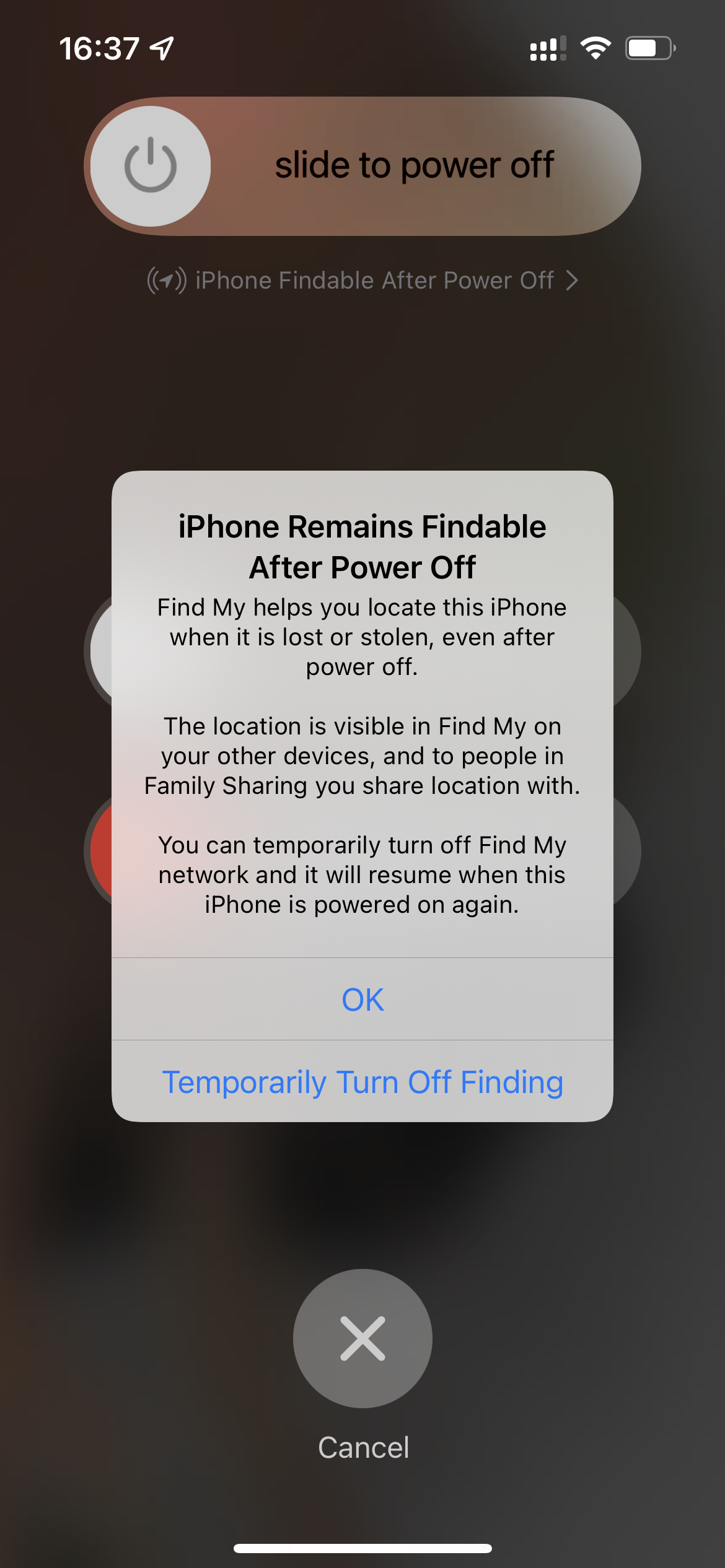
Apple is very clear that this is how things work now. They even give you a dialog prompt now to inform you of this change the first time you try to shut your device off - https://9to5mac.com/2021/06/07/ios-15-find-my-network-can-fi... I'm not sure why this is presented as some new thing, or a gotcha or whatever this is. We've known about it for months... And IMO, it's a positive change although it does sound a little…

> They even give you a dialog prompt now to inform you slightly tangential, I hate being informed of things when I try to do them. I'm in a hurry, I don't want to read all about something now. I wish the dialogs had an "email this to me, willya?" selection, with an opportunity to decide the long term setting that I want.

this lowers engagement metrics, so probably not going to happen

Re: iPhone remains findable after power off

#156

Earlier quoted context omitted.

> They even give you a dialog prompt now to inform you slightly tangential, I hate being informed of things when I try to do them. I'm in a hurry, I don't want to read all about something now. I wish the dialogs had an "email this to me, willya?" selection, with an opportunity to decide the long term setting that I want.

this lowers engagement metrics, so probably not going to happen

the modal dialog that interrupts my flow is forcing engagement, adding a choice doesn't change anything

Re: iPhone remains findable after power off

#157
post #68

Earlier quoted context omitted.

Settings -> (Your Name/Apple ID ...) -> Find My -> Find My iPhone -> Find My Network in latest iOS.

Does 5 levels deep count as easy to find?

You can just type "Find" in the huge text field at the top to filter out settings items. I rarely drop levels deep for anything.

Re: iPhone remains findable after power off

#158

Earlier quoted context omitted.

Wow, first I've heard of it. Seems to be enabled by default too -- I think users definitely are not "clear" about it.

The "slide to power off" prompt literally says "iPhone Findable after Power Off >" right under it every time, but 99% of users will never see it or care about this feature because no one ever turns their phone off. But if you're one of those few people who does turn the phone off, it says right there, and you can tap on it to shut down to unfindable state this time instead. Note that it requires a passcode to disable…

> no one ever turns their phone off

Sometimes turning it off and on again is the only way to get wi-fi syncing to work.

Re: iPhone remains findable after power off

#160
post #68

Earlier quoted context omitted.

Settings -> (Your Name/Apple ID ...) -> Find My -> Find My iPhone -> Find My Network in latest iOS.

Does 5 levels deep count as easy to find?

From the power off menu, it gives you a temporary off button: https://files.catbox.moe/wd48tu.png
Post reply on HN