Live data from Hacker News

You Don't Need a GUI

github.com

401–410 of 439 posts

Re: You Don't Need a GUI

#401
post #193
post #174

Earlier quoted context omitted.

I like your point about discoverability. What if there was such a thing as a right click menu for command line programs? Like if I type ffmpeg or youtube-dl with no args, it lists the 3 most common ways to use it, and maybe allows an interactive CLI menu where you can build up the correct argument list by answering a few questions. I would love the most useful commands to look like: ffmpeg --resizeVideoTo input.mp4 5…

While not entirely matching your vision for this, TLDR [1] does provide for a similar functionality (discoverability of functions of specific applications). This doesn't help when you want to map the fuzzy idea of performing a specific action to a particular existing program but it has helped me avoid having to search online for how to perform a particular task with ffmpeg. [1] https://tldr.sh

I was not aware of tldr. Thanks!

However I think the tldrs need to be sorted better. When tldr git, the first example was

  Check the Git version: git --version
Shouldn't the tldrs show me how to add, commit, push? Who knows.

I think the tldr lists should be interactive and allow you to select by pressing 1-9.

And maybe it should re-sort based on what you use most often, hehe.

Re: You Don't Need a GUI

#402

Earlier quoted context omitted.

There's more than just effort to consider. Discoverability, confidence, error recovery, and consistency come to mind. You might be in a terminal, in the directory you're you want to copy a file within... $open ., type file name, command-C, command-C, command-W would do a great job, require minimal additional effort, but provide better visibility into the status of the copy, allow you to better handle file name collis…

For 90% of this stuff “discoverability” isn’t a problem anymore, I’ve already crossed the learning curve of the command line and I just think in terms of the available command line programs. For the next 5%, I tend to pipe a command like find or ls to a file and then use vim to quickly make a shell script that does what I need. I don’t know if it’s more efficient, objectively, but this just is the workflow that match…

I've been using the terminal (admittedly not as my main interface) for 20 years and I still have to consult man pages, documentation, and google about 10 times a day. I'd say discoverability is certainly still a large problem with CLI.

Re: You Don't Need a GUI

#403
post #380
post #79

Earlier quoted context omitted.

Thankfully while computers are indeed picky about typos, they also gladly guess, complete and validate what you're trying to tell them if you ask politely (a.k.a. banging repeatedly on the tab key).

If someone was nice enough to provide that autocompletion for your favorite commands, because Unix commands don't have any kind of introspection.

Your shell probably does though, at least for files and commands. Some like ZSH even have completions for common commands readily available, accept external completion plugins and let you write your own as a last resort.

Re: You Don't Need a GUI

#404

Earlier quoted context omitted.

That sounds like a GUI; how do I pipe [open, copy, rename, etc] into sed or awk? (Because the^Wa problem with GUIs is that the answer tends to be "Why would you want to do a wierd thing like that?".)

Can you explain more clearly what you mean? Why does the order of commands or their names have any influence on whether pipes can be used? How do you pipe the output of cp into awk?

> Can you explain more clearly what you mean?

I can try... Specifically, given a command that produces a list of "everything that can be done with the file", how do I cause the (unstructured) text of that list to be piped into a arbitrary other program, in the same way that `grep foo a.txt | bar` causes a list of occurences of 'foo' in a.txt to be piped into arbitrary program bar.

> How do you pipe the output of cp into awk?

  $ cp -vT foo/ bar/* | awk '...'

Re: You Don't Need a GUI

#405

Earlier quoted context omitted.

You said a business not an industry.

Exactly, I said business, not company. Gaming is a business, Apple is a company. Understand the difference?

The fact that nearly everyone misunderstood you indicates that you didn't communicate well. A trillion dollar business suggests a singular wherein a singular could be a single corporation or industry in common usage. Without surrounding context to the contrary it isn't trivial to distinguish the intentions.

Re: You Don't Need a GUI

#406

GUI is better for discoverability of the most common scenarios (I can right-click to see everything that can be done with the file, including some third party programs). But it's bad for composing programs and interoperability, often it's impossible or very hard to automate (how many people are doing UI testing? there is a good reason it's not many -- it completely sucks) TUI/console is very good for interoperability…

> `man -K "free space"` isn't very fruitful

"free space" doesn't turn it up, but on my system only turns up one result that obviously isn't it, no big loss.

"free" also doesn't turn it up, which seems like a missed opportunity. Going through the 40ish results before you're confident it's none of them is needlessly painful, but not crazy.

Both "disk" and "space" do turn it up, though, and also surface du (amongst about 50 other things).

I don't think scanning through ~~~

I'd also note that TUI encompasses two kinds of thing - the utility in the shell (like df) and the captive interface that takes you away from your shell for an extended time as you navigate possible actions in some other manner. The latter has more of the benefits and drawbacks of a GUI.

~~~

In any case, I don't think your thesis is too far off, and I certainly welcome improvements to composability and discoverability across the board.

Re: You Don't Need a GUI

#407
post #174

Earlier quoted context omitted.

I like your point about discoverability. What if there was such a thing as a right click menu for command line programs? Like if I type ffmpeg or youtube-dl with no args, it lists the 3 most common ways to use it, and maybe allows an interactive CLI menu where you can build up the correct argument list by answering a few questions. I would love the most useful commands to look like: ffmpeg --resizeVideoTo input.mp4 5…

That's basically what cheat.sh does. It's an editable wiki that contains common use cases (cheat sheets) and can be called directly from the command-line, e.g.: curl cheat.sh/ffmpeg curl cheat.sh/youtube-dl curl cheat.sh/cd curl cheat.sh/find It gives quite a bit more than 3 use cases, but you could do: curl -s cheat.sh/ffmpeg | head For more details you can go to the site in a browser or use: curl cheat.sh curl chea…

Thanks

Re: You Don't Need a GUI

#408

Earlier quoted context omitted.

You can't undo a file-move in (most?) GUI file managers either.

Windows Explorer, macOS Finder, KDE Dolphin, and GNOME Nautilus all beg to differ. The issue is that tasks on the CLI tend to be split between many different utilities. So you'd either need a standardized method for sharing an undo tree between the different utilities, or alternatively to integrate all the different tasks under a single program.

To late to edit my other reply, but the fact that I use 3/4 of those regularly and didn't know they had that feature is possibly a point against "discoverability" being something GUIs naturally have.

Re: You Don't Need a GUI

#409

Earlier quoted context omitted.

Windows Explorer, macOS Finder, KDE Dolphin, and GNOME Nautilus all beg to differ. The issue is that tasks on the CLI tend to be split between many different utilities. So you'd either need a standardized method for sharing an undo tree between the different utilities, or alternatively to integrate all the different tasks under a single program.

I didn't see how this could work in the general case and indeed it doesn't on dolphin. Consider this folder tree: + foo +- bar.txt + bar +- bar.txt Moving the foo/bar.txt to bar/ in Dolphin then undoing leaves you with an empty bar/

Yeah there are definitely a lot of edge cases when it comes to filesystem operations. It works for the simple stuff though (ex accidentally grabbing the wrong file or dropping it in the wrong folder).

I mostly just use Ranger in a VTE to be honest. Cut/Copy/Paste and directional navigation of a tree using standard Vim keybindings is just more fluid than anything with a mouse could ever hope to achieve. Add to that dropping to the shell with `S` with my hands already on the keyboard and it's by far the best workflow I've come across.

Re: You Don't Need a GUI

#410

Full disclosures: 1) I have an App - https://nocommandline.com - that is the opposite of this i.e. it says you should use a GUI instead of CLI (for a specific set of scenarios). 2) I'm not a 9-5 programmer even though I have a computing background At a very high level - I generally disagree with 'you don't need a GUI' or 'CLI is better than a GUI' At a nuanced level, I would say - it all depends. Sometimes CLI is muc…

> "There is the argument that you can't automate GUIs."

Windows of the 2000-2010 era; when business tools were desktop programs and they would generally have a GUI, probably hooked into MMC so they could manage remote computers as well, have .exes which took at least some command line arguments, have a COM automation interface, and have tools which use fairly standard Win32 GUI controls which could be changed or scraped for data interactively with third party programs like Sys Exporter and had decent support for keyboard navigation with system-wide patterns like accelerators and tab ordering.

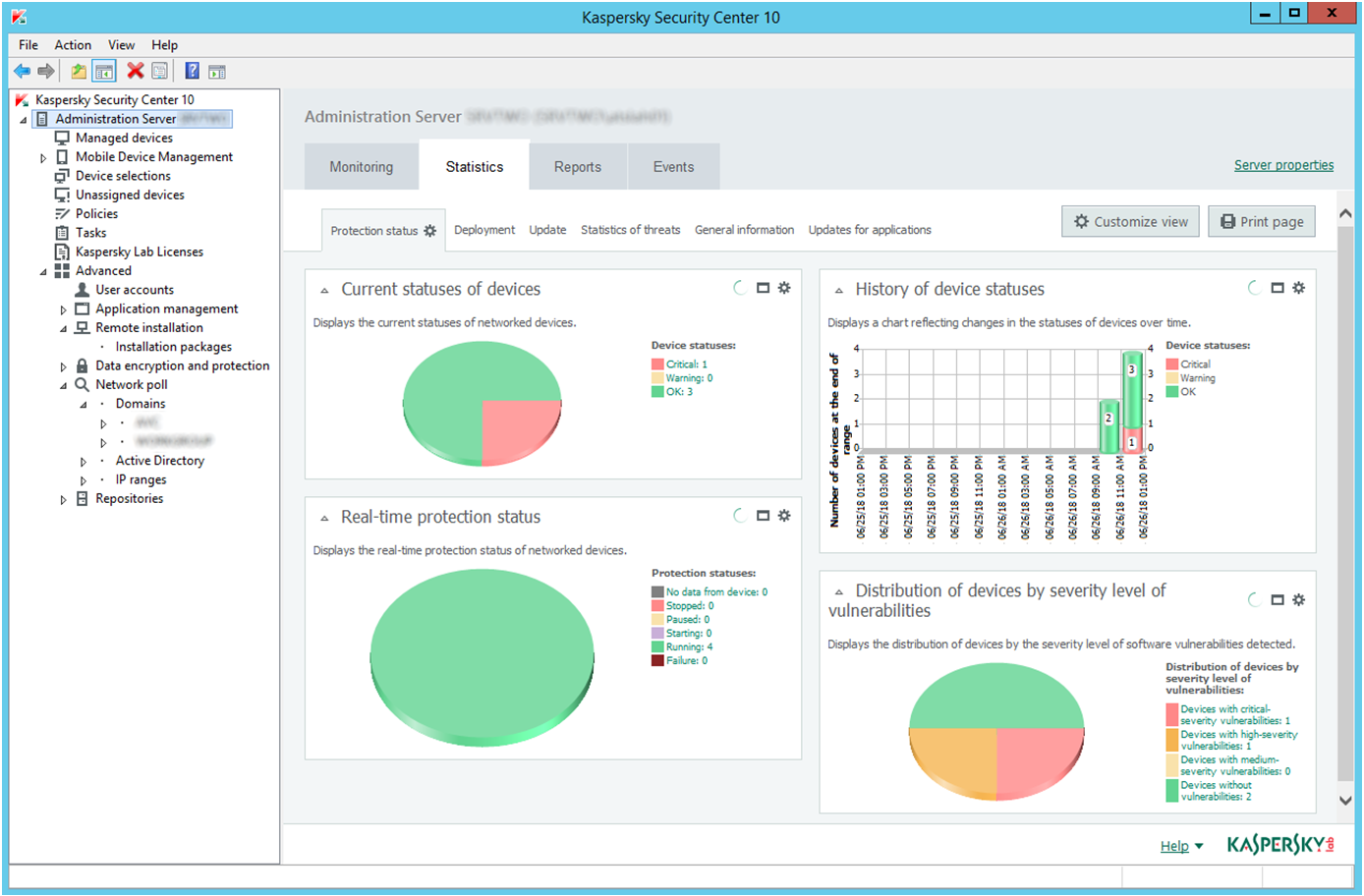
Take Kaspersky AntiVirus management console, it has:

- a GUI, a standard MMC style with a treeview on the left and a web page on the right[1], which is approximately "every gui management tool of the era".

- Various CLI tools that will do things like "check connection from client to server" and "force update"[2]. (Although rarely will Windows tools like this have command line options for everything).

- Documented automation interface using COM with examples for VBScript and JScript, but which can be used by any COM-supporting language (which is most of them on Windows - PowerShell, Python, C#, Dyalog APL, Java,...) [3] where the documentation is in a help file that installs locally with it. The ubiquity of COM automation in the Windows world of yesteryear is way under-discussed in the "can't script GUIs".

- Backed by a database, with documented stable views for you to query for reporting and integration, and the documentation is in a locally installed help file.[4]

By no means is this the end-all be-all of the computing world, but people who say "I only use a CLI" are missing such a huge part of the computing experience, and people on Linux where GUI tools appear to be completely isolated islands disconnected from each other and from everything else and second-rate afterthoughts, are as well. It used to be almost the default in Windows world for tools to take Active Directory / single-sign-on logins, to have granular AD backed permissions, to be automatable with COM, and so on. Ropey, unstable, proprietary, but far more amenable to poking-inside than people typically give it credit for. And it's going with the rise of "why invest when we could take profit instead, why build for the long term when I'll be changing jobs in 18 months, why build a desktop app when we could build a subscription service" models.

And then in the modern day it's SaaS web applications which are their own proprietary, isolated, disconnected systems, maybe with a limited REST API locked behind a premium tier or a rate limit and everything with a limited result set because they can't let you overload their servers, and desktop programs becoming some UWP app-store isolated container, or some Electron tower, also isolated, and/or cross-platform compatible and isolated from the underlying OS and its models of doing things.

If a non-technical person can't use it, a non-programmer, it has no value as a user tool. If you can't auto-deploy 1,000 servers at the other end of a headless network connection, it has no value for scripting. I'm sure there's a use-case falling by the wayside, technical people who could and would script GUI tools together - not for automation, for interactive use, for exploration.

The amount of times I've put |gvim - at the end of a pipeline to load the results into Vim, but then they get stuck there. Only to be saved as a file, or run through a new shell launched from Vim or copy-pasted out. There's no way that I know of to do `ls -l | gvim - | mv ./old` for example; you can do it if you know in advance what commands to run then you can use Vim in headless mode.

My point is there could be a missing, under-explored computing mode, part-CLI and part-GUI.

[1] https://www.av-comparatives.org/wp-content/uploads/2018/07/a...

[2] e.g. https://support.kaspersky.com/9292

[3] https://support.kaspersky.com/us/9291

[4] https://support.kaspersky.com/KSC/EventExport/en-US/140056.h...
Post reply on HN