I came across this reversible USB A connection searching for a usb power pack with sound for my blind
friend. I was curious to how they achieved it. https://accessibility.energrid.us.com/products/energrid-vs15...
I’ve made a Cursed USB-C 2.0 device
111–120 of 143 posts
Re: I’ve made a Cursed USB-C 2.0 device
#112Earlier quoted context omitted.
> just because the two USB-C ports on a laptop look the same, doesn’t mean they work the same. This is already a solved problem[1] through color coding. Not sure why they couldn't use that scheme. Maybe combine a few to indicate things like DisplayPort and Thunderbolt capability, could have up to four quadrants for example. [1]: https://en.wikipedia.org/wiki/PC_System_Design_Guide#Color-c...
> this is already a solved problem through color coding Speaking from experience, I don't think most end users are liable to pay enough attention to their ports to notice the color coding. I remember family members being confused by the blue 3.0 ports when those were a thing--now there's also red ones, and different color C ones, and some C ports have the little lightning bolt and some don't, and most users don't kno…
I built a new desktop recently, and the case has a USB-C port on its top panel. I had to buy a $20 PCI-E card to have somewhere legit to plug the port into because my motherboard didn't support it. I had the option of trying to make it USB 3.1 or whatever, thunderbolt, or USB 3.0 or even 2.0 via a series of adapters that probably shouldn't exist but do on ali express.
I doubt I'll ever plug anything but a smart phone into it, but it seemed worth it for the feng shui.
Re: I’ve made a Cursed USB-C 2.0 device
#113Earlier quoted context omitted.
> this is already a solved problem through color coding Speaking from experience, I don't think most end users are liable to pay enough attention to their ports to notice the color coding. I remember family members being confused by the blue 3.0 ports when those were a thing--now there's also red ones, and different color C ones, and some C ports have the little lightning bolt and some don't, and most users don't kno…
Does the bolt mean Thunderbolt or power delivery?
My wife's laptop has three USB-C ports and the laptop charges off all 3, but only one has the bolt. I strongly suspect it means Thunderbolt support, i.e. it's the only port that will work well with a dock.
Re: I’ve made a Cursed USB-C 2.0 device
#114Earlier quoted context omitted.
Two major reasons, as far as I understand things. Firstly, reversible plugs are harder to make structurally resilient, they only become feasible cost-wise as stronger materials become cheaper and manufacturing grows more efficient. Secondly, reversible plugs are a lot more complex. Compare the 4(ish) pins of USB-A to the 24 pins on USB-C. Not all of them are strictly necessary for parity with USB-A, but you could cut…
Assuming the structural issues are solved, isn't it literally as easy as doubling each pin in a 180° fashion and shorting each pair? What additional controller complexity would this lead to (assuming termination issues are solved)?
Not for high speed data (USB3.1 ++). The electrical length of the unused pins causes reflections in the signal. It's a consequence of the finite speed of light.
Re: I’ve made a Cursed USB-C 2.0 device
#115Earlier quoted context omitted.
You imply that the USB-C could have only 12 cables. Only the USB2.0 pins are duplicated, there is 4GND and 4PWR cables for power need, and the rest of the connector are not duplicated. If it was not reversible, USB-C would be 22 connectors, not 12. Plus USB-A is the only one with 4 cables, what was used on most phones was USB-B micro which has 5 cables.
What are you trying to argue here? All pins on the connector are rotationally symmetric. They may not be useless, because they still increase overall bandwidth, but they are indeed doubled. A non-reversible connector would not use this design and there would be fewer pins as a result (as much as half). Also: USB-B micro connectors might have 5 pins, but the cable itself has 4 wires. The OTG pin is grounded in the con…
The rotating pair can send independant signals.
Thats why USB-C have more or less the same speeds than HDMI, while the HDMI have 22 connectors.
Compare what is comparable, you can't use your USB-A to display 4K-60Hz video, but you can with your USB-C, or HDMI.
Re: I’ve made a Cursed USB-C 2.0 device
#116Earlier quoted context omitted.
I've had more issues with USB-C connections wearing out than other formats, even micro&mini-usb. My phone barely charges at this point, which is frustrating because it otherwise performs fine. I'm going to have to buy a new phone because of the damn charging port! I was considering how many times I've actually plugged it in. Worst case for me would be 3x/day. At 3 years, that's only ~3300 times. Surely they stress te…
my phone had an issue with charging cables falling out. Turns out the port had compacted lint jammed in it. Turned the phone off and used a needle to clean it all out, phone retains cables now like the day it was new.
This. My phone reports "moisture detected" or oscillates between charging and not charging when there's crud inside the socket. I mechanically scrape it with the tip of a sharp pair of tweezers when it's lint, or I use the tweezers to swab with little pieces of paper towel soaked in isopropyl alcohol when it's something more nefarious.
I don't even bother turning my phone off, but it's rated as water resistant and so I am pretty confident that there aren't any voltages present when disconnected. Even on non-waterproof phones, though, any voltage persistently applied to pins on an external connector will result in corrosion over time, so it shouldn't be a problem to just mechanically scrape gently with a dry metal needle.
Re: I’ve made a Cursed USB-C 2.0 device
#117Now I want a USB-C thumb drive that has different data on different sides. Like the old 5 1/4" diskette drives where you flipped the disk for double capacity. Using it for retro-gaming would be fun. When the game says "Flip the Disk" you flip the USB drive.
That won't work because the detection logic is in the female side, not the male side. You could make a hard disk with detachable cable, though.
Put an accelerometer in the drive!
Re: I’ve made a Cursed USB-C 2.0 device
#118Earlier quoted context omitted.
Two major reasons, as far as I understand things. Firstly, reversible plugs are harder to make structurally resilient, they only become feasible cost-wise as stronger materials become cheaper and manufacturing grows more efficient. Secondly, reversible plugs are a lot more complex. Compare the 4(ish) pins of USB-A to the 24 pins on USB-C. Not all of them are strictly necessary for parity with USB-A, but you could cut…
This! Even just comparing USB-A 1.0 to what it replaced, it's hard to imagine a reversible plug like USB-C having been feasible/cost-effective to produce in the mid 90s. The PS/2 mouse and keyboard ports had pins of a similar size and spacing, but it was hard to orient the circular connectors. You could get the connector lined up and twist gently until the pins found their holes, but eventually you would bend a pin.…
This thread makes a convincing case for why the original USB connector couldn’t be reversible, but there’s a parallel question I’ve never seen addressed: Why couldn’t it have been asymmetrical?
The physical design of FireWire was one of its many advantages, in that you could instantly tell, visually and by touch, which side was up by the beveled corners on one side of the plug. I’m guessing the answer here was again cost, that manufacturing an interconnect with two 90-degree angles and four 45-degree angles was more expensive than one with four 90-degree angles, but I’ve never seen any confirmation of this.
Re: I’ve made a Cursed USB-C 2.0 device
#119Earlier quoted context omitted.
This! Even just comparing USB-A 1.0 to what it replaced, it's hard to imagine a reversible plug like USB-C having been feasible/cost-effective to produce in the mid 90s. The PS/2 mouse and keyboard ports had pins of a similar size and spacing, but it was hard to orient the circular connectors. You could get the connector lined up and twist gently until the pins found their holes, but eventually you would bend a pin.…
This thread makes a convincing case for why the original USB connector couldn’t be reversible, but there’s a parallel question I’ve never seen addressed: Why couldn’t it have been asymmetrical? The physical design of FireWire was one of its many advantages, in that you could instantly tell, visually and by touch, which side was up by the beveled corners on one side of the plug. I’m guessing the answer here was again…
> This thread makes a convincing case for why the original USB connector couldn’t be reversible
The sole reason as stated by Ajay Bhatt, the project lead at Intel, was cost. They wanted to encourage mass adoption of USB and every cent saved helped in that initiative.
The compromise for UX was to make the connector rectangular rather than circular, so that there was a 50% chance of getting it correctly orientated on first try.
Re: I’ve made a Cursed USB-C 2.0 device
#120Earlier quoted context omitted.
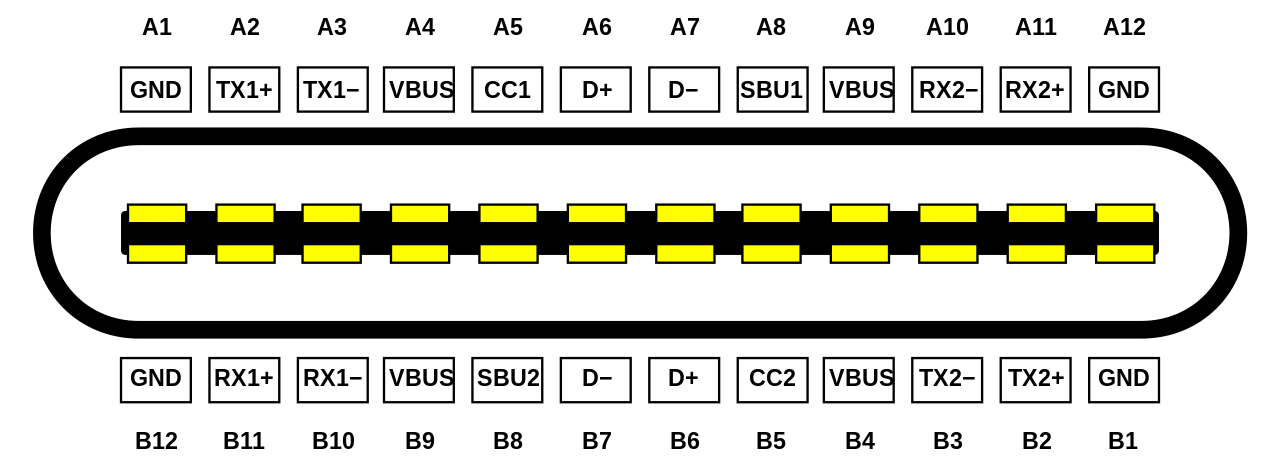
A standard USB 3.1 type A connector has 9 pins. The reversible type C has 3 extra pins (SBU, CC, VBUS), not counting the doubling caused by making it reversible. So while the reversibility doubled the number of pins, the increased complexity of the standard itself tripled it (from 4 to 12).
> A standard USB 3.1 type A connector has 9 pins. The reversible type C has 3 extra pins (SBU, CC, VBUS) Not precisely. The type C connector has four distinct USBSS pairs; the type A connector only has two. This allows the type C connector to be used to carry DisplayPort or other high-speed data alongside USB.
Isn't that a direct outcome of the reversibility aspect? [0] Technically it has 2 of everything.
[0] https://upload.wikimedia.org/wikipedia/commons/thumb/0/07/US...