I've recently become interested in OCR due to using Kaku on Android for trying to get better at reading Japanese. So thanks Hacker News for showing me a new version. I'd love any comments about other resources that may be good for learning. Especially because for funsies I'd like to try and develop my own.
EasyOCR: Ready-to-use OCR with 40 languages
11–20 of 73 posts
Re: EasyOCR: Ready-to-use OCR with 40 languages
#12I'm going to test this on my shopping receipts, if I can get over the Windows packaging hassle, and report back ..
Re: EasyOCR: Ready-to-use OCR with 40 languages
#13From what I can tell (without having read the research papers) it looks like this is just an easy to use package for sparse scene text extraction. It seems to do okay if the scene has sparse text but it
falls down for dense text detection. The results are going to be pretty bad if you try and do a task like "extract transactions from a picture of a receipt." Here's an example of input you might get for a production app: https://www.clusin.com/walmart-receipt.jpg
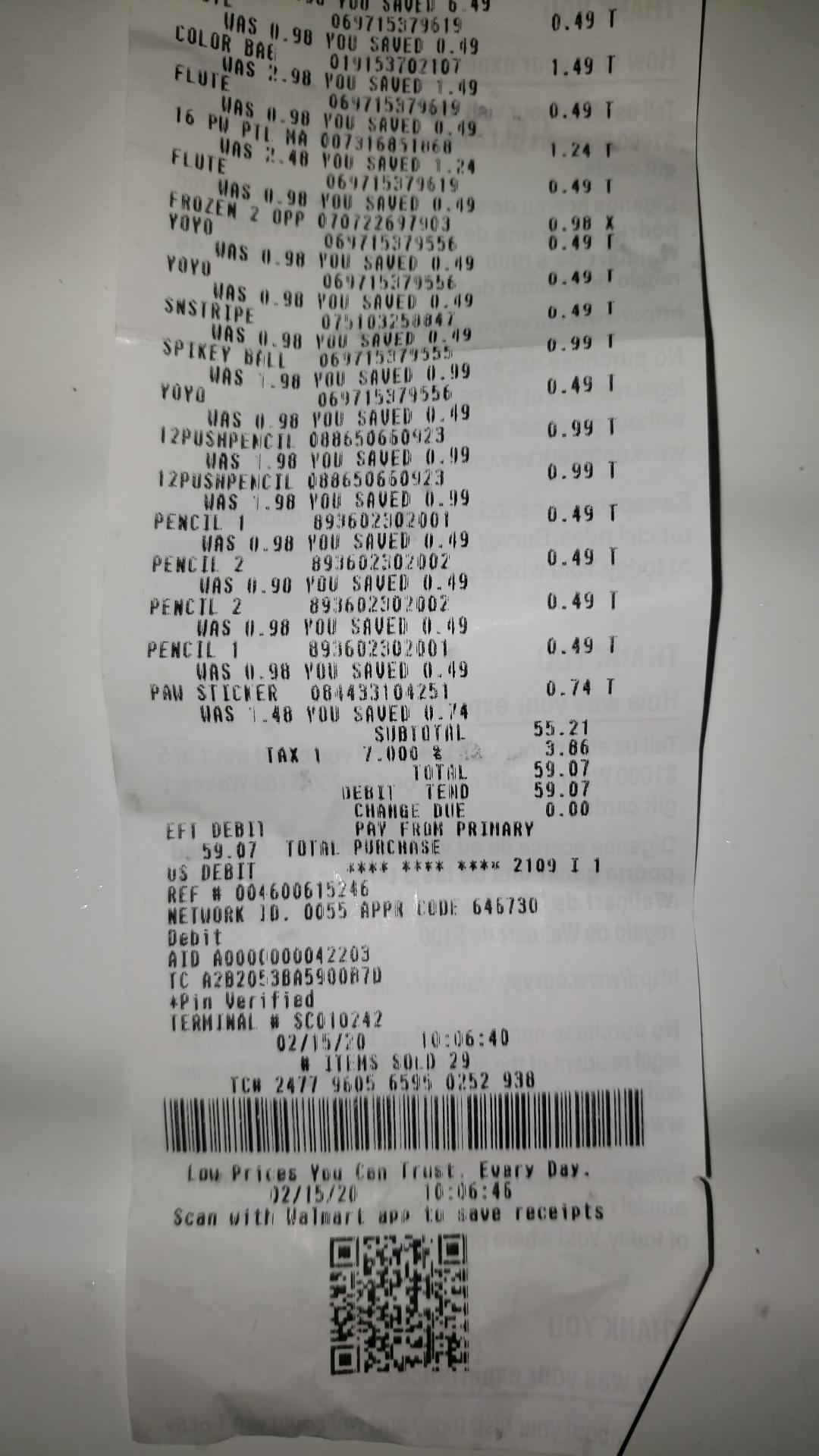
Notice the faded text from the printer running out of ink and the slanted text. From limited experience each of these are thorny problems and the state of the art CV algorithms won't help you escape from having to learn how to algorithmicly pre-process images and clean them up prior to feeding them into a CV algorithm. You might be able to use Google's Cloud OCR but that charges per image, although it is pretty good. Even if you use that you've graduated to the next super difficult problem which is Natural Language Processing.
Once you have the text you need to determine if it has meaning to your application. That's basically what NLP is about. For the receipts example, how do you know you're looking at a receipt? What if its a receipt on top of a pile of other receipts? How do you extract transactions from the receipt? Does a transaction span multiple lines? How can you tell? etc etc etc.
Re: EasyOCR: Ready-to-use OCR with 40 languages
#14Does this require a Nvidia GPU? Some modules seem to import PyTorch and Cuda libs: https://github.com/JaidedAI/EasyOCR/blob/master/easyocr/dete...
Re: EasyOCR: Ready-to-use OCR with 40 languages
#15Has anyone tried it? How good is it?
It doesn't work that bad on a few French examples I had lying around: It's doing quite well on scanned documents, even quite dense ones. Handwriting doesn't work well at all, even for simpler cases. It managed to recognize a few words from a blackboard picture, but that's hardly usable.
However, it looks like my simple example of an old "S note" export (like a lowish resolution phone screenshot) confused it a bit:
    Reglementation -> Reglemantation
    km -> kn
    illimitée -> illiritée
    limite -> liite
    baptême -> bapteme
    etc.
Take that with a grain of salt, that was a quick try, I haven't tried to tune anything.
Re: EasyOCR: Ready-to-use OCR with 40 languages
#16From what I can tell (without having read the research papers) it looks like this is just an easy to use package for sparse scene text extraction. It seems to do okay if the scene has sparse text but it falls down for dense text detection. The results are going to be pretty bad if you try and do a task like "extract transactions from a picture of a receipt." Here's an example of input you might get for a production a…
So your point is that this library is not a magic unicorn that solves all problems related to OCR and natural language processing?
Re: EasyOCR: Ready-to-use OCR with 40 languages
#17This is something that I find really interesting. Open-source OCR is lagging behing commercial applications and seeing someone trying ideas is always beneficial. Kudos!!
Re: EasyOCR: Ready-to-use OCR with 40 languages
#18What would be the advantage compared to something like Tesseract ?
Tesseract isn't very accurate, especially with text in photos. It works OK for scanned documents, but that's about it.
Tesseract can be very accurate (>99%), especially when you train it for your particular data set.
This does involve creating your own labeled data.
I got this 99% accuracy by performing incremental training using latest Manheim model as a base. I added about 20k lines which is not really that much. https://github.com/tesseract-ocr/tesseract/wiki
The hard part was crowd sourcing those 20k lines :)
Tesseract might not be best for photos as you said but I did not have major problems.
Of course some documents the source is so bad that a human can't achieve 99%.
Tesseract used to be quite average before they moved onto LTSM models a few years ago.
Re: EasyOCR: Ready-to-use OCR with 40 languages
#19Looking at the Chinese example, it’s kinda funny it managed to output Traditional Chinese characters when the image contains Simplified Chinese; the SC and TC versions look pretty different (园 vs 園, 东 vs 東).
Yeah, a bit strange considering traditional and simplified make up two different languages in their list of forty.
Re: EasyOCR: Ready-to-use OCR with 40 languages
#20From what I can tell (without having read the research papers) it looks like this is just an easy to use package for sparse scene text extraction. It seems to do okay if the scene has sparse text but it falls down for dense text detection. The results are going to be pretty bad if you try and do a task like "extract transactions from a picture of a receipt." Here's an example of input you might get for a production a…
So your point is that this library is not a magic unicorn that solves all problems related to OCR and natural language processing?
Try reading the post. There’s a lot more there but the gist is that this is optimized for a different set of OCR uses and not the more typical scan a book/receipt cases.