Live data from Hacker News

Show HN: Cross-platform desktop applications with PyQT

github.com

281–290 of 293 posts

Re: Show HN: Cross-platform desktop applications with PyQT

#281

I am curious about final package size on various platforms when using this project. The download bundles for the related "fman" project vary considerably -- Win: 1MB; macOS: 23MB; Ubuntu: 39MB. The last number matches my experience with scripted Qt applications, at which point the size is comparable to a typical ~50-70 MB Electron app, at least for compressed downloads. Visual Studio Code is 44 MB on Windows and 65MB…

You care comparing installer size. Typically an installer is considerably smaller than the installed app size and usually the installer is deleted. So it's not really worth comparing installer sizes.

For comparison of installed size:

- Code.exe is 77MB (version 1.20.0)

- directory "C:\Program Files\Microsoft VS Code" is 225 MB

Re: Show HN: Cross-platform desktop applications with PyQT

#282

Earlier quoted context omitted.

I am happy you found something that worked for you. But to me, I'm just very frustrated. People consistently suggest Qt is a net good because Electron uses more RAM and just totally abandon accessibility. The proliferation of Electron is one of the single most progressive things to happen on the front of general desktop application accessibility for folks with special visual or motor control needs since OS's started…

Thank you for caring about accessibility. However, I don't think the pros and cons between Qt and Electron are as straightforward as you may think. First, Qt accessibility on Windows is improving: https://blind.guru/qtwin.html This blogger specifically mentions the JAWS screen reader, but this should also help users of the Narrator screen reader built into Windows. Speaking of which, Electron is not very accessible w…

I've seen folks with readers on Chrome on Linux. I don't mean to imply that Electron magically providers full accessibility; just that the underlying engine has much more robust support not only for readers and navigators (to which there is a ceiling folks aspire to), but also for auditing.

It's not really possible for developers to understand the full extend of accessibility needs unless they experience it themselves. As such, Electron and Chrome's accessibility auditing tools that capture these needs are an incredible step forwards.

As for Narrator, I think historically folks have been somewhat inclined to use third party or direct integration tools because it was widely considered to be inferior to the capabilities provided by direct integrations like ChromeVox or Apple's (superior) Voice Over (which from all reports I get and can find casually searching, works as well as Safari if not better).

Re: Show HN: Cross-platform desktop applications with PyQT

#283
post #276

Earlier quoted context omitted.

Well, it had always taken me far less time and effort to do a nice, interactive app in Delphi than it would in HTML/JS. For a designer, yes, I can see your point -- it's easy to use markup to make something that looks good (or at least this month's fashion for web pages good) quickly. It's when you want to add any kind of sophisticated behavior and non-standard UI (i.e. exactly why you would want to have a desktop ap…

Native applications vary too wildly, in my opinion. HTML/CSS/JS make it easy to get a consistent UI, which is incredibly valuable if you're making software for less technically advanced people than your average HN poster. Discord's a highly admirable, semi-complicated web application, that extremely benefits by not looking native, in my opinion. The interface of it is miles ahead of any native desktop VOIP/Text clien…

AH, but how many of those less technical people use more than one platform? Most likely they are using Windows. Possibly MacOS. Very unlikely Linux. So giving them something that looks entirely different from all the other apps they are used to, and what integrates well with the system isn't necessarily the best.

Discord seems to be a nice app (never used it, though) but it has the exact same generic look of, say, Microsoft Teams (another Electron app). Nice, but I would not say that it has any better interface than even classic Skype. Much better than the new monstrosity that is Skype 8, but then Skype 87 also drops proper native interface.

Of course you can get native application to look like nothing else quite easily, but by default they at least agree with the host OS conventions, which is a good thing IMHO.

Re: Show HN: Cross-platform desktop applications with PyQT

#284
post #41

I have been developing in HTML/Python for a while now. This works wonderfully. You just need to put all your business logic in Python, use PyQt to run all the platform specific code like file dialogs, printing, etc. but keep the main interface with React. You do that by having a webview with a service object being the bridge between Python and the JS view[0]. If you are a bit careful with the amount of information go…

Forgive my naivete, this is a python application that interfaces with the user through QT. You still had to build a react front-end separately though?

Yes, the react front-end is the interactive view so to speak. In my first comment, you have link to some videos where it shows the interface and you do not need to be a genius to see the HTML look of the interface.

Re: Show HN: Cross-platform desktop applications with PyQT

#285

Earlier quoted context omitted.

When the "good Desktop development framework" is primarily in javascript, it's a good signal.

There are a lot of counter-examples: - apache - lighttpd - v8 - PostgreSQL - Linux - Go - ZeroMQ - any imaging library (libpng, libjpeg) - any compression library (zlib, xz, bzip2) - urxvt - vim - emacs - tmux Basically none of these have good websites. When I'm looking for a CSS framework or like, UI tricks like scriptaculous then I think it's a good signal, but past that I really think there's no link here. Really…

I would expect that apache and lighttpd are hosted in their respective projects; linux is used to run linux.com servers, etc.

Re: Show HN: Cross-platform desktop applications with PyQT

#286
post #283

Earlier quoted context omitted.

Native applications vary too wildly, in my opinion. HTML/CSS/JS make it easy to get a consistent UI, which is incredibly valuable if you're making software for less technically advanced people than your average HN poster. Discord's a highly admirable, semi-complicated web application, that extremely benefits by not looking native, in my opinion. The interface of it is miles ahead of any native desktop VOIP/Text clien…

AH, but how many of those less technical people use more than one platform? Most likely they are using Windows. Possibly MacOS. Very unlikely Linux. So giving them something that looks entirely different from all the other apps they are used to, and what integrates well with the system isn't necessarily the best. Discord seems to be a nice app (never used it, though) but it has the exact same generic look of, say, Mi…

The average Mac OS application varies wildly - from Garageband to Safari, it's not entirely consistent. Windows applications look terrible by default, and the main problem is that there are so many different versions of Windows applications. A Windows 7 application looks entirely different to the same application running on Windows 8 or 10.

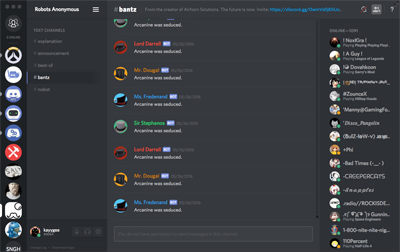
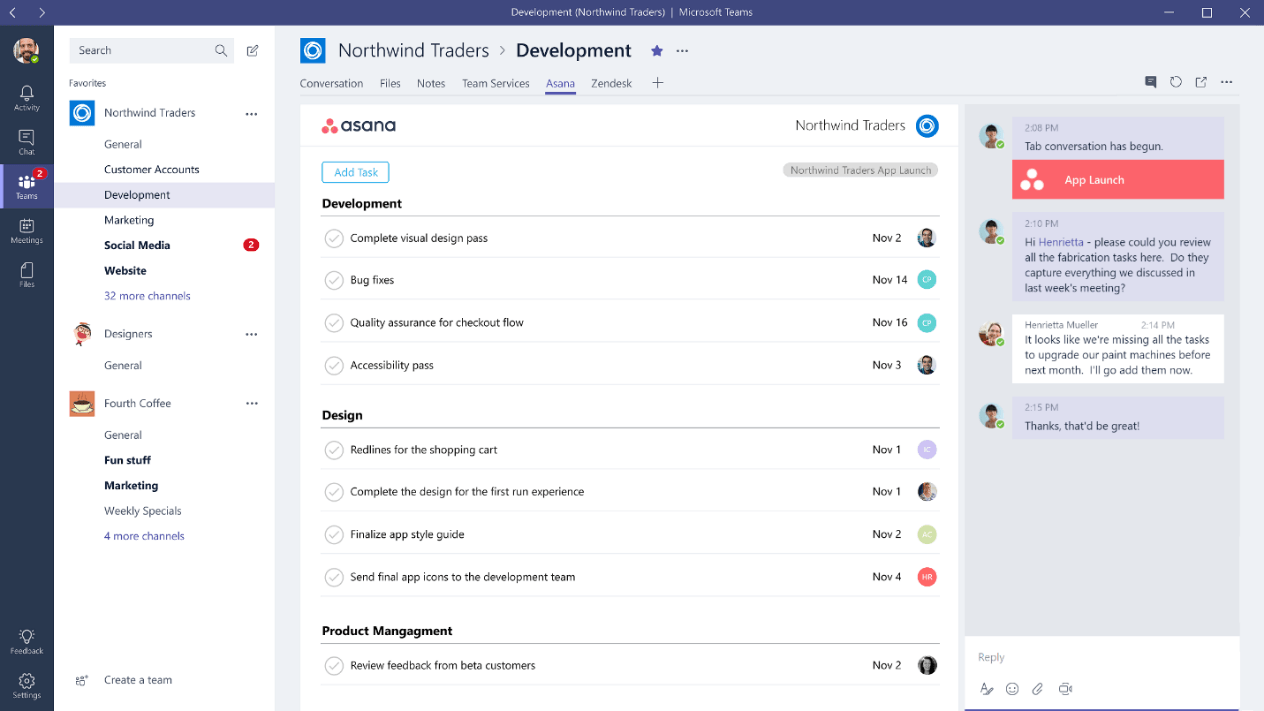
Also, the Discord interface looks entirely different than Microsoft Teams.

Microsoft Teams: https://www.windowscentral.com/sites/wpcentral.com/files/sty...

Discord: https://support.discordapp.com/hc/en-us/article_attachments/...

Discord also allows advanced users to theme it with ease, which is another good thing about it.

Re: Show HN: Cross-platform desktop applications with PyQT

#287
post #283

Earlier quoted context omitted.

AH, but how many of those less technical people use more than one platform? Most likely they are using Windows. Possibly MacOS. Very unlikely Linux. So giving them something that looks entirely different from all the other apps they are used to, and what integrates well with the system isn't necessarily the best. Discord seems to be a nice app (never used it, though) but it has the exact same generic look of, say, Mi…

The average Mac OS application varies wildly - from Garageband to Safari, it's not entirely consistent. Windows applications look terrible by default, and the main problem is that there are so many different versions of Windows applications. A Windows 7 application looks entirely different to the same application running on Windows 8 or 10. Also, the Discord interface looks entirely different than Microsoft Teams. Mi…

I'm not tyhat familiar with Mac software, but last time I checked, Apple had some pretty stringent standards for UI design. And well, unless you went to some extreme lengths, your menus, textboxes and buttons would look consistent.

Now, just double-checked a few apps (Firefox, mIRC, Visual Studio) between Windows 7 and latest insider buld of Windows 10. They look exactly the same. Office? Looks the same, too. Can you reference some app that does look different between them?

Still not seeing any sinificanmt difference between Teams and Discord either. From left to right: - Narrow column with icons - Wider column with list of somethings - Even wider colunm with another list - Less wide column with more icons and text.

Seriously, if you swap icons between the two, would you be even able to tell the difference? Sure, some content in some of those colunms is different -- these are different apps, after all, but saying that one interface looks entrirely different seems to me to be an exaggeration. From a designers' POV maybe, colors re different, and icons are in slightly different locations. From a users view, they are basically identical. For that matter, Slack seems to look exactly the same, too. At least based on what they show on their site. Except, of course, that being an Electron app and not following even what little Windows has for UI standards, they have to start the description form saying that to find settings you need to go a Workspace menu. Which, of course, doesn't look like a menu to begin with.

Honestly, I do not see how this is an improvement. Cheaper for the manufacturer, sure.
Re: Show HN: Cross-platform desktop applications with PyQT

#288
post #41

I have been developing in HTML/Python for a while now. This works wonderfully. You just need to put all your business logic in Python, use PyQt to run all the platform specific code like file dialogs, printing, etc. but keep the main interface with React. You do that by having a webview with a service object being the bridge between Python and the JS view[0]. If you are a bit careful with the amount of information go…

Wait, what? You are using python, to use Qt, to open a WebView to run HTML/JS app... Why can't you just use Qt directly? I've done some test on an embedded device powered by i.MX6 and HTML5 animation in WebEngineView gives 8fps, while the same animation purely in QtQuick gives stable 60fps... That's a K.O. I guess...

Re: Show HN: Cross-platform desktop applications with PyQT

#289
post #108

Earlier quoted context omitted.

"Bah humbug, the old stuff is good enough for me!" is a shitty answer. Why would you not want a toolkit that makes rich application experiences across multiple platforms easy and standard? I get that performance is a problem with the tooling in its current form (arguably...) but that's not a reason to ignore the problem electron is solving: creating complex UIs using things like WinForms, QT, GTK, Cocoa, etc SUCKS. I…

I'd argue the old stuff is better , not simply "good enough" vs. Electron etc. What have we gotten in exchange for the crap performance and extra RAM usage? Pretty animations? I don't need those; in fact they're distracting and annoying. You absolutely can make "pretty", complex UIs in native/cross-platform toolkits, and personally I find them much nicer to work with than the horror show that is HTML/JS/CSS. I get th…

We can totally accept old-fashioned UI as developers. Hell, we even work in our terminals all day or use i3wm instead of any desktop environment. However, most apps target normal end users, not developers. Show your cousin whether she likes a flashy "modern" UI more or a succinct UI more, the answer is a no-brainer. And then try to explain to her what RAM usage actually means... The same as asking her whether she prefers using i3 or Windows, Vim or Word etc.

Re: Show HN: Cross-platform desktop applications with PyQT

#290
post #263
post #41

I have been developing in HTML/Python for a while now. This works wonderfully. You just need to put all your business logic in Python, use PyQt to run all the platform specific code like file dialogs, printing, etc. but keep the main interface with React. You do that by having a webview with a service object being the bridge between Python and the JS view[0]. If you are a bit careful with the amount of information go…

Indeed, Qt is a great basis for developing a modern application with a HTML frontend. This is because Qt bundles a modern browser engine (was WebKit, nowadays Chrome) and has JavaScript support at various places ( https://doc.qt.io/qt-5.10/topics-scripting.html ). All this makes Qt a first citizen in the Rich user interface world where the players have names like Vue, React and Angular today. Btw, don't forget we had…

But why you would want to use React, Angular etc. while you can just do it in C++ and QtQuick and have many times better performance so better user experience and for example Servo browser engine rendering benchmark animation took me 1/2 loc to reproduce in QtQuick...
Post reply on HN