Live data from Hacker News

Microsoft Announces Windows 10 Pro for Workstations

blogs.windows.com

121–130 of 173 posts

Re: Microsoft Announces Windows 10 Pro for Workstations

#121
post #24

Will this address the absurd automatic updates/reboot "feature"? I've had the experience multiple times where a step away for a few minutes and come back to a blank desktop, even during the "active hours" period. This is especially infuriating when I do most of my work in a vbox slackware VM and win10 is just a host that I want to stay out of the way; instead I lose my entire current state. This seems like a major de…

Rebooting your computer daily will do the trick. Either shut it down at the end of the day, or give it a reboot. It will do its thing and leave you alone for the next 24 hours. Before you downvote me, which many of you have done already for some reason, please keep in mind that this advice actually works. It's not my decision to have things work like this. That's on Microsoft. But it does work, and is legitimate advi…

I suspend or lock my machines when I "finish" with them so that I can resume where I left off when I come back. Many people, especially developers (which makes up a large part of the audience here on HN), do this. Your "strategy" doesn't work for us.
Re: Microsoft Announces Windows 10 Pro for Workstations

#122
post #59

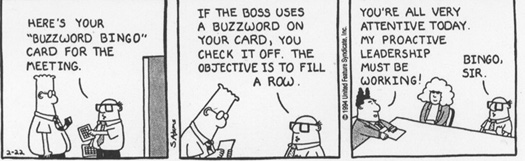
dear microsoft, would you kindly consider going easy on the buzzwords? > Performance is a very important requirement in this new world of fast paced innovation and we will continue to invest on Windows 10 Pro for Workstations to enable Windows power users to maximize every aspect of their high-performance device.

http://lurkertech.com/buzzword-bingo/dilbert-buzzword.jpg

Re: Microsoft Announces Windows 10 Pro for Workstations

#123
post #54

Users are asking for features, not for yet more editions of Windows. Editions are merely a way to charge for those features and I don't think they are a good way to do that. Editions create barriers. They make you work around missing features that would force you into buying a much more expensive edition, so you learn to live without those features or replace them with other operating systems and free software.

Agreed, there should only be Ubuntu.

Or Microsoft could use a pricing model that doesn't drive customers away needlessly.

Re: Microsoft Announces Windows 10 Pro for Workstations

#124

Earlier quoted context omitted.

I understand and agree that it's bullshit. But for normal end users it works fine. And part of me does think that I prefer the majority of the clueless end users to be forced to update. Having to support outdated operating systems and browsers is pretty horrible. And making it harder for botnets to spread is also a pretty good thing. But yes, there should just be a simple setting. Sadly there isn't so we're left to r…

But realistically the clueless "normal" end users who should update automatically don't know about group policies and aren't going to use them, not even by mistake.

I used to regularly see advice shared around that if you got an SSL warning in Chrome when trying to visit Facebook, to just type "DANGER" in the keyboard, and everything would work again. I believe Google changed the workaround after a while because it was never intended to be used as a way for people to dismiss critical warnings without any real understanding of the risks.

Re: Microsoft Announces Windows 10 Pro for Workstations

#126

Earlier quoted context omitted.

This is a prime use case for a workstation and it's hard for me to believe that Microsoft didn't expose better control over updates. More than a few times, I've come to work, wiggled my mouse and been greeted with a blank desktop. It's soooo frustrating that I need to spend the first 15 minutes of my day launching applications, loading projects, digging up notes, etc... when it was all arranged perfectly just a few h…

Oh yeah. On top of the fresh bloat it also reset lots of registry entries and other hidden features. Not a fan of that.

Very true. When I see things like the contacts app reappear, I know it's time to go through the privacy settings because Microsoft invariably resets many of them.

Re: Microsoft Announces Windows 10 Pro for Workstations

#127

Earlier quoted context omitted.

But realistically the clueless "normal" end users who should update automatically don't know about group policies and aren't going to use them, not even by mistake.

You'd be surprised. A user who is annoyed at their computer shutting off while they're gaming because they kept it on for a few days will Google. Find some instructions and blindly follows them. Then they forget about that because they went back to their game. Fast forward a few months and their computer is part of a botnet and we're all worse off.

^ Exactly. If you don't make it user friendly, especially Windows users will track down a user-unfriendly way to do whatever they feel they need to do. Now you've got end users playing in your registry and group policy, to accomplish a thing that should've been doable with a dropdown select.

Re: Microsoft Announces Windows 10 Pro for Workstations

#128

Earlier quoted context omitted.

...which is kind of why people are upset. Things that were possible, i.e. total control over when PC's install updates and how they do them, are now not unless you pony up for a more expensive license. We're not talking Bitlocker or anything here, we're talking control over the system. I agree it's not a typical use case, but it was an understood use case for a very long time. My only real beef with Windows 10 is the…

I understand and agree that it's bullshit. But for normal end users it works fine. And part of me does think that I prefer the majority of the clueless end users to be forced to update. Having to support outdated operating systems and browsers is pretty horrible. And making it harder for botnets to spread is also a pretty good thing. But yes, there should just be a simple setting. Sadly there isn't so we're left to r…

> And part of me does think that I prefer the majority of the clueless end users to be forced to update. Having to support outdated operating systems and browsers is pretty horrible. And making it harder for botnets to spread is also a pretty good thing.

So make it updatable without a system reboot? Why does Windows need to reboot for standard security updates? Hell, most times when Windows says I need to reboot, simply restarting the service(s) that have been updated accomplishes the same thing.

It's not like Microsoft doesn't have control over the entire codebase. Unix applies security patches all the time without restarting, and has for a decade. Why can't MS make this work? TBH, to me it feels like good old laziness. A system reboot has been the go-to to address Windows' lack of stability and quality since freaking 3.1. Reboot reboot reboot, that's all MS ever has for a solution.

Re: Microsoft Announces Windows 10 Pro for Workstations

#129
post #116

Earlier quoted context omitted.

I literally only have windows for games now. The OS is pushing my patience to the point where I'm considering giving up half my steam library and sticking to MacOS / Linux. A couple nights ago my PC woke up in the middle of the night and started an update. I had to get up and force shut it down. I don't think there's anything Microsoft can do to reverse the damage now.

So you don't want it to update while you're using it. And you don't want it to update when you're not using it. When, exactly, is it OK for it to update?

If the OS is stable for me I shouldn't need to update.

Re: Microsoft Announces Windows 10 Pro for Workstations

#130
post #116

Earlier quoted context omitted.

I literally only have windows for games now. The OS is pushing my patience to the point where I'm considering giving up half my steam library and sticking to MacOS / Linux. A couple nights ago my PC woke up in the middle of the night and started an update. I had to get up and force shut it down. I don't think there's anything Microsoft can do to reverse the damage now.

So you don't want it to update while you're using it. And you don't want it to update when you're not using it. When, exactly, is it OK for it to update?

My machine is used for occasional gaming and nothing else. I would like to update it when I please. If that means it's out of date for a while I don't care, I'll happily click through multiple big red warnings confirming I want this.
Post reply on HN