Live data from Hacker News

Show HN: Jpeg.io – Convert any major image format into a highly optimized JPEG

jpeg.io

51–60 of 88 posts

Re: Show HN: Jpeg.io – Convert any major image format into a highly optimized JPEG

#51
post #19
post #15

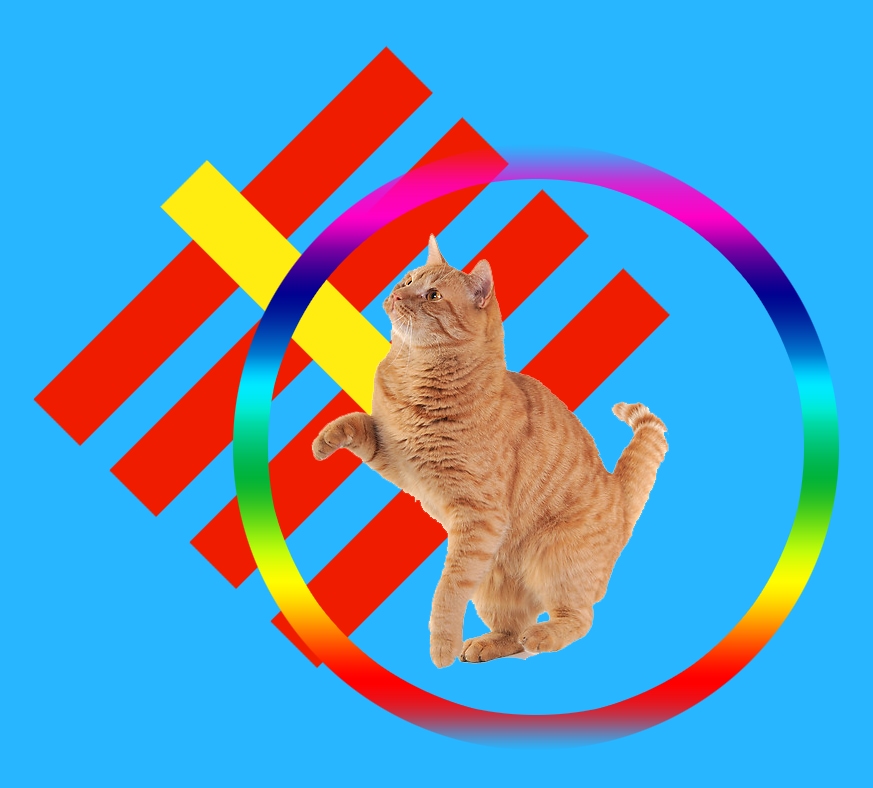
Did a quick comparison test with this beautiful piece of artwork I just created. original http://i.pi.gy/0K7d.png (2.1 MB) jpeg.io http://i.pi.gy/AP8v.jpg (102 KB) Photoshop 60% jpeg Export http://i.pi.gy/Wr4P.jpg (90 KB) tinypng.com http://i.pi.gy/ndKA.png (74 KB) Note pi.gy does not compress uploads.

Since he doesn't summarize the test above, let me. The jpeg.io result is bigger than the other two and noticeably worse quality. The problems were with the sharp lines. Perhaps jpeg.io specializes in photo-realistic pictures rather than graphics and logos.

Photoshop is smart enough to disable chroma subsampling[1] if it will screw up the image, it looks like jpeg.io doesn't do that.

One of the worst case scenarios for chroma subsampling is alternating black and red lines. Some monitors/TVs do 4:2:0 by default. It can cause problems...

https://plus.google.com/photos/photo/100697962438000631056/5...

[1] https://en.wikipedia.org/wiki/Chroma_subsampling

Re: Show HN: Jpeg.io – Convert any major image format into a highly optimized JPEG

#52
post #15

Did a quick comparison test with this beautiful piece of artwork I just created. original http://i.pi.gy/0K7d.png (2.1 MB) jpeg.io http://i.pi.gy/AP8v.jpg (102 KB) Photoshop 60% jpeg Export http://i.pi.gy/Wr4P.jpg (90 KB) tinypng.com http://i.pi.gy/ndKA.png (74 KB) Note pi.gy does not compress uploads.

Also did a comparison:

Photoshop high quality progressive scan 3 pass https://supermathworld.com/static/img/350.jpg JPEG.IO https://supermathworld.com/static/img/342.jpg

I see no difference.. a neat idea, but it doesn't seem to have value for me.

Re: Show HN: Jpeg.io – Convert any major image format into a highly optimized JPEG

#53

Earlier quoted context omitted.

Progressive jpgs increase the size

For anyone else who also didn't know what progressive jpegs are - https://www.wired.com/2013/01/the-return-of-the-progressive-...

When I was experimenting with PS a few years ago, progressive JPEGs were always larger than baseline which is why I came to that conclusion.

This isn't however the full picture. To keep it short, baseline JPEGs are usually smaller if the file size is less than 10 KB.

Useful article about progressive JPEG sizes: http://yuiblog.com/blog/2008/12/05/imageopt-4/

Re: Show HN: Jpeg.io – Convert any major image format into a highly optimized JPEG

#54
post #19
post #15

Did a quick comparison test with this beautiful piece of artwork I just created. original http://i.pi.gy/0K7d.png (2.1 MB) jpeg.io http://i.pi.gy/AP8v.jpg (102 KB) Photoshop 60% jpeg Export http://i.pi.gy/Wr4P.jpg (90 KB) tinypng.com http://i.pi.gy/ndKA.png (74 KB) Note pi.gy does not compress uploads.

Since he doesn't summarize the test above, let me. The jpeg.io result is bigger than the other two and noticeably worse quality. The problems were with the sharp lines. Perhaps jpeg.io specializes in photo-realistic pictures rather than graphics and logos.

Hi, co-founder of jpeg.io and kraken.io here. Thanks for this, we're still in "kinda beta" right now and will have a fix in production shortly. In summary, that's not supposed to happen at all and there are highly likely some other nasties which we will be ironing out over the next hours.

Re: Show HN: Jpeg.io – Convert any major image format into a highly optimized JPEG

#55
post #19
post #15

Did a quick comparison test with this beautiful piece of artwork I just created. original http://i.pi.gy/0K7d.png (2.1 MB) jpeg.io http://i.pi.gy/AP8v.jpg (102 KB) Photoshop 60% jpeg Export http://i.pi.gy/Wr4P.jpg (90 KB) tinypng.com http://i.pi.gy/ndKA.png (74 KB) Note pi.gy does not compress uploads.

Since he doesn't summarize the test above, let me. The jpeg.io result is bigger than the other two and noticeably worse quality. The problems were with the sharp lines. Perhaps jpeg.io specializes in photo-realistic pictures rather than graphics and logos.

jpeg.io may have lost on sharp lines, but it had WAY fewer artifacts than either of the other exports, and the blue was closer to the original compared to the Photoshop export. In my opinion, it's a better quality image.

Re: Show HN: Jpeg.io – Convert any major image format into a highly optimized JPEG

#56
post #19
post #15

Did a quick comparison test with this beautiful piece of artwork I just created. original http://i.pi.gy/0K7d.png (2.1 MB) jpeg.io http://i.pi.gy/AP8v.jpg (102 KB) Photoshop 60% jpeg Export http://i.pi.gy/Wr4P.jpg (90 KB) tinypng.com http://i.pi.gy/ndKA.png (74 KB) Note pi.gy does not compress uploads.

Since he doesn't summarize the test above, let me. The jpeg.io result is bigger than the other two and noticeably worse quality. The problems were with the sharp lines. Perhaps jpeg.io specializes in photo-realistic pictures rather than graphics and logos.

[deleted]

Re: Show HN: Jpeg.io – Convert any major image format into a highly optimized JPEG

#57
post #28
post #2

Cool. When would you want to use JPEG over PNG though? I don't know much about these things (just using PNG/SVG everywhere).

Any time it's a photographic image (rather than a drawing, diagram or rasterised vector image).

This. Here's a quick guide:

JPG - Use for photographic images only.

GIF/PNG-8 - Use for line-art, logos, etc.

PNG-24 - This is a a lossless format/TIFF replacement and generally shouldn't be used for production sites.

Re: Show HN: Jpeg.io – Convert any major image format into a highly optimized JPEG

#58

Earlier quoted context omitted.

Are you serious? A digital photo translated to PNG is going to be quite large. PNG has it's place, for sure, but it doesn't compress photographs like JPEG does. PNG is great for line art, solid color vector that has been rasterized, etc. JPG is great for photos.

>Are you serious? Perfectly. I'm not very familiar with image compression and JPEG conjures up images of pixellated atrocities. It seems like either progress has been made in this domain or most JPEG encoders on the internet are poorly configured (in which case the present webapp makes sense).

I think it's more likely that a pixelated jpg is a result of the creator using the wrong format (ie, using jpg where gif/png-8 would have been more appropriate) or over-compressing the image.

PNG-24 is a lossless format, and generally shouldn't be used for production sites.

Re: Show HN: Jpeg.io – Convert any major image format into a highly optimized JPEG

#59
Has anybody tried mozjpeg? https://github.com/mozilla/mozjpeg

It works much better than any of the alternatives listed here, I'm surprised noone mentioned it yet.

Here is an image compressed to the same size with

mozjpeg http://m8y.org/hn/12597098.jpeg jpeg.io http://i.pi.gy/AP8v.jpg

Re: Show HN: Jpeg.io – Convert any major image format into a highly optimized JPEG

#60
post #15

Did a quick comparison test with this beautiful piece of artwork I just created. original http://i.pi.gy/0K7d.png (2.1 MB) jpeg.io http://i.pi.gy/AP8v.jpg (102 KB) Photoshop 60% jpeg Export http://i.pi.gy/Wr4P.jpg (90 KB) tinypng.com http://i.pi.gy/ndKA.png (74 KB) Note pi.gy does not compress uploads.

i just want to mention that i really like you artwork
Post reply on HN