[deleted]
Apple announces iOS 10
71–80 of 277 posts
Re: Apple announces iOS 10
#72Earlier quoted context omitted.
> what the hell the volume button does in different contexts If the app you're using right now has a handle for audio playback, it changes the speaker volume. If not, it changes the ringer volume. As far as I can tell, that's all, and in a half decade of using iPhones and iPods, I've never actually seen it misbehave.
This bugs me like mad on Android. When I know the app is going to blast out, I have to let it before I can turn it down. I'm forever having to hop through menu after menu to turn the volume down. My phone is permanently on vibrate (have young kids in the house and don't want to wake them), so changing the ringer is frustrating at most.
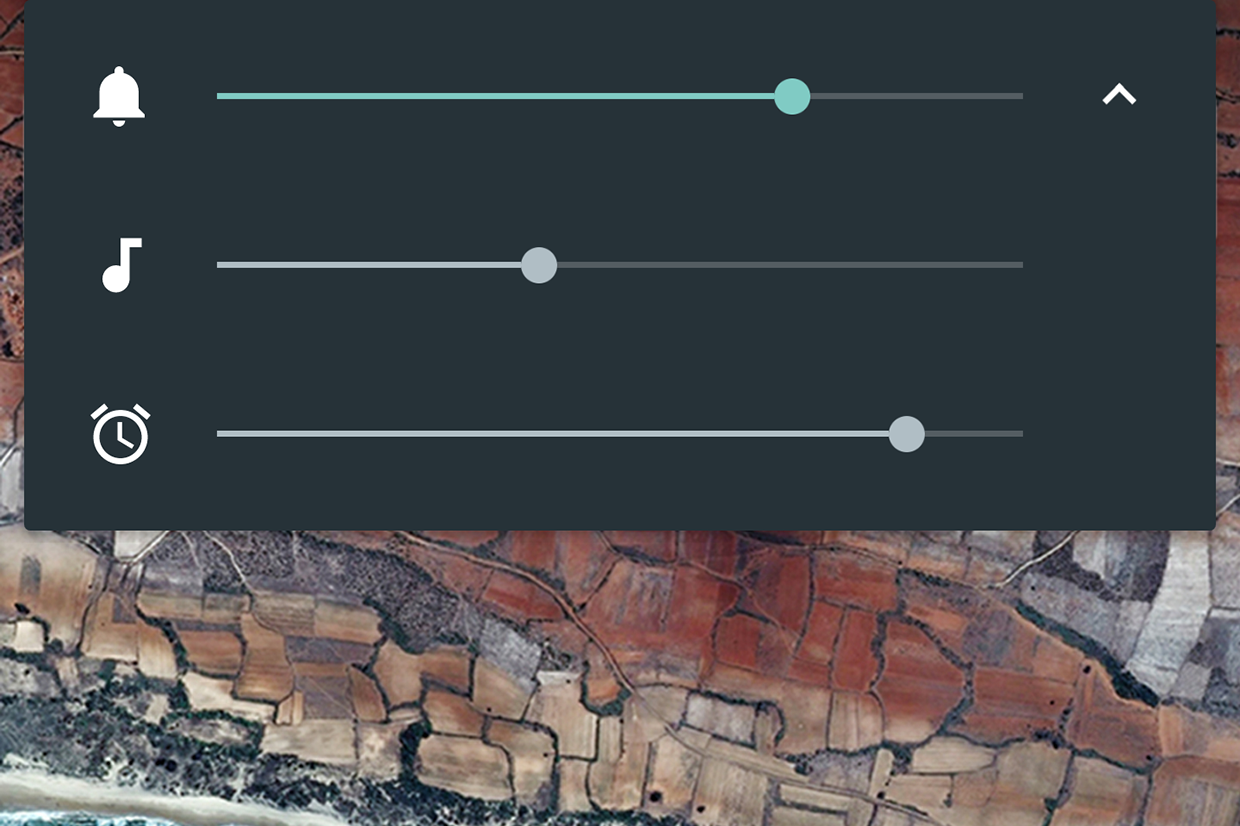
On Android 6:
1) Press volume button to bring up volume controls
2) Tap the arrow on the right to expand
3) Adjust ring/music/alarm volumes as needed: http://core0.staticworld.net/images/article/2015/05/android_...
Re: Apple announces iOS 10
#73Earlier quoted context omitted.
> what the hell the volume button does in different contexts If the app you're using right now has a handle for audio playback, it changes the speaker volume. If not, it changes the ringer volume. As far as I can tell, that's all, and in a half decade of using iPhones and iPods, I've never actually seen it misbehave.
I think there are a few other edge cases. Siri has its own volume controls while you are using siri. I think phone calls have their own volume too. And while you are in the camera volume buttons become 'take photo' buttons.
In Siri and a phone call, you're still adjusting the speaker volume. The current setting appears to be independent of random apps that make noise, but it's still speaker volume vs. ringer volume.
Re: Apple announces iOS 10
#74Holy moly, Apple is very aware of the competing chat apps. iMessage looks amazing and they packed a lot of features in there, but I wonder how they're going to make it all easily discoverable.
The problem is not discoverability, the problem is certainty that the counter part can receive these things. I already find the SMS app on iOS confusing. Am I sending a paid SMS or a free message? I dare say one of the major advantages of messaging apps in general is the certainty that the receiver will receive the message in the same shape as the sender send it. With MMS you never know if the picture can be opened,…
Green bubble = SMS. Blue bubble = iMessage (data only, doesn't count towards text limits). I would assume the app would only let you use the new features with other iMessage users.
Re: Apple announces iOS 10
#75iOS 10. 10 Features that I think they had a hard time to convince the audience that were so important. I've been using iOS since v3 and it's going ^2 complicated every year. Come on guys, nobody expects that you can deliver a revolution with every WWDC. Just don't make the interface more complicated. Siri, 3d touch, home kit? I barely know anyone using those and everyone these days has an iPhone. The focus is shifted…
Siri is great in a car and other hands free situations. In a car is when I used it the most. Mostly for music control, navigation, calls and text messages.
Re: Apple announces iOS 10
#76Earlier quoted context omitted.
> what the hell the volume button does in different contexts If the app you're using right now has a handle for audio playback, it changes the speaker volume. If not, it changes the ringer volume. As far as I can tell, that's all, and in a half decade of using iPhones and iPods, I've never actually seen it misbehave.
This bugs me like mad on Android. When I know the app is going to blast out, I have to let it before I can turn it down. I'm forever having to hop through menu after menu to turn the volume down. My phone is permanently on vibrate (have young kids in the house and don't want to wake them), so changing the ringer is frustrating at most.
If you're on a newer version of Android you can actually open up a three-slider volume control that has alert volume, media volume and alarm volume separately.
Re: Apple announces iOS 10
#77Earlier quoted context omitted.
> what the hell the volume button does in different contexts If the app you're using right now has a handle for audio playback, it changes the speaker volume. If not, it changes the ringer volume. As far as I can tell, that's all, and in a half decade of using iPhones and iPods, I've never actually seen it misbehave.
This bugs me like mad on Android. When I know the app is going to blast out, I have to let it before I can turn it down. I'm forever having to hop through menu after menu to turn the volume down. My phone is permanently on vibrate (have young kids in the house and don't want to wake them), so changing the ringer is frustrating at most.
Just tap the pull-down menu button in the volume dialog and change the appropriate volume slider.
Re: Apple announces iOS 10
#78Looks like Apple is doubling down on at least two features that really seem like duds -- 3D Touch (which as far as I can tell nobody even knows exists), and Siri (which everyone raves about but nobody uses for anything). I'd love to see UX improvements around minor inconveniences of the iOS experience: - what the hell the volume button does in different contexts (sometimes it changes the ringer, other times the in-ap…
3D Touch is to iOS as the Option key is to macOS.
Hold down the Option key and click on Airport or volume control to see what I mean in macOS. It gives you more information, and the information it provides is information you didn't necessarily need to have without holding down the Option key.
In airport, with the option key held, you see options to generate a wireless diagnostics report. Without the option key held, you can just switch networks. In the volume control, with the option key held, you can see options to change speaker outputs and mic inputs. Without the option key held, you just see the volume controls.
On iOS, with regular touch on the camera you get the camera. 3D touch - you get the ability to specify the camera you want before loading the app.
3D Touch is for iOS power users. Option key is for macOS power users.
Re: Apple announces iOS 10
#79Earlier quoted context omitted.
> what the hell the volume button does in different contexts If the app you're using right now has a handle for audio playback, it changes the speaker volume. If not, it changes the ringer volume. As far as I can tell, that's all, and in a half decade of using iPhones and iPods, I've never actually seen it misbehave.
This bugs me like mad on Android. When I know the app is going to blast out, I have to let it before I can turn it down. I'm forever having to hop through menu after menu to turn the volume down. My phone is permanently on vibrate (have young kids in the house and don't want to wake them), so changing the ringer is frustrating at most.
So, on Android, if you know it's going to blast out, you can't go into settings from the notifications shade and change the volume for Music, video, etc. to a reasonable level? I can on mine...
Re: Apple announces iOS 10
#80Earlier quoted context omitted.
It's not just you. That was my first thought too, as it pretty much seems like a huge extension of the amount of data you can see without unlocking.
They're already showing personal data on the lock screen (messages, emails) and there is a setting to disable and has been for a few years.
This seems like more than just a summary of a message/e-mail to me. A live view of the app in question?