Live data from Hacker News

Extensions in Firefox 59

blog.mozilla.org

231–240 of 243 posts

Re: Extensions in Firefox 59

#231

Earlier quoted context omitted.

Is IndexDB slow at querying a database or is it just a pain to implement?

Totally different API, Sqlite is SQL based while IndexedDb is a key/value store with indexing and transaction capabilities (essentially the bare minimum on which a relational database could be built, the irony). If your model is highly relational then it doesn't matter that querying for one entity is fast when what you really need is to, for example, efficiently join together multiple entities, grouping on N columns…

> IndexedDb is a key/value store with indexing and transaction capabilities (essentially the bare minimum on which a relational database could be built, the irony).

It's not ironic at all, it's just a good application of the extensible web manifesto : the browser support minimum necessary building blocs and then libraires can enhance the developer experience.

In that case, you have this https://google.github.io/lovefield/

Re: Extensions in Firefox 59

#232
post #5

Mozilla should fix no exit confirmation for Ctrl+Q. It's just too easy to close the browser this way, and extensions that offered this feature aren't working anymore. It's really a problem in general, there is no way to make an extension that customizes browser behavior itself (rather than page behavior), since WebExtensions can't do that.

Relevant issues:

https://bugzilla.mozilla.org/show_bug.cgi?id=52821 https://bugzilla.mozilla.org/show_bug.cgi?id=1325692

Re: Extensions in Firefox 59

#233
post #232
post #5

Mozilla should fix no exit confirmation for Ctrl+Q. It's just too easy to close the browser this way, and extensions that offered this feature aren't working anymore. It's really a problem in general, there is no way to make an extension that customizes browser behavior itself (rather than page behavior), since WebExtensions can't do that.

Relevant issues: https://bugzilla.mozilla.org/show_bug.cgi?id=52821 https://bugzilla.mozilla.org/show_bug.cgi?id=1325692

This is more relevant one: https://bugzilla.mozilla.org/show_bug.cgi?id=502908

Reported: 9 years ago(!).

Re: Extensions in Firefox 59

#234
post #80

I find this pretty exciting for (hopefully; someday) wider adoption of alternative protocols: Starting with Firefox 59, several protocols that support decentralized architectures are available for use by extensions. The white-listed protocols are: + Dat Project (dat://) + IPFS (dweb:// ipfs:// ipns://) + Secure Scuttlebutt (ssb://)

Hey! I made that patch! :-D so basically the explanation is simple. There is a whitelist of protocols you can have your WebExtension take over. If the protocol you want to control is not on that whitelist such as an hypothetical "catgifs:" protocol, you need to prefix it like: "web+catgifs" or "ext+catgifs" depending if it will be used from the Add-on or by redirection to another Web page. This makes it inconvenient…

That sounds great! Could you give us a pointer how to add a protocol like freenet: to Firefox (or ext+freenet:, as long as its not in the whitelist)?

Re: Extensions in Firefox 59

#235

Earlier quoted context omitted.

I follow Stallman’s school of thought that software should never restrict the user in ability. A user should not be protected from themselves, if a user wants to install an addon to intercept paypal:// requests for whatever reason, that should be their choice. And it should not require the user to do custom changes to the system.

For somebody who blindly follows Stallman's school of thought no matter what the consequences, I find it odd that your password isn't the same as your login name. https://www.gnu.org/philosophy/stallman-kth.html >But gradually things got worse and worse, it's just the nature of the way the system had been constructed forced people to demand more and more security. Until eventually I was forced to stop using the machi…

Back then Stallman worked in a secure space with trusted people where physical locks were between him and people wanting to just wreak havoc. Not using a password was a measure of not restricting good willing people.

Blindly askilg people to apply that to todays computers chickens out from the need to distinguish between very different situations.

Your message is not just an ad-hominem ("blindly"), but also a try to play someone for an idiot.

Re: Extensions in Firefox 59

#236

Earlier quoted context omitted.

For somebody who blindly follows Stallman's school of thought no matter what the consequences, I find it odd that your password isn't the same as your login name. https://www.gnu.org/philosophy/stallman-kth.html >But gradually things got worse and worse, it's just the nature of the way the system had been constructed forced people to demand more and more security. Until eventually I was forced to stop using the machi…

Back then Stallman worked in a secure space with trusted people where physical locks were between him and people wanting to just wreak havoc. Not using a password was a measure of not restricting good willing people. Blindly askilg people to apply that to todays computers chickens out from the need to distinguish between very different situations. Your message is not just an ad-hominem ("blindly"), but also a try to…

Actually, it wasn't quite as secure a physical or virtual space as you imagine.

It was quite easy for anyone to get into the 9th Floor at 545 Tech Square simply by thumping on the door in the elevator lobby, because anyone on a Lisp Machine within earshot would just press Terminal-D to buzz open the door without getting up from their chair [1]. (And they could summon an elevator by pressing Terminal-E.) And many students and non-laboratory people (referred to as "random turists") knew the series of digits to tell a locksmith to make a key to those locks, or somebody who could make them a master key in the robot machine shop. And even if you didn't have your own key, there was always the MIT Lockpicking Guide. [2]

[1] http://dspace.mit.edu/bitstream/handle/1721.1/41180/AI_WP_23... (figure 5-1 and 5-2)

[2] https://www.lysator.liu.se/mit-guide/MITLockGuide.pdf

The physical locks on those doors certainly never stopped me from showing up unannounced, gaining physical access, and wrecking havoc by playing around with the Lisp Machines [3] and PDP-10's [4], spying on other people's sessions with the Knight TVs, printing out and Velobinding reams of documents on the Dover laser printer, and sleeping on the beanbag chair in the "Lounge Lizard Lispmacho" office.

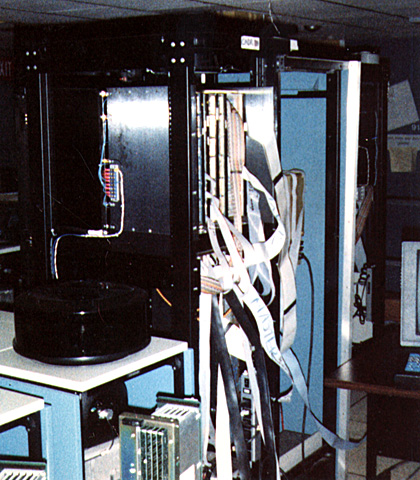
[3] http://donhopkins.com/home/catalog/images/cadr.jpg

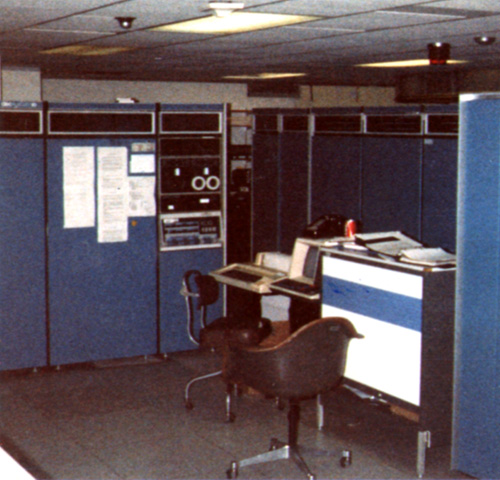
[4] http://donhopkins.com/home/catalog/images/mc-console.jpg

And then there was this thing called the ARPANET that you could use to log in without even knocking on any doors, picking any locks, or being physically present in Cambridge Massachusetts. Breaking into the ARPANET wasn't as difficult as depicted in The Americans "ARPANET" episode [5] (S02E07) where the KGB agents had to actually break into campus and murder somebody to gain access.

[5] https://www.youtube.com/watch?v=hVth6T3gMa0

The dial-up TIPs themselves actually had no passwords, and BBN would mail you a free copy of the "Users Guide to the Terminal IMP" [6] if you asked nicely -- including "APPENDIX A: HOST ADDRESSES". Then all you had to know was a phone number (301 948 3850 for example) and what to type (E, @O 134, :LOGIN RMS, RMS), and you were in.

[6] http://www.walden-family.com/dave/archive/bbn-tip-man.txt

You didn't even have to know RMS's password. If you tried to log in to MIT-AI with an unknown user name, it would ask you if you wanted to apply for an account, what your name is, and why you wanted to use the system, etc. If you answered sensibly (like "learning LISP"), you'd have your very own free off-hours "tourist" account [7] within days.

[7] http://www.art.net/~hopkins/Don/text/tourist-policy.html

Steven Levy wrote about the Hacker Ethic and MIT-AI Lab culture in his classic book, "Hackers: Heroes of the Computer Revolution" [8].

[8] https://murdercube.com/files/Computers/Heroes%20of%20the%20C...

The basic acquisition of every lock hacker was a master key. The proper master key would unlock the doors of a building, or a floor of a building. Even better than a master key was a grand-master key, sort of a master master-key; one of those babies could open perhaps two thirds of the doors on campus. Just like phone hacking, lock hacking required persistence and patience. So the hackers would go on late-night excursions, unscrewing and removing locks on doors. Then they would carefully dismantle the locks. Most locks could be opened by several different key combinations; so the hackers would take apart several locks in the same hallway to ascertain which combination they accepted in common. Then they would go about trying to make a key shaped in that particular combination.

It might be that the master key had to be made from special "blanks" unavailable to the general public. (This is often the case with high-security master keys, such as those used in defense work). This did not stop the hackers, because several of them had taken correspondence courses to qualify for locksmith certification; they were officially allowed to buy those restricted blank keys. Some keys were so high-security that even licensed locksmiths could not buy blanks for them; to duplicate those, the hackers would make midnight calls to the machine shop a corner work space on the ninth floor where a skilled metal craftsman named Bill Bennett worked by day on such material as robot arms. Working from scratch, several hackers made their own blanks in the machine shop.

The master key was more than a means to an end; it was a symbol of the hacker love of free access. At one point, the TMRC hackers even considered sending an MIT master key to every incoming freshman as a recruitment enticement. The master key was a magic sword to wave away evil. Evil, of course, was a locked door. Even if no tools were behind locked doors, the locks symbolized the power of bureaucracy, a power that would eventually be used to prevent full implementation of the Hacker Ethic. Bureaucracies were always threatened by people who wanted to know how things worked. Bureaucrats knew their survival depended on keeping people in ignorance, by using artificial means like locks to keep people under control. So when an administrator upped the ante in this war by installing a new lock, or purchasing a Class Two safe (government-certified for classified material), the hackers would immediately work to crack the lock, open the safe. In the latter case, they went to a super-ultra-techno surplus yard in Taunt-on, found a similar Class Two safe, took it back to the ninth floor, and opened it up with acetylene torches to find out how the locks and tumblers worked.

With all this lock hacking, the AI lab was an administrator's nightmare. Russ Noftsker knew; he was the administrator. He had arrived at Tech Square in 1965 with an engineering degree from the University of Mexico, an interest in artificial intelligence, and a friend who worked at Project MAC. He met Minsky, whose prime grad student-administrator, Dan Edwards, had just left the lab. Minsky, notoriously uninterested in administration, needed someone to handle the paperwork of the AI lab, which was eventually to split from Project MAC into a separate entity with its own government funding. So Marvin hired Noftsker, who in turn officially hired Greenblatt, Nelson, and Gosper as full-time hackers. Somehow, Noftsker had to keep this electronic circus in line with the values and policy of the Institute.

[...]

They went wherever they wanted, entering offices by traveling in the crawl space created by the low-hanging artificial ceiling, removing a ceiling tile, and dropping into their destinations commandos with pencil-pals in their shirt pockets. One hacker hurt his back one night when the ceiling collapsed and he fell into Minsky's office. But more often, the only evidence Noftsker would find was the occasional footprint on his wall. And, of course, sometimes he would enter his locked office and discover a hacker dozing on the sofa.
Re: Extensions in Firefox 59

#237
post #175
post #65

I hope FavTab will be able to work again. That is the one thing that has really messed up my usage of Firefox (I'm using AutoPinTab to pin everything as a replacement, but it causes flashing when it overlaps the favicon bookmarks I have to the right of the tabs and makes Ctrl-w not work).

Have you tried the userChrome.css edits that the author lists on the add-on page? https://addons.mozilla.org/en-US/firefox/addon/favtab/

Thank you! That text wasn't there when I looked. It is still too wide but at least much better than AutoPinTab and with a few adjustments I got something that behaves a little strangely but uses less space.

Re: Extensions in Firefox 59

#238

Earlier quoted context omitted.

It's almost certainly not what OP is using, but if you're interested in tabbing of arbitrary windows as a built-in OS feature, I'd suggest you have a look at how BeOS used to do that. You can still try it with Haiku[1]. I'm also fairly certain that functionality could be implemented with a handful of scripts in awesome (in a floating way instead of using pre-existing tiling WM features). [1]: https://www.haiku-os.org…

BeOS did surprisingly little with its tab titlebars. It couldn't even automatically stack them. If you wanted to use them as actual tabs you had to hold down shift and manually move each individual tab to the right spot along the top of the window, and then manually move the windows on top of each other to sorta simulate pages being stacked. No sort of "drag these windows together and we'll turn them into tabbed page…

Haiku does it automatically, though: https://www.haiku-os.org/docs/userguide/en/GUI.html#stack-ti...

Re: Extensions in Firefox 59

#239
post #167
post #42

Earlier quoted context omitted.

In my defense, one of my own housemates is one of those who has refused to update for want of vimperator. :P

Same here. I've tried alternatives like Waterfox and Pale Moon, but Waterfox is incompatible with some sites, and Pale Moon is dog slow, so I reverted back to Firefox 56. Not upgrading a browser is a scary situation to be in, but I just can't sacrifice the usability of Vimperator.

I'm posting this comment using FF 56 also. I don't agree with the decisions they made. I think that the old extension mechanism is fine; add-ons should be able to integrate deeply into browser internals.

Re: Extensions in Firefox 59

#240
post #209

Earlier quoted context omitted.

> I've tried alternatives like Waterfox and Pale Moon, but Waterfox is incompatible with some sites Oh, I haven't experienced that in a few months of usage. What kind of incompatibilities did you come across? I was initially reluctant about trying Waterfox and made several backups of my then-Firefox profile, but it's been a smooth sail and an easy switch so far.

In Waterfox, Slack shows a message that it doesn't support the browser and refuses to load. This could possibly be bypassed by changing the UA, but I don't agree with that workaround. Although, if hard pressed, I might have to. And I mistakenly wrote Pale Moon above, when I meant IceCat. I've yet to try Pale Moon, but it's on my list.

I use Slack at work as a requirement. I tried going into its video chat feature and it said that it's not supported on Firefox, please use Chrome.

So that's where Slack is w.r.t. Firefox; never mind FF derivatives.

Post reply on HN