If you are curious how smartphone payments work in practice, Here's a video of someone using Wechat Pay to order squeezed-to-order orange juice from a vending machine
https://www.youtube.com/watch?v=Um53J3shL7I
In practice, scanning and paying is much faster than shown in the video. He is using an old phone, on a newer one scanning the barcode takes around 0.5 second and the verification takes 2-5 seconds (not 15 seconds as shown in video).
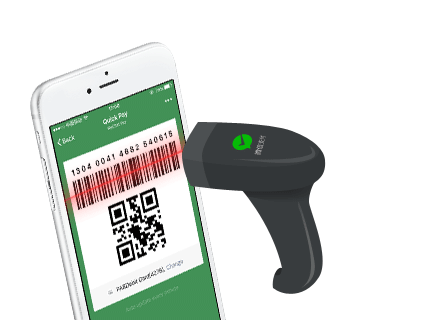
Paying in stores works differently. The WeChat app has a wallet section with your personal payment QR code (which changes every time you open the app). To pay in a store, let the clerk scan it like this https://wx.gtimg.com/pay/img/wechatpay/intro_2_1.png then enter your six digit payment passcode (optionally, you can scan your fingerprint). After entering your passcode, it takes around 5 seconds to process and verify. You get a receipt as a WeChat message (last screen shown here https://www.royalpay.com.au/resources/images/retail-example.... ).
Many stores (usually restaurants) have a nearby QR code you can scan to follow the business's WeChat "Official Account". Follow this account to earn loyalty points, discounts, and freebies whenever you pay with WeChat wallet at this business in the future. The business can send you chat messages about promotions too (you can mute them if you like). This feature ties in really well with WeChat pay.
There are other uses of WeChat Wallet too, most of which are shown in this promo video:
https://www.youtube.com/watch?v=1r95Q2qElFM
At timestamp 0:09, that sign/sticker signifies this store accepts WeChat Pay
At timestamp 0:24, watch the clerk scan the customer's barcode
At timestamp 0:30, the customers scans the store's payment QR code and types in the amount they want to pay. More at 0:50
At timestamp 0:38, this store has a dedicated QR code scanner
At timestamp 0:50, it's the same as 0:30 where the customer types in how much they are paying. Paying like this is common at street stalls.
At timestamp 1:00, two friends use WeChat Wallet to transfer money to each other
Opening WeChat wallet on your phone is very easy. On iPhone just force touch the WeChat app and a quick menu for the QR code scanner and WeChat Wallet appears. In my opinion, it's much faster and more convenient than paying with credit card.