After years of a love/hate relationship with Vim (I love what it does, but have configuring it), I had an epiphany: by sticking with the defaults, whether they are my preferred choices or not, I can instantly understand how to use Vim in any environment. Once you get used to biting the bullet and hitting escape instead of jj, or ctrl+c, it just works, everywhere. If you abandon the urge to pimp out your Vim with a bi…
Just a quick note, you can use Ctrl +[ rather than Escape. Saves your fingers from constantly having to reach for that corner.
History and Effective Use of Vim
191–200 of 226 posts
Re: History and Effective Use of Vim
#192Earlier quoted context omitted.
> But why wouldn't you want the Vim on your main driver laptop, which you use every day to not have a nice custom setup, and some good third party plugins (e.g. file search, linting, etc)? There are two assumptions I think you're making here: Assumption 1: You can do better than the defaults enough to justify the costs of optimizing. I use a pretty much default vim configuration as my primary development environment,…
I have a specific counterexample: softtabs and tabstop. vim uses tabs by default I have to be conscious of when to use tabs vs spaces. With some configuration to detect it by file type, this (for me significant) overhead is removed.
Like all rules, this has exceptions. This is sort of a good "exception that proves the rule". Yes, PEP8 compliant Python development requires you make a few-line change to your .vimrc. My .vimrc contains this:
" Set tabs to width 2.
filetype plugin indent on
set shiftwidth=2
set softtabstop=2
set tabstop=2
set expandtab
" language-specific settings: tab width is 4 for python
autocmd FileType python setlocal shiftwidth=4 softtabstop=4 tabstop=4
So sure, not completely default. But note: the 8 line change I have works without any other changes on every vim install I've come across, and doesn't really change my behavior as a user that much. The people I'm arguing against are proposing installing whole giant behavior-changing plugins (i.e. a linter). I've got a few changes in my .vimrc, but probably fewer lines than even the most basic plugins.Re: History and Effective Use of Vim
#193Earlier quoted context omitted.
I much prefer mapping caps lock to ctrl. That reach is much more difficult for me
Around the time I learned vim I also got myself into the habit of using the opposite hand for Ctrl, the same way you would for Shift. It has pretty much eliminated any need to stretch for a key chord.
Now I type at 100wpm and using Vim gives amazing productivity.
Re: History and Effective Use of Vim
#194After years of a love/hate relationship with Vim (I love what it does, but have configuring it), I had an epiphany: by sticking with the defaults, whether they are my preferred choices or not, I can instantly understand how to use Vim in any environment. Once you get used to biting the bullet and hitting escape instead of jj, or ctrl+c, it just works, everywhere. If you abandon the urge to pimp out your Vim with a bi…
This makes sense if you don't use vim as an IDE, but if you do, configurations and plugins are essential. Of course, you wouldn't expect to have a fully configured jetbrains IDE when you SSH into a remote server, but that doesn't mean you can't use one on your local development machine.
Your parent (https://news.ycombinator.com/item?id=20481729) does say that:
> > Of course, that's just me. I understand why someone would want to turn Vim into their personalized powerhouse editor with IDE powers, with their .vimrc a 'git pull' away.
Re: History and Effective Use of Vim
#195Earlier quoted context omitted.
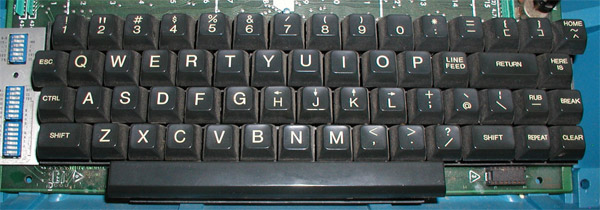
There's an interesting reason for this related to the ASCII table and bit shifting, but I can't find a description of the exact mechanism for it. H and [ are in the same column as escape and delete respectively, and control shifts the bits in the character codes by some amount. Maybe someone smarter than me can elucidate.
This table might help explain: 00 01 10 11 00000 NUL Spc @ ` 00001 SOH ! A a 00010 STX " B b 00011 ETX # C c 00100 EOT $ D d 00101 ENQ % E e 00110 ACK & F f 00111 BEL ' G g 01000 BS ( H h 01001 TAB ) I i 01010 LF * J j 01011 VT + K k 01100 FF , L l 01101 CR - M m 01110 SO . N n 01111 SI / O o 10000 DLE 0 P p 10001 DC1 1 Q q 10010 DC2 2 R r 10011 DC3 3 S s 10100 DC4 4 T t 10101 NAK 5 U u 10110 SYN 6 V v 10111 ETB 7 W…
011 010
0000 0 SP
0001 1 !
0010 2 "
0011 3 #
0100 4 $
0101 5 %
0110 6 &
0111 7 '
1000 8 (
1001 9 )
1010 : *
1011 ; +
1100 .
1111 ? /
¹ https://commons.wikimedia.org/wiki/File:TTY33ASR.jpg² https://catonmat.net/images/why-vim-uses-hjkl/lsi-adm3a-full...
Re: History and Effective Use of Vim
#196Earlier quoted context omitted.
After a several month effort to learn vim bindings and use them full-time, I eventually ended up weaning myself back off because the plugins for the editors I actually use all seemed to come with considerable downsides. vscode-vim caused odd performance issues, and I encountered significant bugs with the undo stack (namely hitting 'u' would sometimes take out the last 10-15 changes instead of just one). IDEAvim would…
You should take a look at language server clients for vim e.g. coc-nvim. I don't personally used one so I can't say what works or not. [0] https://github.com/neoclide/coc.nvim
Re: History and Effective Use of Vim
#197After years of a love/hate relationship with Vim (I love what it does, but have configuring it), I had an epiphany: by sticking with the defaults, whether they are my preferred choices or not, I can instantly understand how to use Vim in any environment. Once you get used to biting the bullet and hitting escape instead of jj, or ctrl+c, it just works, everywhere. If you abandon the urge to pimp out your Vim with a bi…
Yup. I've been using vi[m] on an almost daily basis since about 1989...wow, that's 30 years. In those decades, I have resisted putting anything in my .vi[m]rc except: set tabstop=4 set expandtab set shiftwidth=4 set shiftround That's it. And I agree with you, it's a very happy place for me.
When I started using vi on a Sun machine in ~1986 or so, I was an expert at 'edlin' (if there could be such a thing) because it existed on every DOS machine. I learned vi for the same reason: It not only ran on everything, it was pretty much guaranteed to be installed on everything.
I hated it, as I was used to many other 'visual editors' that were modeless, more like emacs. The first Apollo editor was my favorite.
But in those days, installing an editor was a real task, so I went with what was there. Now it's in my fingers.
Although on the (fairly frequent, because busybox) occasion I have to use REAL vi, I'm flustered when I type capital-V to get a visual line buffer...
Re: History and Effective Use of Vim
#198> Some of the clones: > > nvi - 1980 for 4BSD > [ ... ] > elvis - 1990 for Minix and 386BSD This is incorrect; nvi is in fact a mid 1990's fork of Elvis, worked over for better POSIX compliance by Keith Bostic. > vim - 1991 for Amiga Though that was the first public release, Moolenaar had worked on it since 1988. It was based on Tim Thompson's Stevie, which had been released, in 1987 (noted in the table).
Thanks for the correction, can you give me a more precise date for nvi? I can update the article.
4BSD (same as 3BSD) had the original vi (at version 3.1). You can see the sources at TUHS.
Fun fact: AT&T adopted vi in System V UNIX, and advertised that fact without crediting UCB as required by the BSD license. So when AT&T sued, USB countersued, which is why AT&T settled for merely removing UNIX code from future releases.
Re: History and Effective Use of Vim
#199Earlier quoted context omitted.
It's unfortunate that in this day and age we still have people who directly access and touch a production server at all, ever. There is zero need.
This sounds nice until you have to debug a crazy error that only happens in production.
Re: History and Effective Use of Vim
#200Earlier quoted context omitted.
It's unfortunate that in this day and age we still have people who directly access and touch a production server at all, ever. There is zero need.
You're quite green, aren't you?