Live data from Hacker News

History and Effective Use of Vim

begriffs.com

91–100 of 226 posts

Re: History and Effective Use of Vim

#91
post #84
post #16

Earlier quoted context omitted.

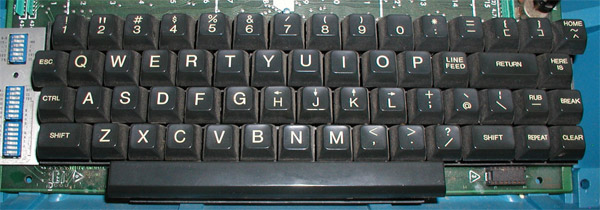
On my keyboard I need ALT GR for [. On a side note, I'm rather disappointed that the ESC key didn't get updated with modern keyboards. The keyboard vi was designed on had ESC where Capslock now resides.

Are your sure it wasn't control? I know the ADM terminals were set up that way and they even had the arrows on HJKL.

True, but ESC was the next button.

https://catonmat.net/images/why-vim-uses-hjkl/lsi-adm3a-full...

Re: History and Effective Use of Vim

#92

Been using vim since 1998 and rarely stray unless I'm typing notes for something unimportant and them I use Nano. Back in the day when I was a Unix admin, we often worked in full screen terminals and when editing a config file didn't like having to close the vim instance to go look at something, so learned about this little gem: :sh (go back to shell and do your thing and leave vim running) Ctrl-d to return to intact…

Or just CTRL+z and then 'fg' to go back.

This is one of the many things I learned from the destroyallsoftware screencasts [0] so many years ago. Before that I used vim in a gui (MacVim). Along with moving to tmux this completely changed how I work.

[0]: https://www.destroyallsoftware.com/screencasts

Re: History and Effective Use of Vim

#93

> Some of the clones: > > nvi - 1980 for 4BSD > [ ... ] > elvis - 1990 for Minix and 386BSD This is incorrect; nvi is in fact a mid 1990's fork of Elvis, worked over for better POSIX compliance by Keith Bostic. > vim - 1991 for Amiga Though that was the first public release, Moolenaar had worked on it since 1988. It was based on Tim Thompson's Stevie, which had been released, in 1987 (noted in the table).

Thanks for the correction, can you give me a more precise date for nvi? I can update the article.

Re: History and Effective Use of Vim

#94
post #41

I used vim for years, but then Sublime appeared.. although I miss the snappiness of vim, and wouldn't mind to come back. Specifically, I'd miss these nice features of Sublime: 1. Multiple cursors!! (and how easy is to use them) 2. Real-time preview of regex search 3. Package Manager (easy installation and discoverability of plugins) 4. Jump to file, jump to function, jump to css selector.. (ctrl+p, ctrl+r, using fuzz…

1. Exists via plugin

2. Exists built in, but need to enable options

3. Exists if you install a plugin manager that has those features

4. Exists via plugin

5. Exists via plugin

Re: History and Effective Use of Vim

#95

Been using vim since 1998 and rarely stray unless I'm typing notes for something unimportant and them I use Nano. Back in the day when I was a Unix admin, we often worked in full screen terminals and when editing a config file didn't like having to close the vim instance to go look at something, so learned about this little gem: :sh (go back to shell and do your thing and leave vim running) Ctrl-d to return to intact…

You can also do

    :! ls -a
to execute a shell command and see the results from within Vim.

Re: History and Effective Use of Vim

#96

After years of a love/hate relationship with Vim (I love what it does, but have configuring it), I had an epiphany: by sticking with the defaults, whether they are my preferred choices or not, I can instantly understand how to use Vim in any environment. Once you get used to biting the bullet and hitting escape instead of jj, or ctrl+c, it just works, everywhere. If you abandon the urge to pimp out your Vim with a bi…

If you want portable then yeah empty out your .vimrc and get fluent with vims superpowers as they are. If you want "personalized powerhouse editor with IDE powers" you are FAR better off going with Emacs/Evil. The Emacs plugin ecosystem is way ahead of Vim. Plugins are clean, stable and compose well together. That was never my experience with Vim. Also unlike Vimscript, Elisp is pretty clean useable language that man…

Use tramp with Emacs and you can interact with remote machines as if they were local. Who cares if the server only has vim, you have Emacs.

Re: History and Effective Use of Vim

#98

I started my programming career determined to be a vim guru and do all my programming with vim. This was misguided and after a year of wasted productivity and wasted time fiddling with plugs and dealing with broken stuff (surely by my own hand) I switched to a professional IDE and I rapidly became a much better developer. I use vim constantly now but in it's most plain vanilla form, for the purpose of editing files w…

You can install IdeaVim in PyCharm. I've been using IdeaVim with IntelliJ for 6 years and could never go back to non-vim style editing. This plugin provides the best of both worlds.

Re: History and Effective Use of Vim

#99
post #68

Earlier quoted context omitted.

> I wish the same could be done on Windows You can:) https://vim.fandom.com/wiki/Map_caps_lock_to_escape_in_Windo...

Yes, technically it's possible, but it is too complex and too permanent to run on every machine and server I log into. Perhaps I should set those registry keys on my own Windows VM though. Thanks for the reference.

buy a keyboard that lets you customize keybindings. my anne pro cost me probably less than $50 and there are many other (better!) choices out there

Re: History and Effective Use of Vim

#100

Earlier quoted context omitted.

Yup. I've been using vi[m] on an almost daily basis since about 1989...wow, that's 30 years. In those decades, I have resisted putting anything in my .vi[m]rc except: set tabstop=4 set expandtab set shiftwidth=4 set shiftround That's it. And I agree with you, it's a very happy place for me.

I also find it important to set encoding=utf-8. I'm not working with Latin-1 files.

Yes, this is a good idea, although I'd like to note there is more nuance.

* `encoding` is what vim uses internally -- the way buffers and registers are stored in memory. Default value is latin1 as you mention, but it will also pick up on the $LANG environment variable. It's more effective in general to set that variable than directly tweak `encoding`. (Mine is en_US.UTF-8 due to my locale.)

* `fileencoding` is the encoding for the current buffer on disk, how it will be read and written. It is translated in memory to `encoding`. Thus you can manipulate files in encodings other than the one used in-memory. (Although if encoding was latin1 I'm not sure how well the round-trip would go.)

* `termencoding` is how the buffer will be displayed to the screen and how the user input will be read. Once again, it can differ from encoding, and will be translated.

* `fileencodings` is an ordered list of options to try when opening a file. Default value: "ucs-bom,utf-8,default,latin1" when encoding is a unicode value.

If you were editing Japanese text, for instance, choosing UTF-16 encoding would actually make vim use less memory than UTF-8, and would not affect the fileencoding used on disk either.
Post reply on HN