http://toastytech.com/guis/ns08.html NextStep 0.8, '88 vintage.
NextStep, yes. The first time I saw Win95 (Chicago beta), I decided it was a rip-off of the NextStep UI.
151–160 of 204 posts
http://toastytech.com/guis/ns08.html NextStep 0.8, '88 vintage.
Another old example. WordStar: Used "X" to Exit to system in its main menu ( https://www.flickr.com/photos/markgregory/6946218793/?rb=1 ) - I do not know the revision shown in the screen shot. According to Wikipedia ( http://en.wikipedia.org/wiki/WordStar ) WordStar was released in 1978. Which moves the date back to at least 1978 to use X for exit. However, there is possibly a very simple explanation that the blog po…
Earlier quoted context omitted.
If you double-click it, it closes the application. It was converted from a picture of a spacebar to the application's icon, but still functions the same way.
Some time ago I was stunned discovering how many Windows users had no idea that double-clicking [-] closes the window. I bet that was the main reason for introducing separate close button.
Another old example. WordStar: Used "X" to Exit to system in its main menu ( https://www.flickr.com/photos/markgregory/6946218793/?rb=1 ) - I do not know the revision shown in the screen shot. According to Wikipedia ( http://en.wikipedia.org/wiki/WordStar ) WordStar was released in 1978. Which moves the date back to at least 1978 to use X for exit. However, there is possibly a very simple explanation that the blog po…
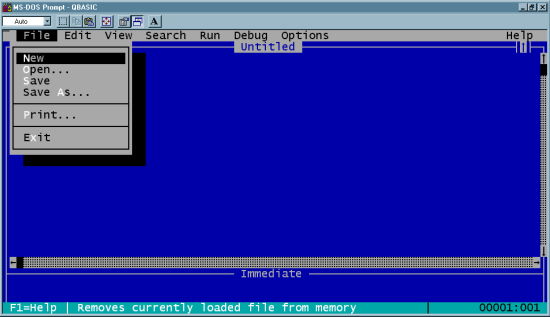
this helps prove your point. This is from Qbasic that ran in DOS. I use to run this on my windows 3.1 all the time: http://www.mysundial.ca/tsp/images/qbasic_screen_2.gif
Earlier quoted context omitted.
this helps prove your point. This is from Qbasic that ran in DOS. I use to run this on my windows 3.1 all the time: http://www.mysundial.ca/tsp/images/qbasic_screen_2.gif
Interesting that that screenshot shows other windowing decorations, but that "close" is hidden in a menu option.
Too bad, that popular Windows applications like Skype and Spotify have gone against this and made "X to minimize". And their making of Alt+F4 also to minimize drives me nuts.
There's frequently a setting to configure if it truly closes or not, but it's not usually there for more mass-market targeted apps (death by settings and configuration options to support being the likely cause).
Earlier quoted context omitted.
It might be because of Sega's consoles, which were more popular in the US than they were in Japan, where Nintendo ruled. The Genesis' button layout was A,B,C arranged in a diagonal from bottom-left to top-right. A was usually 'accept'. The Dreamcast had a diamond with A at the bottom and B to the right. Nintendo's Famicom buttons read A,B from right-to-left, and that trend continued with the Super Famicom's diamond,…
As I said in another comment, almost every Megadrive game I've played lets you use both A and C for accept in menus, so you could use whichever orientation you were more comfortable with. I think anyone who started with Nintendo consoles would instinctually rest their thumb between B and C. My guess is that Sony thought that X and O wouldn't have as obvious connotations outside of Japan, and figured that people would…
I recall being mildly shocked when Windows 95 came out with the the [x] button. I don't know why, but I thought that it was somewhat dangerous to allow users to quickly exit an application like this. Maybe it's because I was used to Windows 3.11, where you had to actually double-click the [-] button to exit an application.
Agreed. But more to the point, I'd like to know what idiot decided it would be great to put a close button right next to the maximise and minimise buttons. It's a disaster just waiting for a mis-click. Since Win95, everyone else has copied this particular feature. First thing I do whenever I do a new Linux install is put the close button on its own on the left where it belongs.
I really wish I could do the same on Mac.