Live data from Hacker News

Kinto: Mac-style shortcut keys for Linux and Windows

github.com

101–110 of 248 posts

Re: Kinto: Mac-style shortcut keys for Linux and Windows

#101

Earlier quoted context omitted.

There's a link to the Table of Contents near the very top of the Readme right after the basic and short description. I prioritized the info to make it a little faster to get up and running versus the need to scroll past an ever increasingly long ToC. For the most part people shouldn't really need to read something a mile long to get it up and running. I really need to get Kinto packaged officially into the repos for…

I'm actually pretty interested in the project and will definitely take a look into it when I next set up a Linux desktop for whatever reason. That said, I'm only interested in it because I had to spend a lot of effort to figure out exactly what it would be useful for. > I prioritized the info to make it a little faster to get up and running versus the need to scroll past an ever increasingly long ToC. For the most pa…

> is it because you can copy and paste with a keyboard shortcut?

To be honest the genesis of Kinto came from my Dell XPS 13 Developer Edition days in 2016 - I was wanting to make Ubuntu my primary OS, but I was highly annoyed by 2 things.

1) Copying and pasting btwn the general GUI apps and the terminal had inconsistent hotkeys because of the need to hold down shift on the terminals. That has always stuck w/ me and I have never liked the need to carry or backup dotfiles around for hotkey configurations of individual apps or being forced into creating a global, always on, hotkey (aka xmodmap, setxkbmap, etc). Autokey was also not good enough & my early python based attempts at context switching was far from what it needed to be.

2) The Dell XPS 13 had a hardware level bug that would cause the kernel on either Linux or macOS to halt the system randomly. I reported it to the community & as far as I know that bug still exists to this day. Only Windows would ignore it, so I sold it and bought another macbook pro after that.

You have to understand that I decided to commit 100% to the macOS keyboard layout in 2012 - up until then I had been switching back and forth btwn Windows, macOS and Linux distros, but I wanted to get a lot more serious about programming and it felt like too much additional mental overhead to keep changing that gear, especially as I was learning new keymaps in code editors that were not consistent btwn OS's. I also committed for ergonomic reasons and the how the terminal behaved.

Back then Apple was still making fairly good decisions and updates to their OS unlike how I feel about that platform in the last few years.

Kinto is just a culmination of an itch I've had for a very long time - it's just I've been extra motivated to scratch it in the last 2-3 years and it's really come together pretty well in the last several months. It's literally the program I wish had always existed for Linux and the one I wouldn't have had to write in the first place lol.

Re: Kinto: Mac-style shortcut keys for Linux and Windows

#102

This is great, btw. Kinto is 100% a sanity saver. Please note the following rant is mostly tongue-in-cheek. 'cuz it turns out, I personally hate how Windows and Linux do things with `ctrl`. Coming from a Mac, my biggest and most consistent annoyance is that the `ctrl` key is fucking useless at best... One of the most common use cases for the `ctrl` key is COPYING shit and followed by PASTING shit and it DOES NOT WORK…

Get a Japanese[1] keyboard and remap some keys around and you can accomplish this on Windows. You will need SharpKeys[2] and Autohotkey[3] at least in my set up. [1]: https://images-na.ssl-images-amazon.com/images/I/61oeDlRN4QL... [2]: https://www.randyrants.com/category/sharpkeys/ [3]: https://www.autohotkey.com/

The problem with the Japanese keyboard is it adds too many keys. Keys added in the last row are OK, we can pick one serving as “Command”; but keys added in the home row, number row break your muscle memory thoroughly(as enter and backspace are frequent keys).

I bought one, threw it into garbage the second day.

Re: Kinto: Mac-style shortcut keys for Linux and Windows

#103
post #94

On a slightly related note: does anyone else map caps lock to control (and vice-versa)? I’ve never really understood why caps lock gets a huge key in the middle of the keyboard, while control gets a regular-sized key at the bottom. Generally speaking, caps lock is used much less than control.

Kinto supports remapping Capslock to Ctrl or Esc, it is in the Tweaks menu, at least on Linux. I have not implemented the Tweaks menu for Windows just yet, besides that the 2 versions are pretty much at parity with each other.

Re: Kinto: Mac-style shortcut keys for Linux and Windows

#104

What I really want, though, is Mac-style character-entry in Linux. It's so much easier to type accented characters in Mac.

Same, I was hoping this did that but judging by your comment I guess it doesn't

Out of scope for Kinto - although this topic has been brought up a number of times in the issue tickets and I did do some early research into the topic. I found at least 1 or 2 existing projects out there that could be a nice jumping off point to create something along these lines - but it isn't something I have the bandwidth to work on or include with Kinto.

I think it's a possible thing to do however from what I have seen for anyone that wants to put in the effort.

Re: Kinto: Mac-style shortcut keys for Linux and Windows

#105
I will only respect this project if it completely breaks alt+tab on windows and linux to make it useless like OSX, where you cannot go to a specific terminal window. ha!

sarcasm aside, I wish there was something that was the exact opposite. I tried to map cltr+c/v on OSX but it doesn't work on some applications, like firefox. And using Switch application that fixes alt+tab to all windows (not programs) for some reason the default shortcut (Option-tab) is stolen on iterm2 which is exactly where I wanted it to work.

man, having to use OSX at the office is like having to use Windows with Outlook in the past. So silly.

Re: Kinto: Mac-style shortcut keys for Linux and Windows

#106

Shameless plug: wincycle makes win/cmd+backtick to cycle between Windows of the same app work. This and iMessage were the two things I missed leaving macOS for Windows and so I solved them both for myself :) https://neosmart.net/blog/2017/easy-window-switcher/

How did you solve iMessage?

I solved it with AirMessage by SparkDev - runs directly on my iPhone. There air similarly named apps and macOS based implementations as well that would work, but I prefer keeping it on my phone instead.

As far as the Alt- switching goes.. that was honestly one of the more difficult things to solve for both Linux and Windows. For Linux because of the sheer number of DEs (a few absolutely hated it to allow certain remapping, had to send in patches for one of the DEs too!) and Windows because it initially appeared that the most simple remapping methods would clobber each other - but after working with Autohotkey enough it was apparent that it was indeed up to the task & I also kicked Sharpkeys registry hacking off to the side and no longer needed users to log off and back on. (Also makes pair programming a bit easier too.)

Re: Kinto: Mac-style shortcut keys for Linux and Windows

#107
post #23

I just switched back to Windows at work for the first time in like... almost 20 years. I'm dying without readline-style controls. If this can offer those, I'm going to jump for joy. I already have the Magic Keyboard Utilities to let me use my mac keyboard as a Windows keyboard and put things in sensical places. (Left Fn & Ctrl -> Ctrl, Left Option -> Meta, Left Command -> Alt, Right Command -> Function modifier, Righ…

What you call readline controls I call wordwise - but yes that is indeed supported by Kinto. You will want to undo any of your custom remaps on modifier keys before you install Kinto as it will not be aware of your own remapping attempts. Going forward you would also be best served by updating new keymaps in ~/.kinto/kinto.py if you can do so.

I do not yet have a method though to help you easily keep your changes when upgrading to newer Kinto versions. I will try to add a git like merging ability to the updates later on though, so custom local changes will be preserved.

Re: Kinto: Mac-style shortcut keys for Linux and Windows

#108

Maybe a n00b question, but will this give me Emacs keybindings in text fields on KDE? If so, I might be able to tolerate switching to Linux now.

Yes, but if you find any hotkey not working just let me know in an issue ticket and I will get it added. I also accept PRs.

Re: Kinto: Mac-style shortcut keys for Linux and Windows

#109

Earlier quoted context omitted.

Get a Japanese[1] keyboard and remap some keys around and you can accomplish this on Windows. You will need SharpKeys[2] and Autohotkey[3] at least in my set up. [1]: https://images-na.ssl-images-amazon.com/images/I/61oeDlRN4QL... [2]: https://www.randyrants.com/category/sharpkeys/ [3]: https://www.autohotkey.com/

The problem with the Japanese keyboard is it adds too many keys. Keys added in the last row are OK, we can pick one serving as “Command”; but keys added in the home row, number row break your muscle memory thoroughly(as enter and backspace are frequent keys). I bought one, threw it into garbage the second day.

For a European keyboard there is hardly a difference but ANSI sure. I have backspace remapped as normal.

Re: Kinto: Mac-style shortcut keys for Linux and Windows

#110
post #22

Earlier quoted context omitted.

Apple’s MO all along has been lock-in to their ecosystem any way they can make it happen, whether it be through their usability, their OS, their App Store, or iTunes. They don’t want to be interoperable because then you might realize you’re paying a huge premium for an inferior product.

Mac keyboard shortcuts were created before Windows existed. And I don't think there was any keyboard-shortcut standard at all in X-land at the time. It was Microsoft who chose to be different here.

It's more a case of parallel and somewhat divergent evolution.

Current PC keyboards, minus the Windows key, are nearly identical to The IBM model F that came with the IBM 3270 in 1983 [1] (the arrow keys are quite different). (Note: IBM is responsible for this, not Microsoft)

The Apple IIe also came out in 1983 [2] but had a very different layout from what Apple uses today. The "open apple" and "closed apple" (two different modifiers) were all that was on the bottom row, similar to left and right command. Control was located above, and option was missing.

Macintosh's keyboards kept evolving well after PC keyboards reached their final form, aside from the addition of the windows key in 1994 (that was microsoft, not surprisingly).

[1]https://en.wikipedia.org/wiki/Model_F_keyboard#/media/File:I...

[2]https://upload.wikimedia.org/wikipedia/commons/9/9f/Apple_II...

Edit: Just for giggles, here's the 1982 Commodore 64's keyboard:

https://upload.wikimedia.org/wikipedia/commons/e/e9/Commodor...

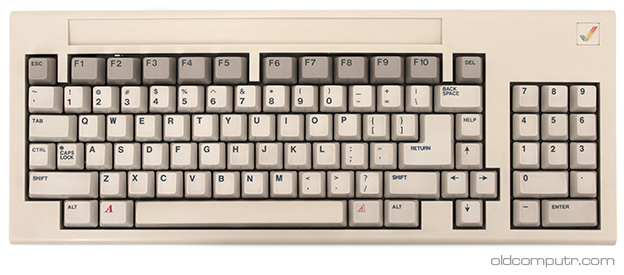
And the 1984 Commodore Amiga 1000's keyboard:

https://www.oldcomputr.com/wp-content/uploads/2014/07/commod...

Every platform has had it's own ideas about what keyboards should look like. In terms of current user-base, the clear winner is the IBM PC keyboard. It was more justifiable for manufacturers to go their own way in the wild and wooley early 80's while everyone was inventing their own way of doing things. Today, when the same software runs on multiple platforms, it's an annoying problem.

One more fun edit:

Here's the 1977 Apple II keyboard.

https://upload.wikimedia.org/wikipedia/commons/9/98/Apple_II...

Just imagine using a computer with the power key right next to the Shift key and where the CTRL key is today!

Post reply on HN