Live data from Hacker News

Discovering Two Screens Aren’t Better Than One

nytimes.com

31–40 of 50 posts

Re: Discovering Two Screens Aren’t Better Than One

#31
My setup for front-end development:

* 15" Retina MPB at 1920x1200 (iTerm 2 with either 3 or 4 panes)

* 27" Thunderbolt (two documents side-by-side, currently tolerating Atom)

* 27" iMac in target display mode (browser and dev tools).

And that's just the three spaces that I do most of my work in. I've got other spaces set up for general browsing, email, image editing, chat, etc.

It's probably excessive for most people. But I need to see all of these things. If I can't have them all up at once, I have to do a lot of switching between windows and spaces, and that takes a time. It's small amounts, but it adds up. I rely on tools like Gulp and BrowserSync to help me save small amounts of time. Staying focused by keeping my work in front of me really does help to keep me focused.
Re: Discovering Two Screens Aren’t Better Than One

#32
Since this is HN and most people here have written code, I compare multi-monitor setups to a text/code editor with a single panel/pane. You just don't do it! Sublime, N++, Atom, etc. all support multiple panes (split screen). Once you get coding enough you never go back to using a single pane.

Same thing with multi-monitor. As long as you are productive (unlike the author), more screen real estate is better (obviously, there are limits)

Personally, I like dual 27"s. Allows you to run 4 full size (think 8.5"x11") word docs at 100% side by side. Very nice!

Re: Discovering Two Screens Aren’t Better Than One

#33
> But if you wouldn’t watch a movie or play a video game while you’re trying to get something done, why would you keep an app as distracting as email sitting within your field of view?

Because... I wouldn't? I use a window manager and I don't have a system tray (so no email notifications, for example). Often, I have one application open on each screen, perhaps a PDF reader, a text editor or a browser. Then, if I need to actually look at two things fairly back and forth, I'll split that screen into two, or use both monitors. What if I don't need the second monitor? I guess it could just be looking at the wallpaper, or displaying an analogue clock (that is: if I'm not looking too much at the clock, pining for the time to pass quicker!).

Does using two monitors make me more productive? I don't know yet. But I don't see how two monitors would make me more susceptible to procrastination. If I feel the need to fire up the browser and go to reddit or something, that's pretty much as with one monitor as with two. The time and effort I save by not having to minimize the currently focused app in order to open the browser, compared to just opening a browser on the already blank second monitor, seems so small as to be inconsequential to a bored, wandering mind.

Re: Discovering Two Screens Aren’t Better Than One

#34
I may be alone, but I'll generally take 2 19" non-widescreen monitors over a single giant monitor any day of the week. There's something (possibly as a minority windows user) that I really like about throwing things from screen to screen. Especially when I have to do the rare front-end tweaks. Some people may be able to spit out perfect CSS without seeing the site they're working on, but I'm 95% a back end dev, so when I have to do the odd styling related task, it's a lot of try this, refresh, try this.. something that works about three times as fast when I have two monitors.

At work, I have three. 2 high quality widescreens, one center, one to the right, and a tiny (by my request) 17" standard ratio screen to the left that email sits on all day long. It moves so rarely that it catches my eye when it does, but again.. it was such a low cost investment that it's almost negligible. When I come home I have one large screen, and an old 17" standard screen to the left. The left screen is almost always playing a TV show or movie, and the center screen is everything from life, to work, to just wasting time.

If I had a single point with all of this, it's that windows don't mean the same to me as screens do. Even with the new win8/metro style interfaces ability to segment screens, I really like the "this one does this, this one does that" effect I get from two monitors.

Re: Discovering Two Screens Aren’t Better Than One

#35
post #20
post #18

Earlier quoted context omitted.

How are you using the three external monitors from a laptop? The reason I stick with a desktop is because I very heavily rely upon three monitors and haven't found any decent solutions to do so with a laptop. I'm using ubuntu, so I understand if the OS is a limitation, but I'd still love to hear about what you're using to make it work.

I'm not who you asked, but I have: 2012 Retina macbook pro 15" 27" display port dell 24" display port dell 27" Samsung on hdmi to dvi cable. It will run all 4 screens at once.

[deleted]

Re: Discovering Two Screens Aren’t Better Than One

#36
I think this is just another case of a tool blaming his tools.

He is obviously distracted by default, and incapable of going without Facebook on IV and Twitter through a nasal tube.

With great firepower, comes great opportunity to shoot one's self in the foot. He doesn't realize that this doesn't mean it's counterproductive, but rather that he is.

Re: Discovering Two Screens Aren’t Better Than One

#37
I think this is just another case of a tool blaming his tools.

He is obviously distracted by default, and incapable of going without Facebook on IV and Twitter through a nasal tube.

With great firepower, comes great opportunity to shoot one's self in the foot. He doesn't realize that this that doesn't mean it's counterproductive, but rather that he is.

Re: Discovering Two Screens Aren’t Better Than One

#38
post #11
post #3

truly laughable, also when your primary screen is a 27 inch 1080p wide panel display as he seems to have in the picture, you probably aren't feeling as constrained as most people with their 4 year old low res 15 inch laptops.

> truly laughable I, and lots of others, find it quite reasonable. Any counter-arguments besides the quick dismissal? > also when your primary screen is a 27 inch 1080p wide panel display as he seems to have in the picture, you probably aren't feeling as constrained as most people with their 4 year old low res 15 inch laptops Well, I work on a 15 inch laptop and don't feel constrained. And lots of people work on 13"…

The author's argument boils down to

"when I use my second monitor (which I put twitter and other inane distractions on) I get distracted by it. Therefore 2 monitors are bad"

no way!

My argument is "When I have my editor on one screen and my debugger/docs/browser in the other, I get more work done than if I had to alt tab every 5 seconds. Therefore 2 monitors are good"

Considering we are comparing anecdotal evidence, I'm going to go ahead and say my reasoning is a lot more coherent.

The authors problem, is that if he sees no productivity decrease or he even sees a productivity increase is that he had no business using multiple monitors in the first place. (And considering this person is a journalist, I don't see why he would need more than one half of the monitor for word and the other for his research)

Re: Discovering Two Screens Aren’t Better Than One

#39
For just writing code, like real algorithmic stuff, I've never been more productive than on my 12" ThinkPad X201. Multi mon is great for many things, but in-the-flow coding doesn't seem to benefit. Unfortunately, Lenovo trashed the ThinkPad line, and I actually hate every minute I'm using my T440p. I'd pay $3000 to get an X201 with updated hardware. Nothing else I've seen comes close to the old X series. It had a full sized real ThinkPad keyboard, no compromises!

Re: Discovering Two Screens Aren’t Better Than One

#40

Since this is HN and most people here have written code, I compare multi-monitor setups to a text/code editor with a single panel/pane. You just don't do it! Sublime, N++, Atom, etc. all support multiple panes (split screen). Once you get coding enough you never go back to using a single pane. Same thing with multi-monitor. As long as you are productive (unlike the author), more screen real estate is better (obviousl…

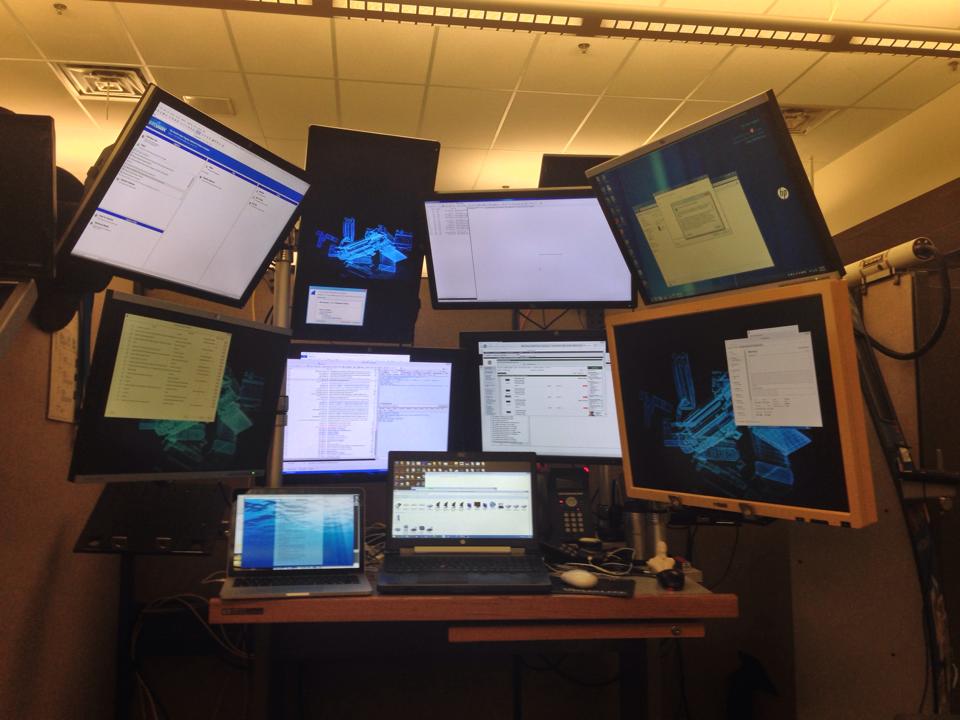
What the author failed to account for is the fact that not everyone does the same type of work. As a security researcher I spend a fair amount of time watching real-time code execution while simultaneously watching & modifying network traffic. In a typical solution review I might have Wireshark running on one monitor, an HTTP editor/proxy running on another hooked to the browser, another HTTP editor/proxy running on yet another monitor hooked to the web service. That's three monitors right there. Next I'll have the browser running on a fourth monitor and possibly be reviewing code and code execution on a fifth. On the sixth and seventh monitors I'll be doing research including static code analysis with the eighth and ninth monitors dedicated to coms (chat/email) and writing up my results. I routinely switch between my multi-monitor solution and a single screen laptop and there's just simply no way I can effectively do my job on one monitor these days. I'll do "simple" reviews on my one monitor laptop and stick with the multi-monitor solution for the harder stuff.

http://defaultstore.com/mydesk.jpg

Post reply on HN