Live data from Hacker News

Hard Drive Reliability Update – Sep 2014

backblaze.com

111–120 of 168 posts

Re: Hard Drive Reliability Update – Sep 2014

#111

How times have changed; Seagate used to be (or at least have the reputation of being) the most reliable and Hitachi the least.

At some point, Hitachi Diskstars were referred to as "Death Stars", and that was all I knew about disk reliability. It is great to have some real information. Dell, Google, and Amazon can never write reports like this because the vendor relationship is important. Because these guys have no relationship and are buying consumer disks, the world finally gets brand level reliability reports. Kudos to Backblaze.

Death Stars were never applied to the drives as Hitachi Drives, but when they were still branded as IBM drives. Namely the 75GXP model era.
Re: Hard Drive Reliability Update – Sep 2014

#112
post #31
post #26

Earlier quoted context omitted.

There is, roughly. This is a lab test as opposed to production monitoring, but it is still interesting. Obviously SSDs and HDDs are quite different technically, so the appropriate test is quite different. They write data continuously to see how long they last. We've now written over a petabyte, and only half of the SSDs remain. Three drives failed at different points—and in different ways—before reaching the 1PB mile…

Latest results: http://techreport.com/review/27062/the-ssd-endurance-experim...

Also worth looking at:

http://us.hardware.info/reviews/4178/10/hardwareinfo-tests-l...

Hardware.info did a "Write until it dies" test for a couple of 250GB Samsung SSDs last year. They found that the drive consistently exceeds the 1000 writes per cell spec.

Re: Hard Drive Reliability Update – Sep 2014

#113
post #8

Biggest takeaway was at the end, with the "enterprise" drives being slightly less reliable than the consumer ones at half the cost.

Second takeaway: if you want working HDDs, go with Hitachi.

But Hitachi is owned by Western Digital, and Western Digital hard disks are not doing quite as well.

Re: Hard Drive Reliability Update – Sep 2014

#115
post #108

Very off topic, but their html is wrong: " https://www.backblaze.com/blog/hard-drive-reliability-update... src=' https://www.backblaze.com/blog/wp-content/uploads/2014/09/bl... alt='Hard Drive Failure Rates by Model' width='560px' border='0' /> " should be "width='560'" not "width='560px'"

Yev from Backblaze here -> It should work with the 560px, if you're referring to the "share this" html code!

Re: Hard Drive Reliability Update – Sep 2014

#116

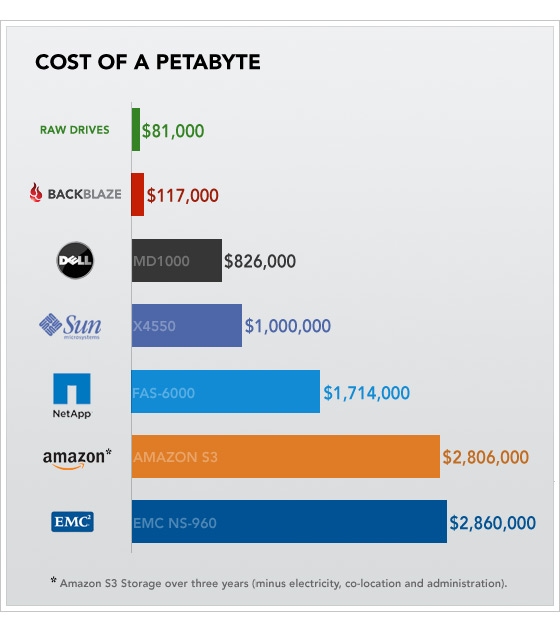
I love reading these posts from Backblaze, but what I never understand is that they are getting a cost of U$ ~0.05/GB with their storage pods: https://www.backblaze.com/blog/why-now-is-the-time-for-backb... At these rates, why not use S3? What am I missing?

Disclaimer- I work at Backblaze. Here is a chart of the cost of a Petabyte that shows why we cannot use Amazon S3: https://www.backblaze.com/blog/wp-content/uploads/2009/08/co...

It is from our original blog post about our storage pods (we assemble 45 hard drives in some sheet metal with off the shelf parts):

https://www.backblaze.com/blog/petabytes-on-a-budget-how-to-...

Re: Hard Drive Reliability Update – Sep 2014

#117
post #104

Earlier quoted context omitted.

Question (not a statement). Doesn't encrypting the drive also prevent you from recovering some of the information on the disk by way of drive recovery utilities? So for example you might want to encrypt something super sensitive (which I do) but decide to not encrypt something less sensitive (say photos or perhaps a wiki with notes or letters to your grandma or wife or sig other). Point being that if the drive isn't…

Yes, the data will probably be completely irrecoverable from an encrypted drive. However, instead of hoping that you will be able to recover data from a broken drive, back it up. I strongly recommend Tarsnap[1] for that. All your data is encrypted before it leaves your machine, it is run by our very own 'cperciva, and the key used for encryption (which you need to store securely somewhere, like your parents' house or…

I think that looks good but I have to tell you that the idea of committing data to what appears to be one person who could get "hit by a bus" worries me.

I'd like to see on sites like that some kind of continuity plan.

Unless you are suggestion that this is just another "redundant array of backups that you have to assume can fail".

But even in that case it would be a good idea if cperciva had something posted on the site which showed there was someone else who had access and kept on top of the system.

Re: Hard Drive Reliability Update – Sep 2014

#118

Earlier quoted context omitted.

unlike consumer drives which statistically are never replaced under guarantee They're never replaced because regular consumers statistically don't ask for replacement and simply eat the loss?

i am a statistical anomaly, then, as someone who tracks warranty expirations in a spreadsheet and always makes sure to wipe & sell old drives before they go out of warranty. in the 20 years i've owned hard drives, i've always had failed drives replaced! drives with longer warranties generally cost more in the consumer segment, and data like this could help people identify the "sweet spot" balancing cost with risk of…

In twenty years, how many hard drives have you had, and how many failed? I've had eight or ten (counting home and work) and just one failed. I had one I used daily for over a decade.

Re: Hard Drive Reliability Update – Sep 2014

#119
post #91
post #69

Question for the OP here (or for anyone else). Do you burn in new drives before using? I typically will take any new drive and do some type of stress test [1] on it for 18 to 24 hours to see if it fails with that initial constant use. [1] Constant reformatting for example writing 0's to the entire disk 7 times etc.

Yev from Backblaze here -> Yes, we do burn in the drives before deploying them. So the drives in the study are ones that have at least made it past that state.

Doesn't that negate a lot of the usefulness of the data? If most Hitachis fail in the burn-in but all Seagates pass it then the expected failure of a drive would be wildly different to that suggested by the charts.

Do you have the figures for raw losses including at burn-in?

I mean, sure, you burn-in and do warranty returns so buying Hitachi would still seem better - but if one needs a drive to just work then it's key to know the overall failure rate.

Re: Hard Drive Reliability Update – Sep 2014

#120
post #113
post #8

Earlier quoted context omitted.

Second takeaway: if you want working HDDs, go with Hitachi.

But Hitachi is owned by Western Digital, and Western Digital hard disks are not doing quite as well.

It's now called "HGST (a Western Digital company)" and the two product lines (WD and HGST HDDs) are totally separate in both parts and manufacturing.

/HGST employee

Post reply on HN