Side tabs are great, because text is wider than it is tall, so you can fit a lot more of them on the screen, to manage more windows.
But why restrict yourself to the top edge, the bottom edge, one side or the other, when you can allow the user to drag the tabs around to any place along any edge that they want? I am perplexed that all tabbed user window frames don't allow this useful and obvious feature, after all these years.
Also, tabbed windows work very nicely with pie menus, and tabbed frames plus pie menus are an excellent combination for window managers and web browsers.
I implemented side tabs in a commercial product in 1988, for UniPress (Gosling) Emacs 2.20 running on the Sun NeWS and SGI 4Sight window systems, and I used them for the HyperTIES hypermedia browser and authoring tool that I developed with Ben Shneiderman at the University of Maryland Human Computer Interaction Lab.
HyperTIES Hypermedia Browser and Emacs Authoring Tool for NeWS
HyperTIES is an early hypermedia browser developed under the direction of Dr. Ben Shneiderman at the University of Maryland Human Computer Interaction Lab.
http://www.donhopkins.com/drupal/node/101
Designing to Facilitate Browsing: A Look Back at the Hyperties Workstation Browser
By Ben Shneiderman, Catherine Plaisant, Rodrigo Botafogo, Don Hopkins, William Weiland.
http://www.donhopkins.com/drupal/node/102
Here's some stuff about it from Wikipedia:
https://en.wikipedia.org/wiki/Tab_(GUI)
The NeWS version of UniPress's Gosling Emacs text editor was the first commercially available product to pioneer the use of multiple tabbed windows in 1988. It was used to develop an authoring tool for the Ben Shneiderman's HyperTIES browser (the NeWS workstation version of The Interactive Encyclopedia System), in 1988.[2][3] HyperTIES also supported pie menus for managing windows and browsing hypermedia documents with PostScript applets. Don Hopkins developed and released several versions of tabbed window frames for the NeWS window system as free software, which the window manager applied to all NeWS applications, and enabled users to drag the tabs around to any edge of the window.[4]
HyperTIES was a "hypermedia" browser, a term first used by Ted Nelson in 1965. The first "web" browser came out later in 1990,[5] and the term "World Wide Web" was not invented until 1990.[6]
HCIL Demo - HyperTIES Authoring
https://www.youtube.com/watch?v=hhmU2B79EDU
Here's another different application of tabs that I developed on NeWS, a visual PostScript programming interface.
The Shape of PSIBER Space:
PostScript Interactive Bug Eradication Routines
Written by Don Hopkins, October 1989.
University of Maryland
Human-Computer Interaction Lab
Computer Science Department
College Park, Maryland 20742
http://www.donhopkins.com/drupal/node/97
Also, here's a video of an even more general implemented of tabbed window frames with a pie menus based window manager, that I implemented at Sun Microsystems for The NeWS Toolkit 2.0:
http://www.donhopkins.com/home/movies/TabWindowDemo.mov
Here is the source code in PostScript for a few different implementations that I gave away for free back in the 80's and 90's:
This is the original version for NeWS 1.1 that shipped with UniPress Emacs, and that I used for the HyperTIES hypermedia browser and authoring environment, which is demonstrated in the video at https://www.youtube.com/watch?v=hhmU2B79EDU :
% Tab window class
http://donhopkins.com/home/archive/NeWS/tabwin.ps.txt
This is the PSIBER Space Deck for NeWS 1.1, which uses its own form of tabbed sub-windows whose tabs you can drag around to any edge, described in this paper http://www.donhopkins.com/drupal/node/97
:
http://donhopkins.com/home/archive/psiber/cyber/litecyber.ps...
This is the first version I implemented for NDE 1.0 on X11/NeWS while at the University of Maryland:
% NDE Tab Frames
% Copyright (C) 1989
% By Don Hopkins, University of Maryland Human Computer Interaction Lab
% May 13 1989
http://donhopkins.com/home/archive/NeWS/tab-1.ps.txt
This is the second version I implemented for NDE 1.0 on X11/NeWS while at the University of Maryland:
% tNt Tab Frames, release 1.0
% Copyright (C) 1990
% By Don Hopkins, University of Maryland Human Computer Interaction Lab
% Started, May 13 1989.
% Reimplemented mostly from scratch for X11/NeWS FCS.
http://donhopkins.com/home/archive/NeWS/tabframe-1.ps.txt
This is the final version I implemented for The NeWS Toolkit 2.0 while at Sun Microsystems, which is demonstrated in the video at http://www.donhopkins.com/home/movies/TabWindowDemo.mov :
% Tab Windows for the NeWS toolkit
% Version 3.0.2
% This file implements a pie menu tab window manager for the NeWS toolkit.
% It should work with TNT2.0fcs on OW2.0fcs and TNT3.0beta on OW3.0beta.
% This code and the ideas behind it were developed over time by Don Hopkins
% at the University of Maryland, UniPress Software, and Sun Microsystems.
% Pie menus and tab windows and NOT patented or restricted, and the
% interface and algorithms may be freely copied and improved upon.
http://donhopkins.com/home/archive/NeWS/tab-3.0.2.ps.txt
I also implemented a tabbed window manager for X11 based on "uwm", which I can't find a link to right now.
And at Sun we developed but never released a really nice extensible window manager with tabs, pie menus, rooms, virtual desktop, and other cool features, that managed both NeWS windows and X11 windows:
http://www.art.net/~hopkins/Don/unix-haters/x-windows/i39l.h...
Some notes about OWM
OWM is the "Open Window Manager" we prototyped in NeWS. We enhanced the NeWS window frames so they sported indexing tabs, pie menus, rooms, and a scrolling virtual desktop. Many of our enhancements were separatly developed, and plugged together orthogonally like legos. All NeWS applications could use these fancy frames, and the Open Window Manager wrapped X clients in the same frames that NeWS windows got!
This way, factoring the window frames out as a part of the toolkit, and implementing the X window manager separately, NeWS applications don't have to know a thing about X window management, and X clients can go on doing the same nasty things they've always done, and everybody get the benefits of dynamic extensibility, and a consistent user interface, by using the default window class!
I39L window management complicates pinned menus enormously. TNT menus pin correctly, so that when you push the pin in, the menu window simply stays up on the screen, just like you'd expect. This is not the case with XView or even OLWM. Under an I39L window manager, the Open Look pinned menu metaphor completely breaks down. When you pin an X menu, it dissappears from the screen for an instant, then comes back at a different place, at a different size, with a different look and feel. If you're not running just the right window manager, pinned menus don't even have pins! There is no need for such "ICCCM compliant" behavior with TNT menus. When they're pinned, they can just stay there and manage themselves. But were TNT windows managed by an external I39L window manager, they would have to degenerate to the level of X menus.
Under the OWM solution, pinned TNT menus work correctly, and they inherit their pinned window behavior from ClassPopupWindow, the same class managing pinned X menus. The look and feel is high quality, consistant, maintainable, and intentionally extensible.
If I39L window management has such a negative impact on pinned menus, how else will it impact other parts of the toolkit and applications?
Will it effect popup notices? Since they need keyboard input for the buttons, will they have to play the I39L window management game? How do we get the notice tail (a separate canvas) to line up, if the window manager decides to wrap a frame around the notice window?
It is impossible to know how it will effect TNT applications, because the toolkit was specifically designed to be subclassed and extended in areas that overlap with I39L window management. NeWSRoom and the TNT virtual window manager are examples of simple, interesting extensions to the window class that are in direct conflict with I39L window management. We would be giving up a lot of actual and potential functionality, that we designed the toolkit to support in the first place. We need to redesign the window class for greater flexbility and easier subclassability, but those goals are at odds with I39L window management. The result of a cross of these two opposing goals would be massivly complex and would sacrifice most of the important advantages of the TNT approach. However, the OWM approach to window management, wrapping X windows in instances of the TNT window class, synergizes with extensions to the window classes. As an extreme example, you can make OWM wrap window frames with title tabs that pop up pie menus full of handy window management functions around all your X windows.
There are several other technological advantages of managing X windows internally with NeWS, over managing them externally with X. By an external window manager, I mean one that is in a separate address space as the windows. Relative to the server, all windows are internal, all X "Xlib" and NeWS "wire service" clients are external, and NeWS canvas objects and light weight processes are internal. But an external X window manager is in a different address space must try to manage many shared resources at a distance, an intrinsicly difficult task, imposing limitations on the whole system and unavoidably restricting the user interface possibilities.
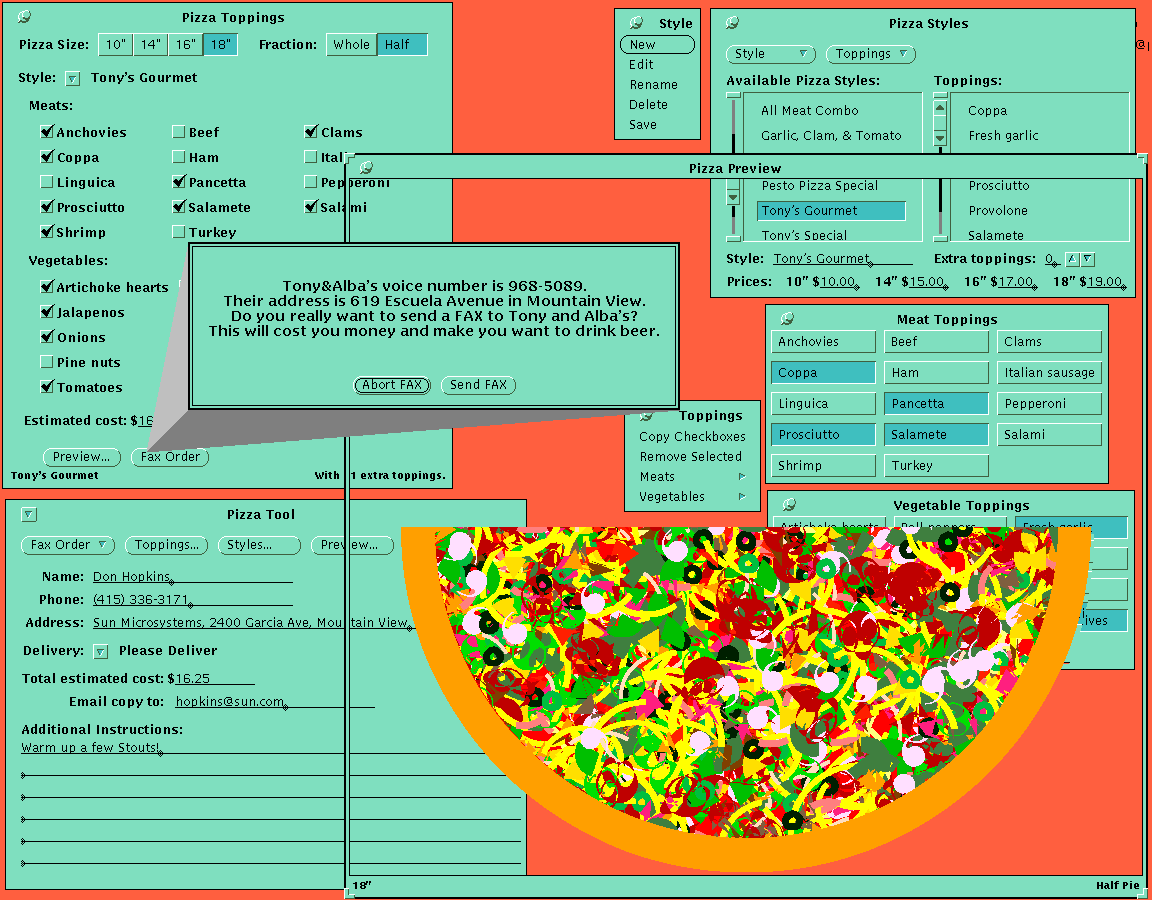
The management of arbitrarily shaped windows becomes very complicated under an I39L window manager. In contrast, PizzaTool has a popup pizza preview window, whose shape is a rectangular frame around a round (or semi-circular, depending on your appetite) pizza window, with the space between the inside of the frame and the pizza cut out. It was very easy to implement, by subclassing ClassPopupWindow and overriding the /path method to cut out the inside of the frame and ask the center pizza client to add its shape to the path. When you move or stretch the window, you see a rubber-band preview of the actual shape the window will take when you release the button. The pizza path procedure knows to maintain a 1:1 aspect ratio (no oval pizzas), that centers the round pizza in the frame as you drag the resize corner around. The shape of a TNT window is not simply defined by curves or bitmaps -- it is defined by a method of the window object, which can apply constraints and may depend on the state of other objects in the system, like the size or number of slices of the pizza inside the frame. All this nice interactive feedback is totally trivial to implement with TNT, and is completely impossible with an I39L window manager. And even if an I39L window manager could be programmed to perform such custom feedback, it would still have to grab the server and lock out all other animation in the process, instead of using nondestructive overlays like TNT.
X11 window managers must grab the server in order to animate rubber-band feedback over the screen when resizing and moving windows. This grabbing causes many problems with NeWS synchronous interests, that can be demonstrated by pressing the "Help" key while dragging out a rectangle on the root background. NeWS can do a much better job at managing global resources in the server because it is in the same address space and it has facilities like the overlay plane specifically designed to implement such window management functions, without even grabbing the server. This antisocial server grabbing behavior is just one symptom of a general class of problems with external X window management, including other important issues such as keyboard and colomap focus.
If NeWS alone manages the input focus, it can manage it perfectly. An X window manager alone cannot, because it runs in a foreign address space, and is not in a position to synchronously block the input queue and directly effect the distribution of events the way NeWS is. But even worse is when an X window manager and NeWS both try to manage the input focus at once, which is the situation we are in today. The input focus problem could be solved in several ways: OWM solves the problem elegantly, as PSWM did in the past; OLWM could be made NeWS aware, so that when our own customers run our own external X window manager on our own server that we ship preinstalled on the disks of our own computers, OLWM could download some PostScript and let NeWS handle the focus management the way it was designed.
It's criminally negligent to ship a product that is incapable of keeping the input focus up to date with the cursor position, when you have the technology to do so. Your xtrek has paged the window manager out of core, and the console beeps and you suddenly need to move the cursor into the terminal emulator and type the command to keep the reactor from melting down, but the input focus stays in the xtrek for three seconds while the window manager pages in, but you keep on typing, and the keys slip right through to xtrek, and you accidentally fire off your last photon torpedoe and beam twelve red shirt engineers into deep space!
Oh yeah, and here is a picture of pizzatool:
http://www.art.net/~hopkins/Don/images/pizzatool.gif