This is awesome, but can we talk about the very scary looking folder icons?
Oh yikes, I missed that. They're pretty garish: https://www.apple.com/osx/preview/design/images/apps-gallery...
111–120 of 307 posts
This is awesome, but can we talk about the very scary looking folder icons?
I don't care about flat or transparent. I just hope they effing fix windowing and multi-monitor support. ⌘+` is ridiculously buggy.
I left OSX for Linux 5 years ago primarily due to the unbelievably lacking window management. Having come from Windoze land with the then, and perhaps still, excellent UltraMon, I could never adapt to manually reizing app windows side by side into grids, or context switching between layers expose-style. The tiling window manager options on Linux are so good that I've dropped the desktop environment entirely (Gnome, K…
Which parts of the front window in this screenshot[0] are draggable? Maybe this is just me, but I don't like how the titlebar and window contents are visually merged. [0] https://www.apple.com/osx/preview/images/overview_design_her...
Earlier quoted context omitted.
First thing I thought of. "Look at how the background beautifully interacts with the translucent menu bar." Didn't we all turn that feature off back in 2007?! Though in fairness that was partly because it was such a hog on Vista. I've left translucency on in Win 7, though it sure isn't a productivity boost and it ain't 'beautiful' either.
Apple people like to mock Aero's translucency, but I... always liked it. Anyone else? Anyone?
After 22 years on Macintosh, I've completely transitioned to Crunchbang on a MacBook Pro and a Windows 7/Crunchbang dual-boot workstation. I really like the translucency and general look of Win7. I had started to feel like OS X was visually dated, but more importantly, harming my workflow.
For development and design, I am working nearly twice as fast in the OS using Crunchbang, and I've made it look and behave just the way I want it to. OS X is completely non-configurable! Since the only thing I need a consumer OS for at this point is for digital audio, I moved to Win7 as I wasn't about to lay out the $$ for the new, unfathomable, Mac Pro. What is that thing anyway? I worked with a guy in a metal shop to customize a case for my new workstation, tricked it out with an internal pro audio interface with exposed preamps and 1/4" jacks, and made it a 3U rack-mount. That versus a garbage can?
That being said, my 2007 Mac Pro is still ticking and I've been able to upgrade it considerably, though changing the processor was a PITA. It's still on 10.6.8- what I consider the high-water mark of OS X- but I would need Mavericks now, and that needs a 64-bit bootloader. (Couldn't use the hack for this since I have a flashed PC GPU in it and that precludes the hack.) Like I said, I can't fathom buying a new Mac Pro.
The way I see it, Apple is just for consumer devices now, and I love 'em. My iPad is critical to my workflow. OS X? Considered harmful. And visually dated!
Which parts of the front window in this screenshot[0] are draggable? Maybe this is just me, but I don't like how the titlebar and window contents are visually merged. [0] https://www.apple.com/osx/preview/images/overview_design_her...
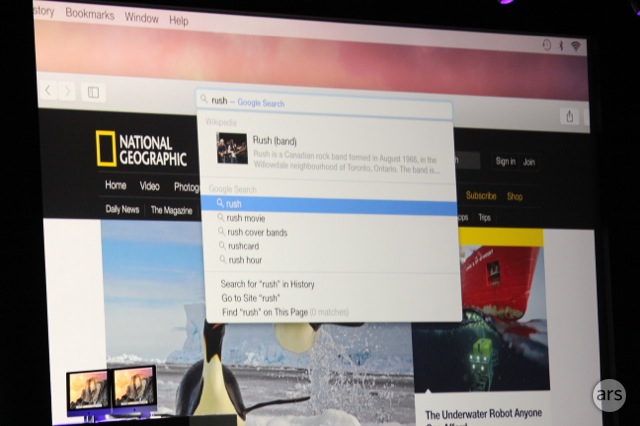
The upgrades to Safari look amazing! [0] Less chrome, Javascript benchmarks (impressive), and the spotlight search in the url...nice! I hope Apple changes the zoom button to maximize the screen. [0] https://www.apple.com/osx/preview/apps/
Favorite features: HandOff, phone calling feature, Markup, Safari improvements... Oh yes, and AirDrop now working between OS X and iOS. At last.
I think the iOS 7 design looks like a joke, but I'm nonetheless happy they're changing OS X, it needed a renovation.
Those bars looks surprisingly close to GNOMEs' ones.
https://wiki.gnome.org/Apps/Web?action=AttachFile&do=get&tar...
http://cdn.arstechnica.net/wp-content/uploads/2014/06/IMG_96...