Live data from Hacker News

Chrome's insane password security strategy

blog.elliottkember.com

21–30 of 315 posts

Re: Chrome's insane password security strategy

#21
tl;dr - You're holding it wrong.

Seriously, is the HN audience really that non-technical these days?

Lol.

I don't know what the clown who wrote that post is thinking, or the person that submitted it was, but seriously, how the heck did you think password storage works?

It's like when everybody got up in arms about Pidgin storing passwords in cleartext.

Heck, they even made a page explaining the rationale:

https://developer.pidgin.im/wiki/PlainTextPasswords

I encourage the author as well as the submitted to read that.

Anything you did to obscure it would just give you a false sense of security.
Re: Chrome's insane password security strategy

#22
post #16

Shock! Firefox is insafe too! Call the presses, write the blogs! Go to any page where browser (Chrome or Firefox) pre-fills password. Click on the password, click on "inspect element", change the type of the form input from "password" to, say, "pasword". You just broke the internet security.

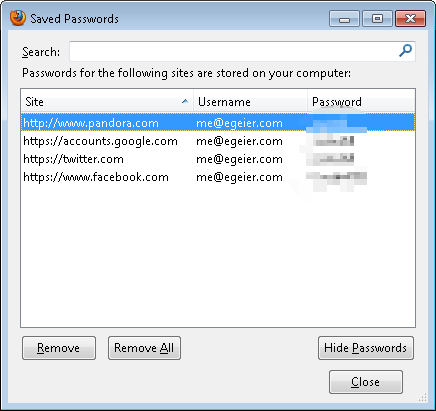
For completeness (I assume the answer is yes, but since you weren't clear): Does FireFox have a corresponding settings page with the list of all of the pages it knows a password for?

Re: Chrome's insane password security strategy

#23

No, no, no, no, NO! What do you think "store password" means, when you click it? If you can fire up your browser and log in without ever typing in a password how could you EVER assume your passwords are stored in anything but plaintext? I'm sorry, this article just shows stupidity of the user rather than "Chrome’s insane password security strategy".

Logging in without typing a password is quite different from making your password visible in plain text. I take it you're a developer.

Your password is available in plain text either way. Not displaying it just give users the illusion that someone can't run off with it, whilst making their lives harder if they need to log in somewhere else.

Re: Chrome's insane password security strategy

#24
post #10

To those saying this isn't insane... you are wrong. I can open anyone's chrome browser and access their passwords without a master password? That's plain fucked up. (I realise I could visit sites and use password reset, but this is so frictionless as to be insane)

Well, the assumption is, if you cared at all about security, you would actually have a login password, and bother locking your computer?

Or you might not just let random people sit down at your laptop and start using it without you being there?

Re: Chrome's insane password security strategy

#25

No, no, no, no, NO! What do you think "store password" means, when you click it? If you can fire up your browser and log in without ever typing in a password how could you EVER assume your passwords are stored in anything but plaintext? I'm sorry, this article just shows stupidity of the user rather than "Chrome’s insane password security strategy".

No, I want to store my passwords with strong encryption on my own machine, then unlock them for short periods, a-la the sudo password prompt.

Re: Chrome's insane password security strategy

#26

No, no, no, no, NO! What do you think "store password" means, when you click it? If you can fire up your browser and log in without ever typing in a password how could you EVER assume your passwords are stored in anything but plaintext? I'm sorry, this article just shows stupidity of the user rather than "Chrome’s insane password security strategy".

Logging in without typing a password is quite different from making your password visible in plain text. I take it you're a developer.

No it is not. Without taking any secret information from the user not available/stored in the system itself there is no way to store a password on a system that is not trivially retrievable by someone who has access to the computer.

Re: Chrome's insane password security strategy

#27
Chrome delegates the protection to the OS[1], which I think is a good idea from the user experience perspective.

The case of "somebody used my computer and saw all my passwords" is solved by setting a password in your OS and locking your session when you're not there.

The problem here would be if some malware were to steal your passwords when logged on, but then not even a dozen of master passwords can save you (just install a keylogger and wait!).

[1] http://superuser.com/a/146744/7482

Re: Chrome's insane password security strategy

#28

No, no, no, no, NO! What do you think "store password" means, when you click it? If you can fire up your browser and log in without ever typing in a password how could you EVER assume your passwords are stored in anything but plaintext? I'm sorry, this article just shows stupidity of the user rather than "Chrome’s insane password security strategy".

They're not stored in plaintext, they're stored in the Keychain. The point here is Chrome provides essentially unauthenticated access to the Keychain.

For reference, here's what Safari prompts you with when you try to view your saved passwords: http://imgur.com/k2gIqtM

Re: Chrome's insane password security strategy

#29
post #16

Shock! Firefox is insafe too! Call the presses, write the blogs! Go to any page where browser (Chrome or Firefox) pre-fills password. Click on the password, click on "inspect element", change the type of the form input from "password" to, say, "pasword". You just broke the internet security.

For completeness (I assume the answer is yes, but since you weren't clear): Does FireFox have a corresponding settings page with the list of all of the pages it knows a password for?

Yes: preference, security, saved password, show passwords.

You can set a master password, though.

Re: Chrome's insane password security strategy

#30
post #16

Shock! Firefox is insafe too! Call the presses, write the blogs! Go to any page where browser (Chrome or Firefox) pre-fills password. Click on the password, click on "inspect element", change the type of the form input from "password" to, say, "pasword". You just broke the internet security.

For completeness (I assume the answer is yes, but since you weren't clear): Does FireFox have a corresponding settings page with the list of all of the pages it knows a password for?

Yes: http://images.techhive.com/images/article/2013/05/firefox_se...
Post reply on HN