Live data from Hacker News

Mac Pro

apple.com

281–290 of 571 posts

Re: Mac Pro

#281
post #233

Earlier quoted context omitted.

This is going to be a $3000 workstation. Its processor will cost more than that "workstation" you linked to. They aren't even competing in the same space. The new "paradigm" this is pushing is that you don't need PCIe cards or internal storage. We'll see about that.

This is not the first time they've decided there are elements that don't need to be part of the base machine. Each time there were outcries but they were proven right in the end. When's the last time you needed an optical drive for example? And did you see the mention under Thunderbolt 2 of "add a PCI expansion chassis" - that's their answer for those who really really need expansion.

> When's the last time you needed an optical drive for example?

About a dozen times each month.
Re: Mac Pro

#282
Some pictures coming out are extremely interesting.

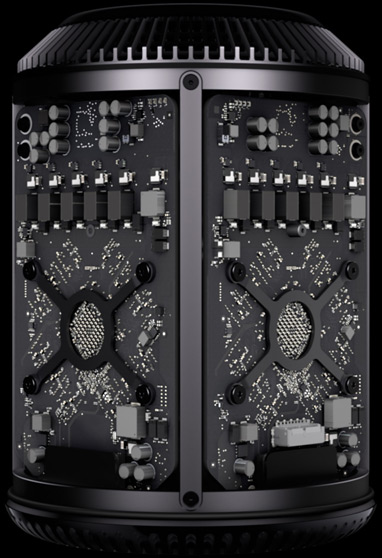
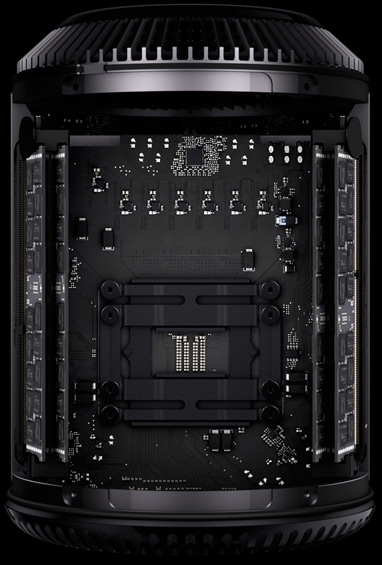
This one seems to show the the "CPU board" with the single CPU, and RAM on each side... OK http://cdn.arstechnica.net/wp-content/uploads/2013/06/proces...

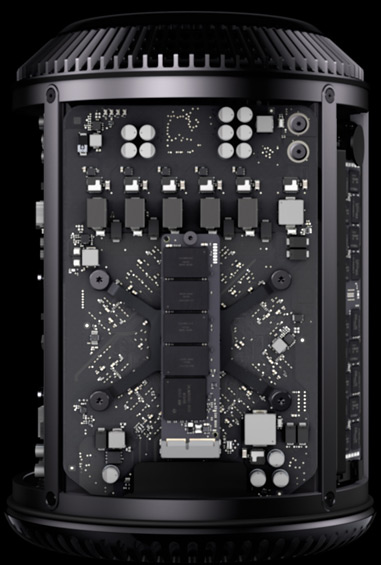
This one shows the two "GPU cards" - notice the one on the right has a white connector, bottom middle, which is for the SSD. Otherwise, they are almost identical (I see slightly different components at the top) http://cdn.arstechnica.net/wp-content/uploads/2013/06/graphi...

And this one shows the "GPU Card", now with an SSD in that connector.... http://cdn.arstechnica.net/wp-content/uploads/2013/06/storag...

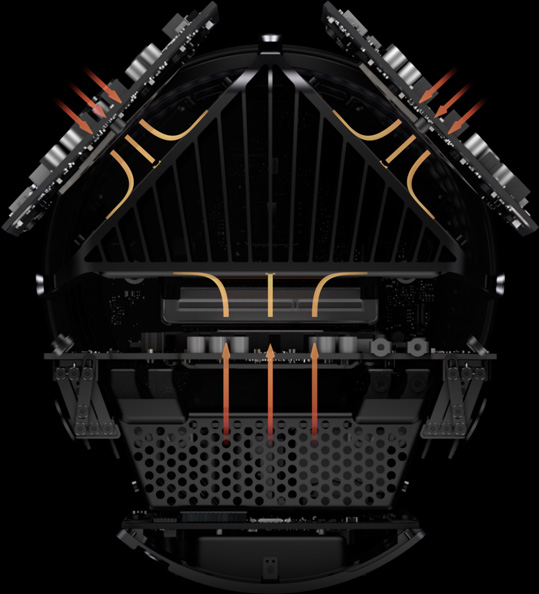
Finally this one shows the three "cards", presumably with the power supply at the very bottom. http://cdn.arstechnica.net/wp-content/uploads/2013/06/therma...

I think the big question here is how are the three "cards" joined together?

If they're using some kind of connector, I imagine that makes them "replaceable" if not "upgradable".

It also hints at the possibility of getting just one GPU card.

I wonder if one could have 2xCPU cards and 1xGPU card?

Interesting

Re: Mac Pro

#283
post #224

Earlier quoted context omitted.

That's absolutely no good for a lot of workstation deployments. Ours are locked into desks so they don't get nicked due to the high value nature of the work that is done on them. Try locking a new Mac Pro, 20 dangling Thunderbolt devices and an iSCSI array into a desk. You're going to end up with this as well: http://i.imgur.com/4dmz6Q3.jpg

Why not use fiber-attached storage and forget having all the drives on your desk? Lock them in a room.

The infrastructure cost is too high.

We do use fibre, but only in production deployments.

The secondary issue is "open holes". People like plugging stuff into their workstations. We can fix that with desk cages as well. There is a hole big enough to get your finger at the power button.

Re: Mac Pro

#284
post #130

Earlier quoted context omitted.

Curiously, my first association was "jet engine", was amused to learn that to many it's a trash can. Am I the only one whose breath was taken away by this new design? Power desktop seriously revisited for the first time since the 80's, anyone?

Everyone made fun of the i"Pad" 3 years ago. Now everyone owns one.

Everyone in the Valley, maybe. I don't think that statement is true for the rest of America, or much outside of the US.

Re: Mac Pro

#285
post #74

Certainties: 1. Use of glue somewhere which knackers any chance of repairing it. Memory, disks and that is it. 2. Proprietary fan which will get noisy after time and cost a fortune to replace. First step will be to put it on the floor so you can't hear it... leading to... 2a. Someone is going to put a half drank coffee cup in it and blow it up. 2b. Plume of hairballs every time a cat owner fires it up as it'll suck i…

Aren't all 2a,2b,2c all applicable to other machines though?

Re: Mac Pro

#286
post #282

Some pictures coming out are extremely interesting. This one seems to show the the "CPU board" with the single CPU, and RAM on each side... OK http://cdn.arstechnica.net/wp-content/uploads/2013/06/proces... This one shows the two "GPU cards" - notice the one on the right has a white connector, bottom middle, which is for the SSD. Otherwise, they are almost identical (I see slightly different components at the top) ht…

That's interesting! Perhaps one of the future cards will be a Xeon Phi 50 core x86.

Re: Mac Pro

#287
post #73
post #58

Earlier quoted context omitted.

I don't see it that way at all. The Mac Pro has always been about the top 1% power users. The appeal was twofold: it was a bitchin'-fast machine you could stuff with as many cards and drives as you want, and it ran OS X. This new design removes the former selling point. 12 core max (same as current)?? Four RAM slots (down from eight)?? 1/6th the volume (i.e. space to plug stuff in)?? This offers almost no advantage o…

>This offers almost no advantage over a late model iMac with a Thunderbolt-to-PCIe breakout module (which is what many power users have been doing in the years since the last update). A few big advantages over the iMac: Xeons processors, so more cores & more cache; ECC RAM; and (two) workstation graphics cards. Six thunderbolt ports means up to 36 (!) PCIe peripherals by daisy chaining, which means a lot more expanda…

I suspect that a lot of people bought the Mac Pro despite the fact that it has Xeon processors, rather than because of it. They're a lot more expensive without a huge performance benefit for desktop or workstation applications.

The main advantages of Xeon were dual-socket support and support for oodles of RAM slots, and the new Mac Pro supports neither of these things.

Re: Mac Pro

#289
post #6

This page is a fantastic example of great development skills used in a way that is utterly infuriating to use. I don't want it to animate when I use my scroll wheel. I want the page to scroll. Off topic, but were this and the Air the only product announced? If so, I'm disappointed- I was hoping to pick up an updated Macbook Retina 13". Oh well.

I wish meta complaints about site a link points to would be flagged out of existence. This adds absolutely nothing to the discussion of the topic on-hand, the new Mac Pro. It takes up a ton of scrolling space with unrelated moaning garbage.

Re: Mac Pro

#290
post #20

Earlier quoted context omitted.

I think the idea here is that, between plentiful Firewire 2 and Thunderbolt 2, you now have enough external bandwidth that you shouldn't need internal cards. When given the choice, I prefer this route, since it means I can transport my proprietary stuff to other machines, or even use them with laptops in a pinch. That might not work for you, granted, but the amount of bandwidth available between all those ports (20 G…

A correction: Thunderbolt 2 can go up to 20Gbits/s not 20GBytes/s. Thunderbolt uses a 4x PCI-E 2.0 connection. Things like graphics cards use 16x PCI-E 3.0 at this point which is 128Gbits/s.

Actually, a 16x PCIe 3.0 slot can do ~128Gbit/s each way - ~256Gbit/s in total[1].

[1]: http://www.pcisig.com/news_room/faqs/pcie3.0_faq/#EQ3

Post reply on HN