Live data from Hacker News

Visual Task Management for Individuals and Teams

droptask.com

51–60 of 71 posts

Re: Visual Task Management for Individuals and Teams

#51

Have to admit - from the video and a five minute play I find it very hard to imagine using this for anything. The information density is very low. Doesn't seem to allow you to easily order tasks beyond dates. Lousy on phones. I could go on. List aren't boring... there useful. I don't go to my project management software to be entertained - I go there to get shit done ;-) What I want to know when I go to project manag…

The problem with lists is not boredom, it's importance overload.

When you have 1000 items (conservative for our business, in Asana we must have at least that many), the problem is that no matter how many categories or hierarchies you make, there's no way to make sense of the information overload. I call it importance overload because that's what it is: when everything looks the same and feels the same, everything becomes the same importance. And when you have 1000 items of the same importance, nothing is important. This is a design paradigm used on information. I think it works well to describe the problem.

There's no list structure that yet exists that solves this problem. Nothing that brings your list of 1000+ things into a manageable analogue of what is actually important for you to see and do at any given time, in any given context.

I don't think this is it, but it's getting closer. And "lists" are still not sufficient. We can do better.
Re: Visual Task Management for Individuals and Teams

#52
It looks really good, and seems very simple and intuitive. You should add Polls or ramifications or both. Imagine if there are 3 options to make a task. You should be able to show those three options, and let the people vote on the one that should be made. Just a thought. Good luck.

Re: Visual Task Management for Individuals and Teams

#53
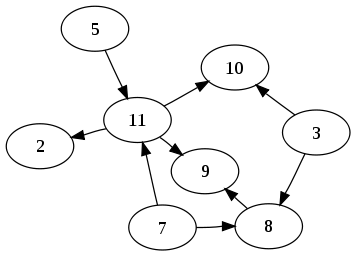
Would a directed graph metaphor add to this? If task circles could be linked in order of precedence, and project circles linked to show resource collaboration, the resulting diagram layout could be visually useful.

http://upload.wikimedia.org/wikipedia/commons/thumb/3/39/Dir...

Re: Visual Task Management for Individuals and Teams

#54
post #43
post #41

Earlier quoted context omitted.

You probably also advocate using shared folders to collaborate on code development too? Those darn kids and their 'innovations' ...

Make no mistake, I'm not against real innovations. For example, I've been using git and advocating for it, while many of my peers are still with older CVS systems. The point is if you masquerade a solution to a non-problem with pretty things, it just wastes everyone's time and energy. Like I said, it would be interesting if there is a study to find out if any of these pretty task management tools actually increases p…

Did you wait for a study before you switched to git? Or did you simply start using it cause it made sense?

Let's be realistic here ...

Re: Visual Task Management for Individuals and Teams

#55
post #42
post #22

Earlier quoted context omitted.

Bingo. The whole point of Trello is to mock up some manual end-to-end process. The natural state of this is columns that consist of "Backlog, TODO, Doing, Done". More advanced versions of this look something like, "Vetting, Grooming, Backlog, TODO, Doing, Done". The circles kind of kill the whole point of a taskboard, IMO.

I also usually insert a "Paused" between TODO and Doing in case a "Doing" task stalls out. Rather than putting it back into TODO, I use Paused to indicate that once the issue that's causing it to stall is remedied, it's at the absolute top of the priority queue to get worked on.

Yep. I've seen this too, usually as the "Blocked" state at the end of the process. Items that go in the blocked state need a blocked reason.

Re: Visual Task Management for Individuals and Teams

#56
OK so I don't think I would say, replace Trello right now, but this is really neat service, well done.

I especially like how things are visual and how you can zoom in and out and see this as potentially very useful feature. I will continue to review it and use it.

Also, describing it as Trello killer, I think made us expect way too much of it. So this might not worked the way it was intended.

Re: Visual Task Management for Individuals and Teams

#57

This might be a bug, or not. If I have 2 groups with different colors and put one inside the other, the inner group changes color. Did not expect this behavior.

> This might be a bug, or not. If I have 2 groups with different colors and put one inside the other, the inner group changes color. Did not expect this behavior. This is by design - we simply could not get the visuals to look at all decent with mixed colours for nested groups. The idea is that the one colour applies for the entire category.

Ok, that's fine!

Thanks for the clearification.

Re: Visual Task Management for Individuals and Teams

#58

What's the stack behind this? Very nice by the way!

> What's the stack behind this? Very nice by the way! The entire app is written in CoffeScript - we're using Node.js on the backend and the front is mainly SVG/D3.js/Backbone.js.

Thanks!

Re: Visual Task Management for Individuals and Teams

#59

Have to admit - from the video and a five minute play I find it very hard to imagine using this for anything. The information density is very low. Doesn't seem to allow you to easily order tasks beyond dates. Lousy on phones. I could go on. List aren't boring... there useful. I don't go to my project management software to be entertained - I go there to get shit done ;-) What I want to know when I go to project manag…

The problem with lists is not boredom, it's importance overload. When you have 1000 items (conservative for our business, in Asana we must have at least that many), the problem is that no matter how many categories or hierarchies you make, there's no way to make sense of the information overload. I call it importance overload because that's what it is: when everything looks the same and feels the same, everything bec…

I'm no programmer but I suddenly thought of a possible solution - adaptive sizing. Depending on the importance, the first few words of the task would appear bigger or smaller appropriately. I'm sure this would work great on the desktop but I have no idea how good this can be designed to appear on a mobile phone screen (3.5-4.5inches).

Re: Visual Task Management for Individuals and Teams

#60
I'm going to try this for a while since it was easy to start using it with my Google apps domain. Within the first few minutes it has become clear that I need a way to convert a task into a group. I find myself wanting to express task dependencies by dragging things into each other but I can't drag a task onto another task. Annoying.

Edit: Also, a visual indicator of task progress, or more intermediate states (blocked, started, in progress, etc) would be helpful too.

Edit 2: And I've hit an arbitrary three project limit. So much for dumping my task list into this thing. Evaluation concluded.

Post reply on HN