I'd absolutely love to see ruby in Light Table, how are plans looking for this? If there was a kickstarter for adding ruby I'd pony up in a flash. I realise manpower is probably going to be the main issue though...
Python is first. It was already paid for in the kickstarter...
A new Light Table experience
51–60 of 152 posts
Re: A new Light Table experience
#52I'm wondering if there's a roadmap for Light Table's release, specifically if there's a point where the code will be available? I have a programming language in progress and I'm interested in potentially hacking LT to support the language. It seems like it would be a good fit.
Re: A new Light Table experience
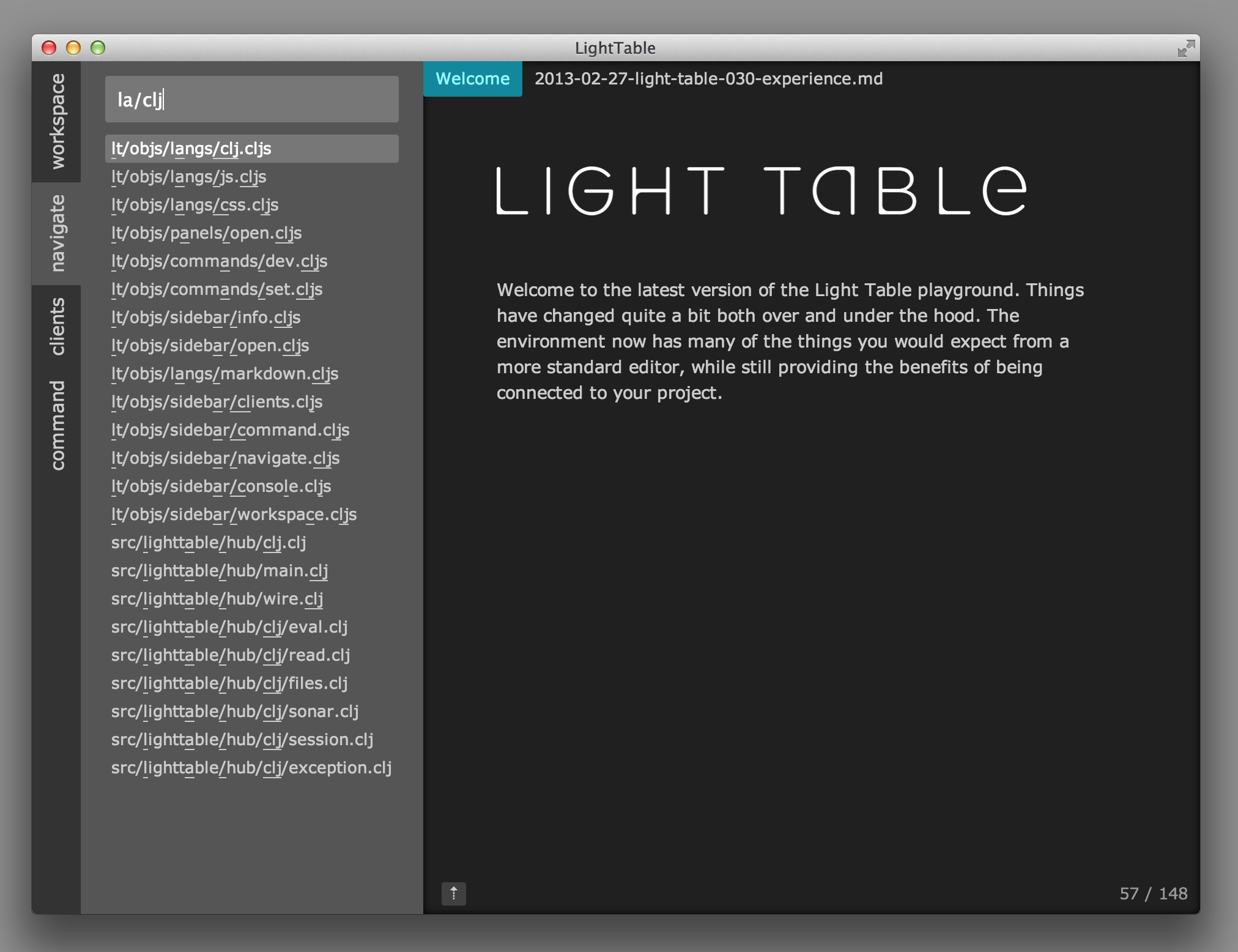
#53http://www.chris-granger.com/images/030/navigate.png
It looks like the same method I'm using in emacs/ido, which is to turn "la/clj" into
"(l).*?(a).*?(/).*?(c).*?(l).*?(j).*?"
I've found this technique gives inferior results to whatever SublimeText is doing. For example, in your hits with "langs", such as "lt/objs/langs/js.cljs" I think "lt/objs/langs/js.cljs" is more intuitive than the result you give of "lt/objs/langs/js.cljs". (Sorry for the hard to read italics)For another example, on a search of "completions" I think your technique will highlight "hacks-completions" as "hacks-completions" instead of "hacks-completions".
Does anyone know if there's an easy way to modify the regex (not LightTable) and get the user-friendly results of Sublime Text?
Re: A new Light Table experience
#54[deleted]
Re: A new Light Table experience
#55Anyone else on Windows at the moment with tips?
(The 'bindings' command lists things like Cmd Enter; since it lists Ctrl for other keybindings, I'm guessing that's meant to mean Alt.)
Re: A new Light Table experience
#56Earlier quoted context omitted.
Changing the trackpad direction doesn't have any effect, still the same issue.
10.8? and all you're doing is scrolling quickly? If you close the app and bring it back up, it still does it? EDIT: tracking in this issue: https://github.com/Kodowa/Light-Table-Playground/issues/271
Thanks very much for Light Table! I'm loving it.
Re: A new Light Table experience
#57How are you highlighting the matching characters in the fuzzy search results? http://www.chris-granger.com/images/030/navigate.png It looks like the same method I'm using in emacs/ido, which is to turn "la/clj" into "(l).*?(a).*?(/).*?(c).*?(l).*?(j).*?" I've found this technique gives inferior results to whatever SublimeText is doing. For example, in your hits with "langs", such as "lt/objs/langs/js.cljs" I think "l…
Re: A new Light Table experience
#58Noooo! So many wasted pixels at the top! Why!? It was so much better before! Aside from that: neat! :)
Re: A new Light Table experience
#59How are you highlighting the matching characters in the fuzzy search results? http://www.chris-granger.com/images/030/navigate.png It looks like the same method I'm using in emacs/ido, which is to turn "la/clj" into "(l).*?(a).*?(/).*?(c).*?(l).*?(j).*?" I've found this technique gives inferior results to whatever SublimeText is doing. For example, in your hits with "langs", such as "lt/objs/langs/js.cljs" I think "l…
.*?(/).*?
and leave the rest alone?If you don't want to treat slashes specially and want to allow "ab" to match "aqqqb" then I don't think you can do it without creating a giant regex. You can go for a modified longest common subsequence algorithm.
Edit: here's how you can do it:
// gives one point for each letter matched
// plus an extra point if the next letter is also a match
let rec scorematch = function
| true::true::r -> 2 + scorematch (true::r)
| true::r -> 1 + scorematch r
| false::r -> scorematch r
| [] -> 0
// find the match with best score
let rec search xs ys =
match (xs,ys) with
| (x::xr, y::yr) ->
let matches = [false::search xr ys; false::search xs yr]
let matches = if x=y then (true::search xr yr)::matches else matches
matches |> List.maxBy scorematch
| _,ys -> List.map (fun _ -> false) ys
let underline xs ys = search (List.ofSeq xs) (List.ofSeq ys)
|> List.map (fun b -> if b then "-" else " ")
|> String.Concat
for x in ["foobarbaz"; "foobaXrbaz"; "foobXaXrbaz"; "foobXaXrbazr"] do
Console.WriteLine x
Console.WriteLine (underline "bar" x)
For search term "bar" this outputs: foobarbaz
---
foobaXrbaz
-- -
foobXaXrbaz
- - -
foobXaXrbazr
-- -
You'll want to memoize this or apply dynamic programming.Re: A new Light Table experience
#60It is absolutely gorgeous, but it is also looking a lot more like a traditional text editor from what i can gather. I'll download and play with it a bit anyway, to see what i get from it.
It is, but that's because we have to have a solid editing experience for the "simple" stuff before we can do the more interesting things. What good is it to have these awesome function oriented editors when you can't even modify a file efficiently? :) We use tabs as a simple way of wrapping up a context. In the future they will include all sorts of neat things - and they aren't limited in any way. If we want, we can…
Speaking of which, are Emacs keybindings coming any time soon?