Live data from Hacker News

The Chromebook Pixel

chrome.blogspot.com

491–500 of 507 posts

Re: The Chromebook Pixel

#491

The Verge has more pictures. http://www.theverge.com/2013/2/21/4013480/google-chromebook-... It looks an awful lot like a Macbook: Just witness the aluminum-like color and the black bevel around the screen. Where it looks different, it's uglier. The hinge looks particularly bad. And judging by the pictures it's an awful lot bulkier than a Macbook Air. Chrome OS strikes me as an underpowered OS. That is, there's a lot…

>The ChromeBook Pixel has a 4:3 display. That would be 2560x1920. ChromeBook Pixel has a 2560 by 1700 display, which makes for a wider aspect ratio of almost 3:2.

You're lucky that it has quadratic pixels! You can't assume that. See http://en.wikipedia.org/wiki/Pixel_aspect_ratio
Re: The Chromebook Pixel

#492

Earlier quoted context omitted.

I don't know what benchmark would give an unbiased comparison.

Build your own benchmark. Measure whatever you want to do. Or if you insist on standardized testing, use something like SPECInt 2006. Results here: http://www.spec.org/cpu2006/results/res2013q1/ (sadly no ARM results). Of course that is only for integer calculations, if you need fp, use SPECfp.

There's nothing that you can really condense down into a couple of simple numbers to use in marketing to non technical people.

Re: The Chromebook Pixel

#494
post #236

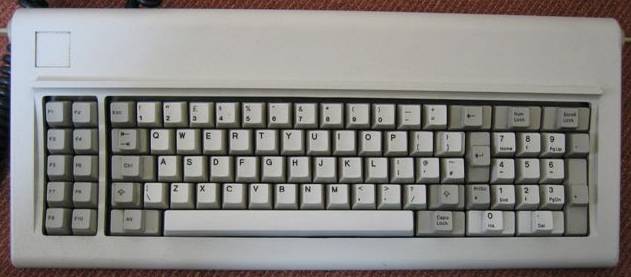
Where are the home/end/pgup/pgdown keys? It doesn't have a function key as in Mac either.

You probably need to use the other modifier keys. But it's weird... it's not even a PC-101! I guess Google has really gone back to the roots... PC/XT or PC/AT :P

PC/XT keyboard: http://upload.wikimedia.org/wikipedia/commons/8/85/IBM_5150_...

Discussion briefly mentions PgUp: https://plus.google.com/+JeffJarvis/posts/g9gcXLPuVVQ

Re: The Chromebook Pixel

#495

Earlier quoted context omitted.

>The ChromeBook Pixel has a 4:3 display. That would be 2560x1920. ChromeBook Pixel has a 2560 by 1700 display, which makes for a wider aspect ratio of almost 3:2.

You're lucky that it has quadratic pixels! You can't assume that. See http://en.wikipedia.org/wiki/Pixel_aspect_ratio

It seemed like a pretty safe assumption to make given the nature of the device. Google shipping a web-oriented device with non-square pixels would be very strange of them because of all the potential problems this would entail. Are there any modern portable computers with non-square pixels? For that matter, were pixel aspect ratios other than 1:1 ever prominent on LCD portables?

Last time I had to deal with non-square pixels on x86 was when programming mode 13h graphics for DOS at a 320x200 resolution (which was then stretched to 4:3). The only thing that comes to my mind that you could do now with modern equipment would be to connect your laptop/PC to a bargain bin plasma panel that has a 1024x768 physical resolution and achieves a 16:9 aspect ratio by virtue of non-square pixels [1]. My first encounter with one of those caused me trouble when I wanted to use it with a Linux PC some time ago.

[1] http://hometheater.about.com/cs/television/f/aaplasmafaq5.ht...

Edit: expanded first paragraph.

Re: The Chromebook Pixel

#496
post #107

Oh boy. If only they gave it 128 GB drive. The way it is it's useless for me (and I guess most people on HN, though I think basic Ubuntu could fit into 32/64 GB), but it still makes me cautiously optimistic that after years of stagnation and perhaps even regression, the 1366x768 era might be nearing it's end. I can hope that in a year, "reasonable-resolution" (as Linus called it) laptop like the Pixel will be not out…

I can't wait for a teardown. I'm crossing my fingers for there to be an ssd in there attached to an msata interface which could be easily swapped out for something bigger. I'm guessing that the ram is soldered in though, due to the thinness of the device. Oh well, 4gb is workable.

It's use msata interface. teardown picture :http://goo.gl/Gt2oN

Re: The Chromebook Pixel

#497

I'm saddened that it's 2013 and we still have to deal with laggy screens! http://www.theverge.com/2013/2/21/4013932/chromebook-pixel-h...

If Chrome for Android is anything to go by it's not the screen, but Chrome's touch handling.

Re: The Chromebook Pixel

#498
post #475
post #352

Earlier quoted context omitted.

almost no one has sharp enough eyesight to distinguish individual pixels at even lower densities than that That's exactly the point. Apple markets its high-PPI displays as being higher-resolution than the human retina[0]. It does need some help from software to not cause usability problems like font scaling and tiny images, but we've had the hardware capability to do this for a while. It's past time we improved on th…

> That's exactly the point. Apple markets its high-PPI displays as being higher-resolution than the human retina. But the resolution doesn't need to be any higher than the maximum resolution of a human retina. By definition, you'd be unable to see the difference; you're just left with the scaling problems of an extremely high resolution on a very small display.

But the resolution doesn't need to be any higher than the maximum resolution of a human retina.

As I mentioned, the claim that the resolutions sold are higher than the human retina are disputed. See http://www.pcmag.com/article2/0,2817,2364871,00.asp

Apple's successive retina devices have decreased in pixels per inch, but have increased in pixels per degree at their intended viewing distance as larger high-PPI devices were introduced. Of course, sometimes people use devices at distances other than those the manufacturer intended, and some people have better eyes than others.

The point is, current high-PPI screens haven't actually banished the pixel from human perception just yet. There are still gains to be made, but they aren't nearly as significant as quadrupling pixel counts over previous devices.

Re: The Chromebook Pixel

#499
post #347

Earlier quoted context omitted.

You are missing something. 2 things, actually. Cache and instruction set. Intel is still more powerful than ARM because of its instruction set.

What makes the x86 instruction set more powerful than ARM?

It's CISC rather than RISC, and ARM chips are also designed to use as little power as possible, reducing performance.

Re: The Chromebook Pixel

#500

Earlier quoted context omitted.

> companies build screens with more code friendly aspect ratios I hear this complaint a lot and I think it's based on a flawed premise. Taller aspects might be better on very small screens that only fill tiny portions of your vision but on bigger screens -- the sort you should be using if you're working regularly on a computer -- you want wider not taller. It's the only way to usefully use your field of view. This is…

> the sort you should be using if you're working regularly on a computer Could you go into more detail on this? I've been using 12 and 13" screens regularly for my day job for years, and I find the extra physical area of larger screens rather arduous. Basically, if there's some kind of ergonomics concern I'm prepared to change, but not otherwise. > wider aspects -- they use your eyes better Seems false, otherwise let…

> Seems false, otherwise letters would be typed in landscape. There are other things in my FOV and that's a good thing.

It's true that in reading, we're only good at scanning approximately 8-10 words per line. This is why letters are the width that they are. But I'm not talking about making a single document fill the width of the screen. That document behavior is a relic of a small-screened world.

Modern computer working environments (particularly programming) generally involve opening a few different documents simultaneously and having them open side-by-side. Multiple editors, browser windows, debug tools, documentation, file-trees, etc. This all needs to go somewhere. It is easier to place these separate documents side-by-side than stacked vertically.

> I've been using 12 and 13" screens regularly for my day job for years, and I find the extra physical area of larger screens rather arduous.

Maybe you've only ever opened documents fullscreen or your work involves little more than punching brief commands into a terminal window but if you've ever wanted to edit two documents side-by-side there's little you can do on a screen that small. You're pigeonholing yourself into a mono-tasking environment because you don't have the real-estate to present multiple documents simultaneously.

Post reply on HN