Live data from Hacker News

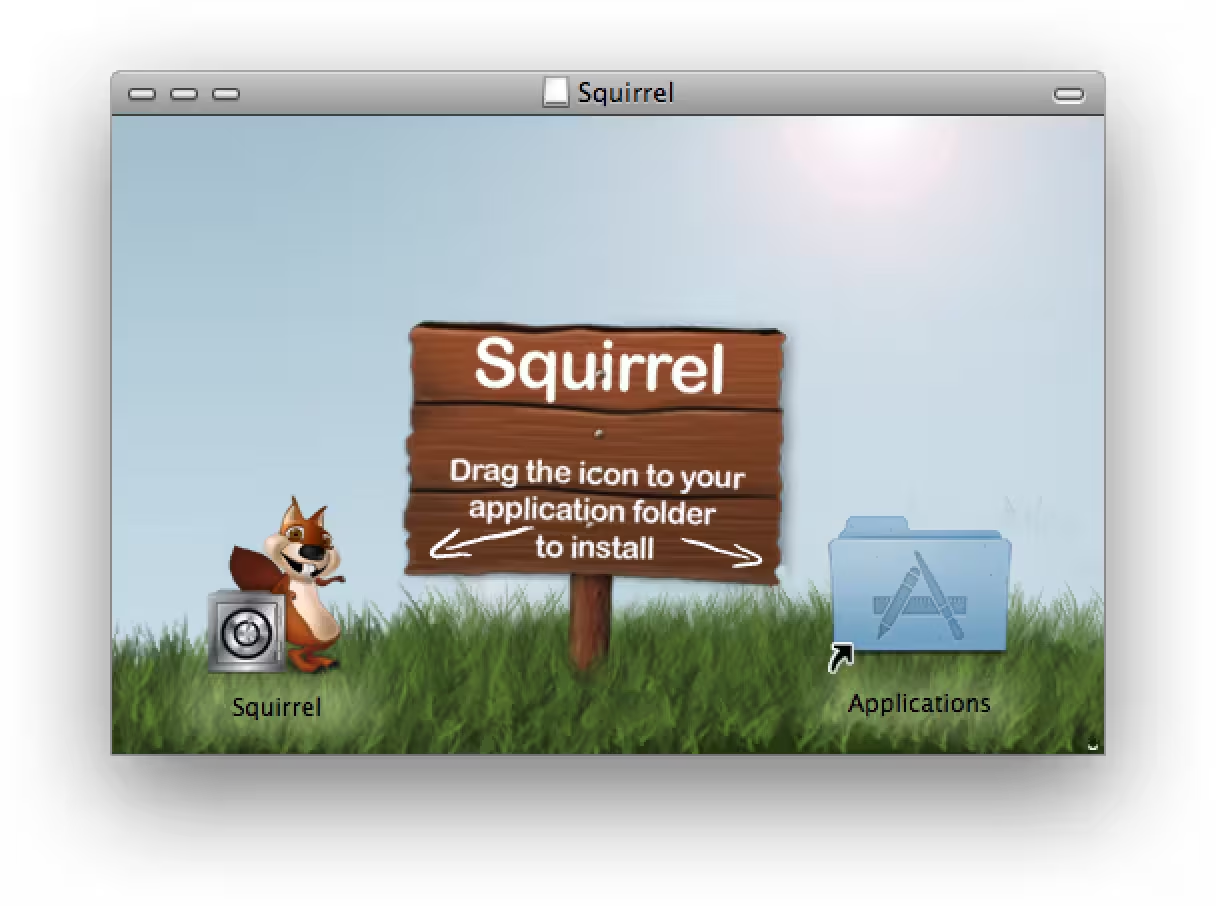
As a Windows user, it's a surreal way to install a program

unsung.aresluna.org

81–90 of 163 posts

Re: As a Windows user, it's a surreal way to install a program

#81
A long while ago I found myself helping out with some products MSI installer. I don't think anyone can really point a finger at the Mac and accuse it of having issues by comparison with what seemed to me to be the nightmare from hell of trying to make an installer that would work on various versions of windows.

It's not the fault of MSI per se, although its concept seems utterly frightful to me, but the way DLLs work and are registered and where you have to install them etc. When your app requires an older or newer MSVCRT etc. Also...the registry...something else that makes good old UNIX text file editing seem good to me.

I always thought that libsomelibrary.so.MAJORVERSION.MINORVERSION with symbolic links from libsomelibrary.so.MAJORVERSION and libsomelibrary.so allowed one to create dependencies that made sense - more or less specific as you chose. It also allows different versions of the same library to exist in the same directory such that one is less likely to break existing software when installing something newer (or older).

To be fair it might just be the way Windows tries to keep compatibility for the ages that makes it super difficult. I do think that you tend to get similar outcomes from similar assumptions/requirements and compatibility was indeed very very important till the internet became good enough to offer everyone easy upgrades.

I'm not a big snap or flatpack fan but DMG seems rather in their class - making things simpler. It might be easy to run an MSI after someone has burned many hours testing it to get it to work everywhere but to me it's a non-simple architecture that is made to work by extreme effort. I'd rather a simpler architecture that open source packagers could manage more easily.

As an example, I tried creating an Ubuntu package recently - a plugin for GNU Make that adds some useful functions.....that was SO hard - worse than any MSI experience I ever had - and I gave up. There were millions of confusing instructions and none worked properly. I couldn't work out which way was up or down - I don't know how people do it.

On Artix (an OS which is a little harder to install than Ubuntu) it is an absolute dream to create packages - exceedingly so. It might be that they aren't the greatest packages in the world but something that can be developed easily and got working can also be improved easily.
Re: As a Windows user, it's a surreal way to install a program

#82
post #80

Earlier quoted context omitted.

Why would you remove an app if you want it to stay set up? iPhone has the "deleting an app will remove its data" thing for this reason.

Lots of possible reasons: - You used a trial version of a software, or other time limited license, and want to keep the output from that around. - You are upgrading and that particular app requires uninstalling the old version before installing the new version - You run out of disk space and want to uninstall a game but don’t want to lose you’re progress That’s just what immediately comes to mind but suffice to say a…

User can back up files in all those cases, but if this is really an issue, the "data will be deleted" dialog can have a button to say no. The way it is now is the worst. It's so unclear what you need to do to actually uninstall something that people go download stuff to do it, often malware.

Re: As a Windows user, it's a surreal way to install a program

#83
post #36

Earlier quoted context omitted.

Happened to me last year. My wife always taunted me because I have been anti-Apple since they hermetically sealed their iMacs so you couldn't stick in RAM with talking to a "genius". "It just works!" she says. I dunno, I guess I didn't think an "Install" button needed reworking but here we are, not an ugly instruction or tooltip in sight. Also Apple: I bought my son an old refurbished iPad for watching Netflix on lon…

That should be your hint that the OS version is too old to be connecting to random services on the internet.

Not necessarily. The only real thing about this restriction is that Netflix is afraid that this OS version can be used to pirate their content. Which is orthogonal to the question whether this OS is safe to use for random internet browsing.

Re: As a Windows user, it's a surreal way to install a program

#84
post #77

This is one of my favorite things with the Mac. I feel it is very intuitive me moving the app to Applications, then just move it to trash if it sucks and it is completely gone. setup.exe .pkg installers make me feel dirty because I hav enough control over how it will fuck up my system or not.

I think most of the complexity is around the concept of disk images. If the app was just distributed in a zip file (like many in fact are) then you just unzip it, and the application is right there. You can move it to /Applications if you want (and many apps offer this) but it's not necessary.

Disk images seem to be much rarer on other platforms, and are usually only used for images of optical disks. Even the concept of "ejection" can be confusing, especially since when mounted disk images appear almost identical to actual physical removable media. I'd like to hear the reasoning behind why mounting disk images isn't relegated to a vestigal "power user" feature by now, since it seems like zip files (especially in appledouble format) can serve the same needs for most normal user flows.

Re: As a Windows user, it's a surreal way to install a program

#85

Counterpoint: as a Mac user it is surreal to click Next Next Next to install a program on Windows. Same for uninstalling. Move to Trash and poof, unistalled. There is no standard way to install stuff, so neither MacOS nor Windows deviates from something. For all the bickering about it here in the comments, no one proposed an “ideal” solution to install a program on Mac.

>as a Mac user it is surreal to click Next Next Next to install a program on Windows.

macOS has similar multi-step prompts for some programs such as Microsoft Office, Python, FUSE-T, VeraCrypt, etc:

click [Continue] [Continue] [Agree] [Continue] [Install] enter password [Install Software] [Close]

Then deal with the various popups in the upper right portion of the screen relating to Login Items & Extensions Background tasks. Dismiss them by clicking [x] several times or drill into them to adjust App Background Activity sliders etc.

I also never understood why some apps put the x.pkg inside of a x.dmg which makes people perform another click. Seems redundant to do that. I can only guess is they just want the customized background image of the .dmg instead of the plain skeuomorphic cardbord box icon of the .pkg.

Re: As a Windows user, it's a surreal way to install a program

#86

Counterpoint: as a Mac user it is surreal to click Next Next Next to install a program on Windows. Same for uninstalling. Move to Trash and poof, unistalled. There is no standard way to install stuff, so neither MacOS nor Windows deviates from something. For all the bickering about it here in the comments, no one proposed an “ideal” solution to install a program on Mac.

At least with Windows it's always clear what to do. Mac can dump you in a finder window with two icons. Very unclear. You may have forgotten how unclear this can be for the first time.

I grew up using windows and the first time I ran into that on the Mac I think I had to Google what to do.

Re: As a Windows user, it's a surreal way to install a program

#87
post #57

The dmg thing makes no sense. I do like that the app is self-contained, unlike Windows where it's always an installer, but don't like how deleting the app doesn't clear whatever files it put all over the place.

Windows uninstall scripts often do the same. Some have an option of removing data files, some just leave them behind. I don’t have any statistics but I see no reason to believe the situation is any «better» on windows. Also, I am sure people will disagree on whether it is better to remove data files or leave them.

Not surprising, but at least devs are given a clear way to behave well if they want. I do think all desktop operating systems were overly loose with apps touching files, though.

Re: As a Windows user, it's a surreal way to install a program

#88

Earlier quoted context omitted.

How's registry different than ~/Library/Application Support?

It's not a directory tree you can just browse in the filesystem, it's a few database files. Idk much about Windows, but at first glance I like how you can browse the Windows registry all in one place without digging through other files.

But it has directories and files inside, right?

It's only the program that is used to browse is different.

It's like you don't use explorer but regedit. It's the only difference.

On macOS it's not like you can always type what's inside the plist files with a text editor, sometimes you need to use 'plutil' anyway (if a plist is binary). So to browse Application Support you still often need thirdparty software anyway.

Years ago I did a small project that mapped windows hive (registry) files as a filesystem through fuse on linux. It mapped to a filesystem concept nearly flawlessly.

edit: can't reply anymore for today ('posting too fast'), so i just reply here: What is a file if not a key/value entry in a directory? Anyway, you can put custom binary data in registry, one value type is just "binary". But you shouldn't! Just like in Application Support - you can but you shouldn't. Registry just enforces it more. Entering regedit also requires to elevate it if you want to change system settings (HKEY_LOCAL_MACHINE). Changing user settings doesn't need elevation (HKEY_CURRENT_USER).

Re: As a Windows user, it's a surreal way to install a program

#90

Earlier quoted context omitted.

It's not a directory tree you can just browse in the filesystem, it's a few database files. Idk much about Windows, but at first glance I like how you can browse the Windows registry all in one place without digging through other files.

But it has directories and files inside, right? It's only the program that is used to browse is different. It's like you don't use explorer but regedit. It's the only difference. On macOS it's not like you can always type what's inside the plist files with a text editor, sometimes you need to use 'plutil' anyway (if a plist is binary). So to browse Application Support you still often need thirdparty software anyway.…

You use regedit, and only registry keys/values are in there, not other kinds of files. And editing systemwide plists on Mac means authenticating each time you touch one unless you're using a sudo terminal or sudo Finder. It does meaningfully change the experience for whoever is digging into it.

Also, Mac plists have two formats, xml and the non-text kind. Now mentioning that, I kinda hate both formats.

Post reply on HN