Live data from Hacker News

KOReader

koreader.rocks

141–150 of 253 posts

Re: KOReader

#141

Interesting. I generally hate proprietary software, but I've actually been really satisfied with the kindle UI. I don't use the store at all, simply email epubs to it directly. (I usually only move 1-5 books max at a given time, so this process feels really simple to me). The only adjustments I need are the text size and front light, battery life is amazing. I'm guessing this would be really useful if I had advanced…

You must have a newer kindle. Koreader was basically my best bet once mine (2012 vintage) stopped being supported by Amazon. Native epub support plus other goodies. I’m sure you’re aware that emailing an epub to your kindle converts it to mobi before sending, potentially mucking up the formatting.

I think mine is from 2019. I didn't realise it wasn't natively displaying an epub. I haven't noticed any breaks, or maybe I attributed any errors simply to the original epub and didn't realise it was a conversion error. But also the things I read are quite plain and text heavy so perhaps that's why.
Re: KOReader

#142
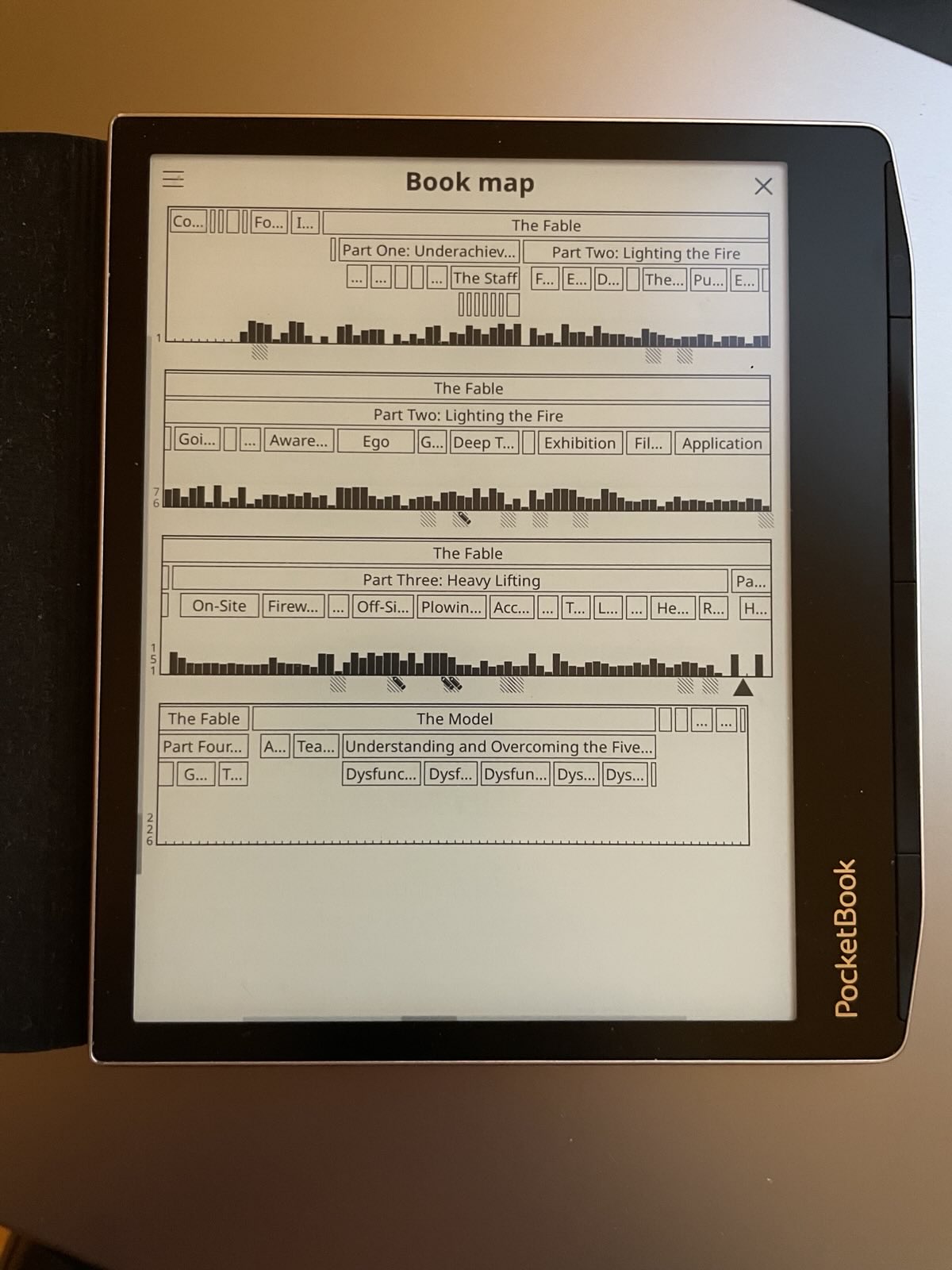
The thing I find the most valuable on KOReader is something I haven't seen mentioned yet: the book map[0]

It shows you chapter and section divisions in a single screen, along with black bars to show you which pages and chapters you've spent a lot of time on. I use this very often to jump back to pages or chapters, or look at which parts confused me. It also visualizes where bookmarks and notes are. When you want to see a segment in more detail, you click there and it brings you to a 6-page zoomed-in view.

Let alone being more useful than the Kindle or Kobo UX, it's more useful than the book UX.

[0] https://www.tc3.dev/posts/pocketbook-era-with-koreader/IMG_6...

Re: KOReader

#143
BookFusion recently introduced a KOReader plugin (no affiliation). Combining that with a Kobo has finally let me break free of the Kindle ecosystem

Re: KOReader

#144

I finally installed this on my Kobo Libra 2. The UX is clunky but overall it works great. Very fast. Don’t need KEPUBS anymore as epubs render just as fast, where as that’s not the case on the stock software. I finally got around to installing it as I got an xteink x3 and wanted to have cross device syncing back to my Grimmory server. Works great with OPDS and KOSync. Although I miss using the native kobo sync where…

What's the advantage of Grimmory over Booklore?

Booklore maintenance stopped a while ago. Grimmory maintenance continues. The original author of Booklore has seemingly moved on to a new project.

Re: KOReader

#145
My only real complaint with KOReader is that the book browsing UI is file and folder based by default, while virtually all other ebook readers support some kind of cover based library view you can sort 20 different ways based on metadata rather than filenames etc.

It's not a huge issue, but I find just browsing my collection to find a read a lot more enjoyable on other ebook readers. IIRC there are plugins to add this feature, but it's not present out of the box.

On the few Kobos and jailbroken Kindles I've used it on, it also drains the battery significantly faster than the stock reader app, although not enough that I couldn't last at least a few days. On stock software I can go weeks between charges.

Re: KOReader

#146
KOReader is one of these projects where idea is fantastic, it's impressive that it works, and the result is sufficiently quirky that I couldn't get used to it. UI is cumbersome. On kobo, it feels like it's draining battery much faster than the "regular" kobo OS. When you sync progress to KOSync with WiFi you keep getting these "Connecting to wifi" popups. And on mobile, having to use the internal keyboard feels like using the keyboard on a reader, which I do not want to.

Re: KOReader

#147
post #100

I really like that this exists, but I found the menus and UI to be rather non-intuitive. My main use case was to sync reading progress between my Kobo and my iPhone. I was able to do this using KOReader on the Kobo & the Readest app[1] on iPhone (also open source). Ultimately I decided to get rid of KOReader because it felt a bit laggy. The gestures (eg: swiping up on the left side to increase frontlight brightness)…

https://github.com/baskerville/plato might interest you. I've yet to try it, personally.

Re: KOReader

#148

Earlier quoted context omitted.

What extra features has over regular kindle software? I find kindle features enough but I want to know if I’m missing something

- Better and faster UI. I always thought the Kindle was just slow, nope, it's just really bad software - Customise any/everything. Font size, line spacing, paragraph spacing, margins, header/footer content, the list goes on - Ability to use things like BookOrbit (or alternatives) to manage your books and sync your progress/stats. - LLM-integration through plugins like KOAssistant, highlight a word/phrase/passage to g…

Ability to use things like BookOrbit (or alternatives) to manage your books and sync your progress/stats

I discovered BookOrbit about two months ago. I think that it, together with the KOReader plugin that exposes the remote BO UI, may turn out to be a game changer in how I organize and access my ebook repository.

Re: KOReader

#149

KOReader is one of these projects where idea is fantastic, it's impressive that it works, and the result is sufficiently quirky that I couldn't get used to it. UI is cumbersome. On kobo, it feels like it's draining battery much faster than the "regular" kobo OS. When you sync progress to KOSync with WiFi you keep getting these "Connecting to wifi" popups. And on mobile, having to use the internal keyboard feels like…

I've never used it on Kobo (as I don't have one), but I felt that for the Kindle KOReader it was a significantly better experience than the stock experience. It's easy to sync stuff with Calibre, you can choose any TTF font, and there are more display options for reading. At least on the Kindle Paperwhite (purchased in 2015), it does not appear to significantly affect battery life.

Maybe I'm just too entrenched in the engineering space that I'm just used to "developer UI", but my wife is decidedly not a software person and she seems to like KOReader just fine.

Re: KOReader

#150

Earlier quoted context omitted.

- Better and faster UI. I always thought the Kindle was just slow, nope, it's just really bad software - Customise any/everything. Font size, line spacing, paragraph spacing, margins, header/footer content, the list goes on - Ability to use things like BookOrbit (or alternatives) to manage your books and sync your progress/stats. - LLM-integration through plugins like KOAssistant, highlight a word/phrase/passage to g…

Ability to use things like BookOrbit (or alternatives) to manage your books and sync your progress/stats I discovered BookOrbit about two months ago. I think that it, together with the KOReader plugin that exposes the remote BO UI, may turn out to be a game changer in how I organize and access my ebook repository.

Same here, I jailbroke my kindle just 1-2 months ago (when the PW5 JB came out) and I had been using BookOrbit for only a few weeks before then. Since then I've read over 15 books and been loving BookOrbit and KOReader.
Post reply on HN