Live data from Hacker News

If you're a button, you have one job

unsung.aresluna.org

251–260 of 308 posts

Re: If you're a button, you have one job

#251

I want to support the "what about debouncing" argument mentioned elsewhere; the author shouldn't just ignore this. But I also hate the "you had one job" meme and want to argue against its mindless usage. Most of the time, when people do the "you had one job" thing, it's false. And that's true most of the time in the case of buttons, too. In a typical user interface, a given button has some combination of these jobs:…

>But I also hate the "you had one job" meme and want to argue against its mindless usage

the "you had one job" meme could pretty much always be followed up by "because i refused to consider the actual complexity of your job"
Re: If you're a button, you have one job

#252
post #34

Earlier quoted context omitted.

There’s effectively no universal list of UX warts people agree with. The Flat UX fad was objectively terrible on just about every metric I was taught, but people were actively pushing for such designs.

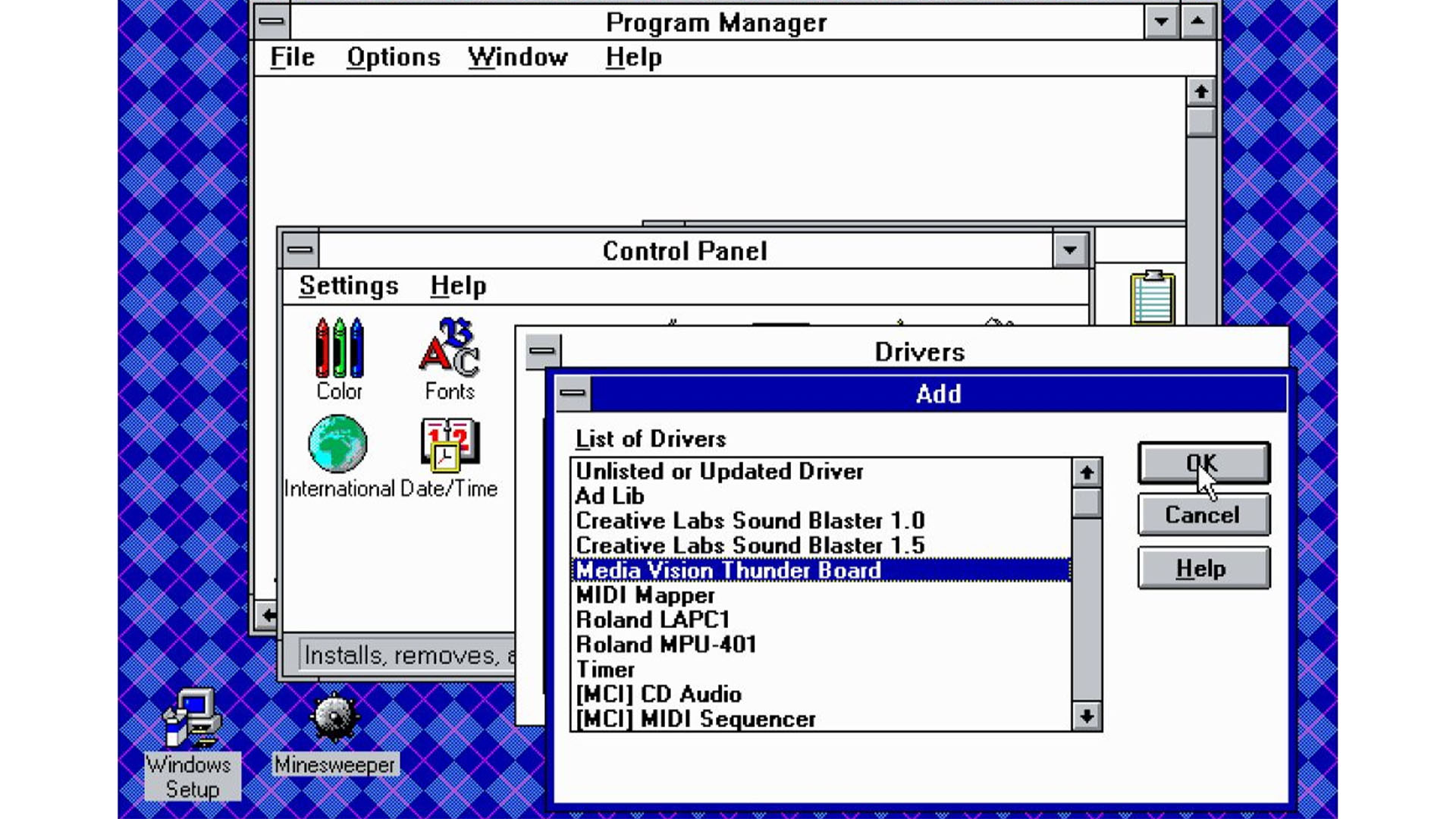
I bet people had the same concerns with the transition from Windows 3.1's flat UI (only basic shapes were used) to the pseudo-3D effects of Windows 95. Although in 3.1 it was easy to tell what was interactable, despite being flat. I attribute this to the use of standardized components almost everywhere.

3.1 wasn’t a flat UI as the shading represented light coming from the top left on a 3D button, windows 2 used a flat design.

https://www.custompc.com/wp-content/sites/custompc/2023/06/W...

Re: If you're a button, you have one job

#253
Great point. So often I hear people talk about Apple as the hallmark of usability, but the reality is other systems do a great job too.

This is a good example of thinking through the user's intention and accessibility states. We need to capture clear user intent first, then decide on the UX behavior. Changes like these help all users.

Re: If you're a button, you have one job

#254
post #35

How about when users accidentally click too much, or they believe the first click didn’t register? I am still reminded of a keynote where Steve Jobs was demoing how much faster PDF documents would display on the newer macOS. So he had engineers put a button in for him to click that would scroll through the PDF on the screen, and he accidentally clicked it more than once. Steve wondered aloud if it would scroll all th…

From the article:

> The Nothing Phone button gives you a tap confirmation via both haptics and sound, and then ignores the tap if a previous rotation is still animating.

This is the issue. Number of performed actions has to be equal to number of times the app identified that button press was registered. Debouncing is a good practice, but if it is used then debounced taps must not produce feedback.

Re: If you're a button, you have one job

#255
post #232

Earlier quoted context omitted.

You can reference other things without resorting to skeomorphism. Like using stars to represent favorites, typography to emphasisze/deemphasize things, the color red for warnings/errors, the color green for go/submit/ready, or the clearest of all: using descriptive naming in buttons and having self-documenting labels. Skeuomorphic UIs absolutely have a place in things like games and tutorials for the youngest of chil…

> Like using stars to represent favorites, typography to emphasisze/deemphasize things, the color red for warnings/errors, the color green for go/submit/ready, Screw the dyslexic and colourblind, I guess. > using descriptive naming in buttons and having self-documenting labels. Screw the non(-native)-English speaking in this case. And even in the case that you're a native speaker, this is really hard to do well. You…

> Screw the dyslexic and colourblind, I guess.

You can also use checkmark/cross icons for success/failure. And What does this have to do with dyslexia?

> What's clearer? [Call] or [(telephone receiver emoji) Call]?

We’re arguing about flat vs. skeuomorphic design, so more like:

What's clearer? [(simple phone icon) Call] or [(photorealistic drawing of a telephone receiver) Call]?

Re: If you're a button, you have one job

#256
post #255

Earlier quoted context omitted.

> Like using stars to represent favorites, typography to emphasisze/deemphasize things, the color red for warnings/errors, the color green for go/submit/ready, Screw the dyslexic and colourblind, I guess. > using descriptive naming in buttons and having self-documenting labels. Screw the non(-native)-English speaking in this case. And even in the case that you're a native speaker, this is really hard to do well. You…

> Screw the dyslexic and colourblind, I guess. You can also use checkmark/cross icons for success/failure. And What does this have to do with dyslexia? > What's clearer? [Call] or [(telephone receiver emoji) Call]? We’re arguing about flat vs. skeuomorphic design, so more like: What's clearer? [(simple phone icon) Call] or [(photorealistic drawing of a telephone receiver) Call]?

> You can also use checkmark/cross icons for success/failure. And What does this have to do with dyslexia?

Your comment on typography.

> What's clearer? [(simple phone icon) Call] or [(photorealistic drawing of a telephone receiver) Call]?

The latter.

Re: If you're a button, you have one job

#257
post #73

Earlier quoted context omitted.

They aren’t purely for that, they also contribute to how an application feels to use in a creative manner.

I don't want my image editor to feel like something in a creative manner though. I want it to rotate an image by 90° when I tap the button that does that. See, this is exactly my point when I say that animations are no end in themselves. They serve a supporting role to better get the actual job done. The actual job is not "feel" it is "do". For vibes, there are movies, Art, and AI hallucinations. Of course, "feel" ca…

What I'm gathering here is that your argument simply boils down to that it's your personal preference (in this example) that rotating 90 degrees should have no associated animation.

> The actual job is not "feel" it is "do".

According to.. you? And subject to your expectations? If I click a button to rotate an image 90degrees on my phone's image editor, I personally expect (and want) it to have rotation animation.

So who's right? You, because you speak in absolutes?

Re: If you're a button, you have one job

#258
One job doesn't really fit the button thing because a button has to do many things, only one of which is being clickable.

Having feedback when clicked, feedback when hovered. A loading state, a disabled state, a mix of everything. That's also something I found very frustrating. Like if you take the example of a button that is tied to a service on the back end, clicking this button without any visual feedback doesn't tell you if that button was clicked or not. And if it doesn't have a loading state, you wouldn't know that. something is working behind the scene when you click this button so you would click at multiple times not knowing that it's still working behind the scenes.

Re: If you're a button, you have one job

#259

I’m thinking a lot about how older applications are often better than new for reasons like this. Sometimes I log into my big Windows machine at home with RDP from out of the house to post photos to my socials, like https://mastodon.social/@UP8 and with a folder with a few hundred images in it is is awkward to use the official file chooser dialog because it is based on modern UI toolkits and practices which are wastef…

I browsed through a bunch of the photos on your Mastodon profile – I like them a lot, especially the pictures of happy people enjoying the presence of friends and family. I think that's one of my favorite genres of photography.

I don't have Mastodon so can't follow you there, but I've added your profile to my RSS reader. Looking forward to seeing more of your photos!

Re: If you're a button, you have one job

#260

Earlier quoted context omitted.

a button that debounces requests should be disabled until the action is complete instead, so you can only click it once until it is ready to be clicked again. debouncing button clicks is a design failure (it makes more sense for things like requests that happen during typing, where you don't want to stop the feedback)

There always will be time between the first click and the time the button gets disabled and even more time before the visual representation of the button gets updated to reflect that. Keeping that time so short that it is impossible for a human to click the button again can be very hard. It would help if GUI elements had a property “automatically disable on click”, removing the need for the “on click handler” to disa…

[dead]
Post reply on HN