Earlier quoted context omitted.
No, still a misconception. You're not running Android, you're running a version of Android adulterated by Samsung. The latest release of stock Android has unified search built in.
Good luck explaining this to the (vast majority) of Android users that have an "adulterated" version.
Windows 8 — Disappointing Usability for Both Novice and Power Users
241–250 of 261 posts
Re: Windows 8 — Disappointing Usability for Both Novice and Power Users
#242Earlier quoted context omitted.
This is my problem with all discussions with Windows 8. You made one of the top comments even you didn't really gave a try to W8 (I base myself on the comment I'm replying to). IMHO, the OS works quite well out of box. There isn't a lot of compatibility issues, and I find it more efficient to work with because of small improvements like the speed of the start-up, the new interface to copy files, etc.
If you read my comment you'll find out that we did install it on one machine and tried to run it. I am a working professional. I really don't have time to waste trying to get around someone deciding to completely change the interface on one of the tools I use to make a living. Imagine if tomorrow morning you had a choice to drive two cars: The first, is a newer version of the car you already own. Everything is cleane…
No offense but that is a really lame excuse. You wouldn't have time to learn to use a nail gun instead of a framing hammer if you were a carpenter? You risk being out of work soon with an attitude like that.
Re: Windows 8 — Disappointing Usability for Both Novice and Power Users
#243Earlier quoted context omitted.
Well, guh. The point of those DEs is too be highly customisable. Although, I agree that they should be more appealing out of the box.
Gnome-anything is far from customizable. If you don't count hacking it by editing XMLs and javascripts (for gnome-shell).
Re: Windows 8 — Disappointing Usability for Both Novice and Power Users
#244Great work guys!
Re: Windows 8 — Disappointing Usability for Both Novice and Power Users
#245Earlier quoted context omitted.
Therefore since that is the equivalent to the Windows 8 process of forcing a program to close the complexity of the action is really a non issue.
I disagree. In windows XP, Vista and 7, if you click the magical red X on a misbehaving program, Windows will offer to kill if after something between 5-50 seconds. Non-tech-savvy users _do_ use that functionality.
Re: Windows 8 — Disappointing Usability for Both Novice and Power Users
#246Earlier quoted context omitted.
IMHO they only push developers to start building Windows Store apps because, well, they need apps in their store. It doesn't mean you should stop building apps for the desktop.
We'll see whether or not (and how much) desktop apps and their developers become second-class citizens in the coming months and years. I'm betting it will happen. The lure of taking such a significant cut from every app sold has to be weighing heavily on a company that is rapidly running out of ways to make more money besides planned obsolescence.
Also, even for Apple the app store doesn't seem to be a big profit center. I really think that consumer preference is driving the move to app stores, not greedy platform owners.
Re: Windows 8 — Disappointing Usability for Both Novice and Power Users
#247"Windows no longer supports multiple windows on the screen." In Metro mode .
Re: Windows 8 — Disappointing Usability for Both Novice and Power Users
#248Have been using a Surface as well as a Win8 desktop for a couple of weeks now, and I have to say this is pretty accurate. When WinPhone first came out with the Metro UI I was a fan - there's a visual simplicity to it that's very appealing. After you use it for a while though the weaknesses become pretty glaring and hard to accept. It is often very hard to tell what UI elements are interactive and what are purely info…
What bothers me about the OP though is that if you really dislike Metro so much on a desktop, you don't have to use it! I'll repeat that even though I think we all know this already: if you don't want to use Metro apps, you don't have to use Metro apps. It is really that simple. So, if you're a power user and want to stay away from all of that nonsense, then click on the "Desktop" tile and you're done. Sure, you have…
Re: Windows 8 — Disappointing Usability for Both Novice and Power Users
#249Earlier quoted context omitted.
"Windows" no longer supports multiple windows on the screen. I don't understand how they can make such a bold claim and get away with it. That is NOT TRUE. A power user who needs multiple windows will quickly understand that using the Desktop is in order, so he can work exactly the way he was on Windows 7.
It's basically true for Windows RT, for which Microsoft has stated there will be no new Desktop apps approved for it. AFAICT, WinRT is the new officially-recommended API and support for Win32 desktop apps is legacy.
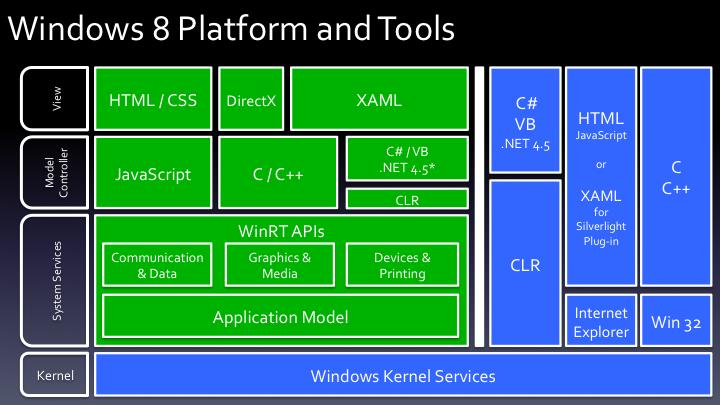
And AFAICT myself WinRT has always been presented as a new API designed for new kind of Windows applications (i.e. Windows Store apps). It doesn't make the other APIs obsolete in any way for the other kinds of application, just like the CLR didn't force anyone to write managed code. See this chart from Build 2011 for example : http://1.bp.blogspot.com/-uUSc-JjjBDs/TnWkasRU74I/AAAAAAAAAV...
Re: Windows 8 — Disappointing Usability for Both Novice and Power Users
#250Earlier quoted context omitted.
I disagree. In windows XP, Vista and 7, if you click the magical red X on a misbehaving program, Windows will offer to kill if after something between 5-50 seconds. Non-tech-savvy users _do_ use that functionality.
And in Windows 8 you don't even need to worry about it. After switching to another program the previous program will be suspended and if it takes too long to suspend, terminated. Sounds a lot better than asking "Non-tech-savvy users" to make the decision.