Live data from Hacker News

KDE Connect: Enabling communication between all your devices

community.kde.org

101–110 of 208 posts

Re: KDE Connect: Enabling communication between all your devices

#101
post #53

Earlier quoted context omitted.

KDE is simply the 'community' that maintains it, makes sense why that's the branding used despite the inevitable confusion (the DE has been called Plasma for ages, and almost everything KDE works outside of it)

they should rebrand it as Konnekt.

Legacy KDE apps used to follow this naming convention until the late 2000s, early 2010s.

You had apps like Konqueror (web browser, file manager), KMail (email client), Kompose (music score editor), KImages (later rebranded to Krita), and KDevelop (software dev IDE).

Modern KDE apps dropped the 'K' prefix and moved to a more recognizable scheme, like: Falkon (web browser), Dolphin (file manager), and Okular (document viewer).

As you can see, its now a mix of whether the app keeps the 'K' in the name. Some do not.
Re: KDE Connect: Enabling communication between all your devices

#102
I love KDE Connect, it is insanely useful and pairs nicely with KDE Plasma.

But I think it has some major usability issues. The two things I struggle with the most:

1. Sometimes (not always, but often!) the phone is not connected to the computer at all. In order to send something from the computer to the phone, I have to unlock the phone, find KDE connect in the apps, run it, and connect to the computer. I understand that this could very well be just The Way of Android, but it's still obnoxious.

2. The text/SMS sub-app in KDE connect is terrible. It doesn't sync text messages in the background, so it tries to sync when you start it. But it's very slow and takes a good 5-10 minutes for all of your text messages to sync. And apparently it does contacts last because in the beginning you only see phone numbers. And it doesn't show pictures. And (this is normally not a complaint I make), it is very ugly. GS Connect looks way better, but I have no idea if it _works_ any better.

Re: KDE Connect: Enabling communication between all your devices

#103
post #91

How well does this work for sending a lot of files without re-sending the same file? I have a desktop + laptop + phone. When I want to sync a directory with a lot of files I wrote a little shell script that uses rsync to do it. This does require running SSH on my laptop but I can invoke the shell script from my desktop. Likewise with my phone I want to backup my camera photos, using rsync is nice here to avoid sendin…

For this purpose, I would not suggest KDE Connect. What you're looking for is something more like SyncThing: https://syncthing.net

I use SyncThing on my phone to back up photos/videos on my phone to my NAS. The UX is not great, but it does sync things correctly 100% of the time. For years on end, I never have to worry about it.

Re: KDE Connect: Enabling communication between all your devices

#104
post #63
post #52

Earlier quoted context omitted.

How is Slackware doing nowadays? Last release was several years ago, but I need a replacement for Win 10 on my PC.

Why Slackware specifically? You can install any distribution. I use Gentoo btw - not really a distribution so much as a distribution construction kit. There are other popular distros, notably Arch.

> Why Slackware specifically?

To me, coming from Unix, it's mostly sane.

Re: KDE Connect: Enabling communication between all your devices

#106
post #53

Earlier quoted context omitted.

they should rebrand it as Konnekt.

Legacy KDE apps used to follow this naming convention until the late 2000s, early 2010s. You had apps like Konqueror (web browser, file manager), KMail (email client), Kompose (music score editor), KImages (later rebranded to Krita), and KDevelop (software dev IDE). Modern KDE apps dropped the 'K' prefix and moved to a more recognizable scheme, like: Falkon (web browser), Dolphin (file manager), and Okular (document…

> Legacy KDE apps used to follow this naming convention until the late 2000s, early 2010s.

Wow, what a coincident that parent just happened to suggest the identical naming convention. What are the chances?

Re: KDE Connect: Enabling communication between all your devices

#107
Slightly tangential, I find the lack of a "proper" way of organizing data across multiple devices frankly terrible. KDE connect is nice, but it's a bandaid patch. Airdrop between your devices is the same. Apple wants you to store everything on iCloud... which isn't terrible, as long as everything syncs fast enough, you can pay, and you're not without internet (an issue even in urban areas like for eg on the subway).

Modern devices have just "grown", your phone with its 2FA app is also a source of identity, yet the boundaries between a tool to be used, a computer to "work on" (even an SMS to your boss counts as work for me!), and a "fundamental part of your life" - whether by you or by a megacorp (see: notifications! Mindless scrolling on the social media of your choice!) - are all blurred.

Re: KDE Connect: Enabling communication between all your devices

#108
post #77
post #51

Earlier quoted context omitted.

I can't say I'm experienced with Android development, but is there something about this issue that makes it hard for a volunteer to submit a PR? Seems like it should be just an OS API call or something.

Android doesn't really have such a thing as quitting an app. You're meant to just stop doing stuff when off screen, and let your app be evicted in LRU order (or whatever order is actually used). If your app does background stuff you should have a settings toggle to do the background stuff or not, and when it's on and the phone is on, you do the background stuff.

This is not true: https://stackoverflow.com/a/40231289

Re: KDE Connect: Enabling communication between all your devices

#109
post #92

Earlier quoted context omitted.

Arch has an installer these days. It works pretty well and you can have a system up and running in about 20 minutes if you have a fast internet connection. For people that want a Windows like UI, I would probably suggest Cinnamon. It works pretty much like Windows 7/10 without all the visual nonsense that KDE typically has.

My experience is that KDE 6 has very little visual nonsense right out of the box. 4 and 5 did have a lot more, but most/all of it could be disabled. Most other Linux DEs don't really let you customize them to your own personal level of nonsense at any rate.

I probably see a lot more than other people since I spent a good few years doing pixel perfect web dev.

I am not being hyperbolic when I say that I can see a pixel out of place on a webpage on the other side of the room.

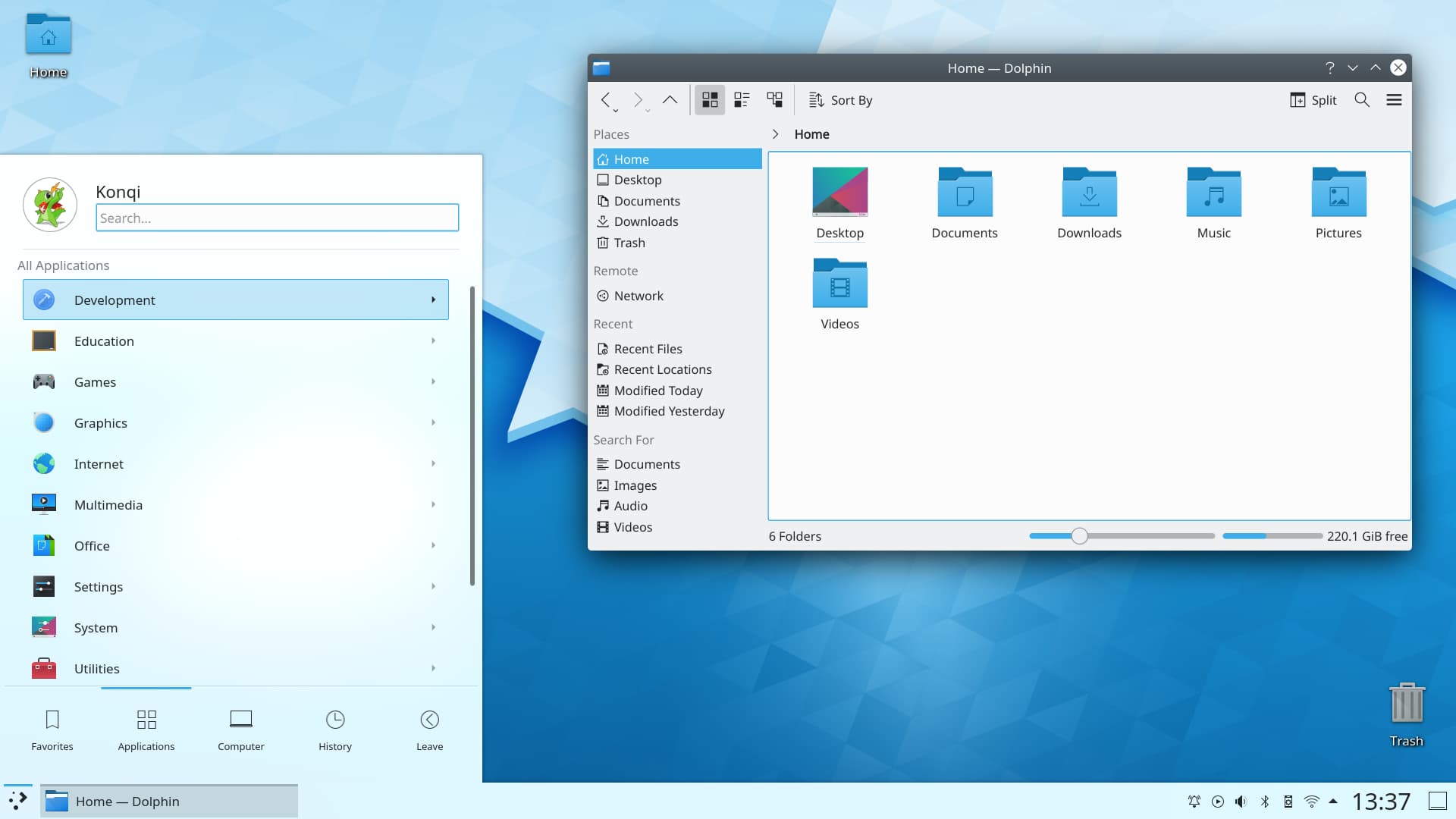
https://kde.org/content/home/main.jpg

This is a screenshot from their site. Just in this screenshot I see the following:

1) there is an horrendous text shadow effect on the text under the "Home" desktop icon in the top left.

2) Clock text is too large compared to the rest of the interface, especially the icons next to it.

3) Trash Icon looks like out of place compared to the other icons.

4) Drop shadow effect on the window and the start menu thing. It kinda too dark really.

5) Every single gap between interface elements seems different and off. The icon sizes seem a bit all over the place.

6) There is a gradient on the window title bar and rounded corners. Cinnamon does this as well. I dunno it is very Window XP Luna (which I never liked).

7) The window control icons look off to me and don't fit in with the rest of the interface IMO.

A lot of this I appreciate can be probably be changed. But that is how it comes OOTB if it is an official screenshot. It feels like a Windows Vista ripoff.

Generally I find KDE lacks "taste". None of the Linux GUIs are that great tbh. People put up fancy screenshots, but I guarantee the moment the windows are arranged in any other way it looks not so great.

Re: KDE Connect: Enabling communication between all your devices

#110

I can't get this to work across subnets/wifi networks in my home network. My phone can see my workstation (KDE) but not the other way around.

In general, some wifi routers will offer to isolate cross-forwarding between WLAN hosts. Depending on the model, one may not be able to modify this setting.

Best of luck =3

Post reply on HN