Epson MX-80 Fonts
mw.rat.bz
Epson MX-80 Fonts
1–10 of 72 posts
Re: Epson MX-80 Fonts
#2A lot of people never saw anything different come out of these printers.
These are built-in fonts available so the simplest devices/OS like DOS can directly print per-character (ASCII) rather than per-pixel or per-dot. You send it the signal to print an upper case letter for instance, it responds and prints the upper case letter about like a daisy-wheel printer would have done. No dots involved in the communication between the PC and the printer, other than the trigger that makes it print the right letter on the paper.
Printing per-dot was graphics mode, the PC has to send every single dot to the printer but that's what you need for real pictures.
After a while fonts appeared which you loaded in the PC, which would then send every one of their dots to the printer in graphics mode, so there was a lot fancier text output available. But it was fiddly and didn't always work right, and by that time there were newer printers having lots of those typewriter-style fonts built in. Those who couldn't get the fonts installed into their PC correctly, for the old MX and FX printers to print all fancy like the few real geeks were doing, just got a new printer instead and their office correspondence went from these bare-bones Epson fonts to pseudo-letter-quality just plugging in the new printer.
Windows 3.1 made it a little easier to get the auxiliary DOS fonts going, but people mostly had gotten newer printers by then.
By the time Windows 95 came out very few of these old printers were still being used, but there were plenty of True-Type fonts built into Windows by then, plus the built-in drivers for such old printers were very mature.
So it was never really very common knowledge, but you could just plug MX-80 series in to Windows 9x and pick any of the same fonts as you would for a laser printer, and it went bi-directional laying down overlapping dots like Adobe bricks, near-letter-quality enough to where they could hardly tell the difference once you faxed the page to somebody.
Re: Epson MX-80 Fonts
#3A lot of people never saw anything different come out of these printers. These are built-in fonts available so the simplest devices/OS like DOS can directly print per-character (ASCII) rather than per-pixel or per-dot. You send it the signal to print an upper case letter for instance, it responds and prints the upper case letter about like a daisy-wheel printer would have done. No dots involved in the communication b…
Thanks for you memories and observations on old printers!
Re: Epson MX-80 Fonts
#4A lot of people never saw anything different come out of these printers. These are built-in fonts available so the simplest devices/OS like DOS can directly print per-character (ASCII) rather than per-pixel or per-dot. You send it the signal to print an upper case letter for instance, it responds and prints the upper case letter about like a daisy-wheel printer would have done. No dots involved in the communication b…
>but you could just plug MX-80 series in to Windows 9x and pick any of the same fonts as you would for a laser printer, and it went bi-directional laying down overlapping dots like Adobe bricks, near-letter-quality enough to where they could hardly tell the difference once you faxed the page to somebody
I am happy to report that I was doing the same thing in 1986 with GEOS on Commodore 64! And again in 1990 with PC/GEOS on Tandy 1000!
(Although I mostly used SpeedScript on C64, and WordPerfect or pfs:Write on DOS.)
Re: Epson MX-80 Fonts
#5A lot of people never saw anything different come out of these printers. These are built-in fonts available so the simplest devices/OS like DOS can directly print per-character (ASCII) rather than per-pixel or per-dot. You send it the signal to print an upper case letter for instance, it responds and prints the upper case letter about like a daisy-wheel printer would have done. No dots involved in the communication b…
I don't think the original Epson ROM on the MX-80 had a graphics mode. I think that was a feature added by the Graftrax-80 ROM: https://archive.org/details/Graftrax-80_1981_Epson_America/m...
Re: Epson MX-80 Fonts
#6A lot of people never saw anything different come out of these printers. These are built-in fonts available so the simplest devices/OS like DOS can directly print per-character (ASCII) rather than per-pixel or per-dot. You send it the signal to print an upper case letter for instance, it responds and prints the upper case letter about like a daisy-wheel printer would have done. No dots involved in the communication b…
Thanks for you memories and observations on old printers!
I don't miss the piercing sounds they made.
Re: Epson MX-80 Fonts
#7A lot of people never saw anything different come out of these printers. These are built-in fonts available so the simplest devices/OS like DOS can directly print per-character (ASCII) rather than per-pixel or per-dot. You send it the signal to print an upper case letter for instance, it responds and prints the upper case letter about like a daisy-wheel printer would have done. No dots involved in the communication b…
I don't think the original Epson ROM on the MX-80 had a graphics mode. I think that was a feature added by the Graftrax-80 ROM: https://archive.org/details/Graftrax-80_1981_Epson_America/m...
You are right. I bought (well my parents did) and it came with a complimentary upgrade. We installed the chip and it was great but the driver was not universal so it printed out with a slow stretch so the lines would go downward on the right side. We took it back for tech support and it turned out it was a software issue. My first lesson in debugging goes up the stack. (I was like 13 I think)
Re: Epson MX-80 Fonts
#8A lot of people never saw anything different come out of these printers. These are built-in fonts available so the simplest devices/OS like DOS can directly print per-character (ASCII) rather than per-pixel or per-dot. You send it the signal to print an upper case letter for instance, it responds and prints the upper case letter about like a daisy-wheel printer would have done. No dots involved in the communication b…
I replaced my Okidata ML92 with a Fujitsu DL-3800 and got a huge bump in quality when printing from Word 2.0 on Windows. The only downside was that if I finished a paper after about 10pm I had to wait until morning to print or I would wake the whole house up.
Re: Epson MX-80 Fonts
#9Something isn't right with this, though. I don't remember if there was a "wide" mode, but this font, while it feels very accurate, is somehow stretched wider than what would have been default. Here's an image of something from an MX-80 that looks more like what I remember: https://technicallywewrite.com/images/2024/07/epson2.png
(taken from https://technicallywewrite.com/2024/07/01/dotmatrix). Still, thanks for sharing this!
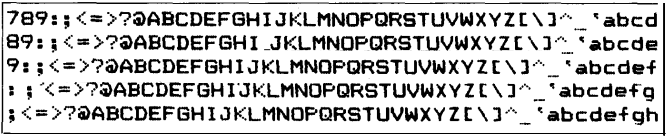
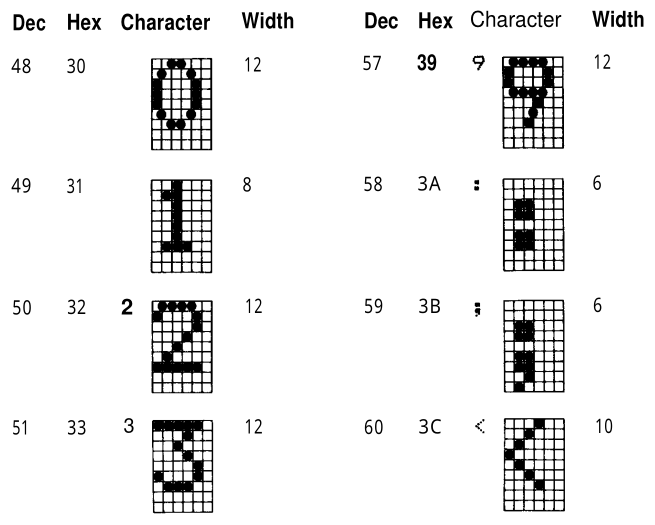
EDIT: Now I know what the issue is! Per the link above: "Like other impact printers, the Epson series of dot matrix printers used a 6x9 grid to arrange the dots for each letter. Dots could also be printed halfway between each vertical line on the grid, effectively providing a higher resolution of 12x9 for each printed character." Here's an illustration: https://technicallywewrite.com/images/2024/07/epson1.png
Re: Epson MX-80 Fonts
#10A lot of people never saw anything different come out of these printers. These are built-in fonts available so the simplest devices/OS like DOS can directly print per-character (ASCII) rather than per-pixel or per-dot. You send it the signal to print an upper case letter for instance, it responds and prints the upper case letter about like a daisy-wheel printer would have done. No dots involved in the communication b…
I had an FX-80 and although you could print your True Type fonts on it (from Windows 3.1 onwards) it would chew through the ribbon and the print head would get very hot.