Live data from Hacker News

What to expect from Debian/Trixie

michael-prokop.at

81–90 of 211 posts

Re: What to expect from Debian/Trixie

#81

Warning for those running Debian and Dovecot under stable. In this new stable release, an update to Dovecot will break your configuration: https://willem.com/blog/2025-06-04_breaking-changes/

Not only that: Dovecot 2.4 will also remove the functionalities of dsync, replicator and director [1]. This is frustrating and a big loss as these enabled e.g. very simple and reliable two-node (active-active) redundant setups, which will not be possible anymore with 2.4.

I use it for years to achieve HA for personal mail servers and will now have to look for alternatives -- until then will stick with Debian Bookworm and its Dovecot 2.3.

[1] https://doc.dovecot.org/2.4.0/installation/upgrade/2.3-to-2....
Re: What to expect from Debian/Trixie

#83

Earlier quoted context omitted.

The page about upgrading [0] does have this warning: Back up your data Performing a release upgrade is never without risk. The upgrade may fail, leaving the system in a non-functioning state. USERS SHOULD BACKUP ALL DATA before attempting a release upgrade. DebianStability contains more information on these steps. [0] https://wiki.debian.org/DebianUpgrade

Yet Windows will let you roll back an upgrade with a single click within 10 days. Of course anyone can restore from backups. It's a pain and it's time consuming. My post serves more as a warning to those who may develop buyer's remorse.

I always find the rough edges on upgrading windows (and macos), I've had several computers that take 3-4 hours to hit a roadblock, give a inscrutable error message and rollback. I feel spoiled using nixos (once you get over the learning curve)

Re: What to expect from Debian/Trixie

#84

Trixie is SUPER for desktop use! I’ve been on sid for the last 10 months for my laptop (old T450s) and my secondary desktop, and it is really fun. There are annoyances but they are not related to Debian itself. FIRST I decided it is time to switch to Wayland. Now my favorite run-or-raise app (Kupfer) cannot do run-or-raise. But there is a really nice extension to do run-or-raise on GNOME without the aggressive disrup…

Just using KDE solves both your problems.

Re: What to expect from Debian/Trixie

#85
post #63

Earlier quoted context omitted.

fighting your distro in practice is a total nightmare.

I ended up in gentoo mostly just to avoid systemd (used it before, mostly to learn. went to debian for new laptop. gave up after fighting systemd. I'm aware of devuan and artix, but gentoo just worked (after all the time spent))

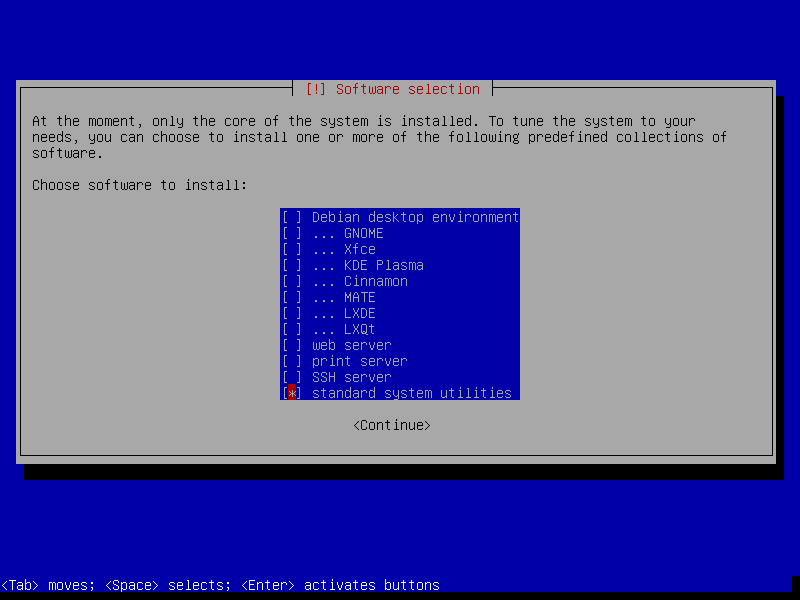
Debian, at least until bookworm works perfectly without systemd. The easiest way to make this transition, is to installed Debian with nothing but 'standard system utilities' and 'SSH server' (if you want) during install:

https://forum.qubes-os.org/uploads/db3820/original/2X/c/c774...

Once install is done, login and save this file:

  /etc/apt/preferences.d/systemd

  # this is the only systemd package that is required, so we up its priority first...
  Package: libsystemd0
  Pin: release bookworm
  Pin-Priority: 700
  /etc/apt/preferences.d/systemd

  # exclude the rest
  Package: systemd
  Pin: release *
  Pin-Priority: -1

  Package: *systemd*
  Pin: release *
  Pin-Priority: -1

  Package: systemd:i386
  Pin: release *
  Pin-Priority: -1

  Package: systemd:amd64
  Pin: release *
  Pin-Priority: -1

After:

  apt-get install sysvinit sysvinit-core sysvinit-utils
Reboot then:

  apt-get purge systemd

There are a few edge cases, packages which require systemd, but I've been running thousands of systems including desktops this way for a decade.

Yes, I also run thousands of systems with systemd too.

Re: What to expect from Debian/Trixie

#86
post #64
post #61

Earlier quoted context omitted.

https://chrisdown.name/2018/01/02/in-defence-of-swap.html

An ivory tower answer. All those arguments would be useful if we somehow could avoid the fact that the system will use it as "emergency memory" and become unresponsive. The kernel's OOM killer is broken for this, and userland OOM daemons are unreliable. `vm.swappiness` is completely useless in the worst case, which is the only case that matters. With swap off, all the kernel needs to do is reserve a certain threshold…

the kernel requires swap (and its bugs) to be enabled for hibernation to work

this one gets me irritated every time i think about it. i don't want to use swap, but i do want hibernation. why is there no way to disable swap without that?

hmm, i suppose one could write a script that enables an inactive swap partition just before shutdown, and disables it again after boot.

Re: What to expect from Debian/Trixie

#87
post #65
post #22

Earlier quoted context omitted.

The "stable" interface naming scheme is a scam. And I have proof. Test upgraded a VM today, from bookworm to trixie. And guess what. Everything worked, except after reboot the network interface was unconfigured? Guess what. The name changed...

That can only happen if the emulated hardware layout presented to the VM changes. I'd look at that before calling anything a scam.

Scam is probably the wrong word, and it's choice might be a bit feeling fueled, but it's really not true that this only depends on the HW.

systemd also changes behavior in what naming policies are the default and what it considered as input, it did that since ever but started to version that since v238 [0]. Due to that the HW can stay exactly the same but names still change. I see this in VMs that stay exactly the same, no software update, not change in how the QEMU cli gets generated, really nothing changed from the outside virtual HW POV, interface name still changes.

The underlying problem was a real one, the solution seems like a bit of a sunken cost fallacy, and it added more problem dimensions than there previously exist.

Besides, even if the HW would change, shouldn't a _predicatble_ naming scheme be robust to not care about that as long as the same NIC is still plugged in somewhere?

Disclaimer, as stated elsewhere: I really like systemd, I'm not one that speaks out against it lightly, but the IF naming is not something they got right, but rather made worse for the default case. Being able to easily pin interface names through .link files is great, but requiring users to do that or have no network after an upgrade, especially for simple one-NIC use cases in a completely controlled environment like a VM is just bonkers.

[0]: https://www.freedesktop.org/software/systemd/man/latest/syst...

Re: What to expect from Debian/Trixie

#88
post #63

Earlier quoted context omitted.

Thank god you can enable and disable each of these components in complete isolation, so you don't suffer any kind of lock-in from systemd.

fighting your distro in practice is a total nightmare.

I’ve been dropping systemd-timesyncd and using chrome since forever, and it works well. I’m sure some systemd-* things are harder to replace, but not every replacement is a fight against your distro.

Re: What to expect from Debian/Trixie

#89
post #65

Earlier quoted context omitted.

That can only happen if the emulated hardware layout presented to the VM changes. I'd look at that before calling anything a scam.

Scam is probably the wrong word, and it's choice might be a bit feeling fueled, but it's really not true that this only depends on the HW. systemd also changes behavior in what naming policies are the default and what it considered as input, it did that since ever but started to version that since v238 [0]. Due to that the HW can stay exactly the same but names still change. I see this in VMs that stay exactly the sa…

Ah, ok, I didn't think of systemd version changes. Thanks.

Regarding your rhetorical question about "the same NIC", I think the problem is in determining whether the NIC is the same, and it is not an easy one to solve. I remember that older Suse Linux versions used to pin the interface name to the NIC's MAC address in an udev rule file that got autogenerated when a NIC with a given MAC first appeared on the system, but they stopped doing that.

Re: What to expect from Debian/Trixie

#90
post #58

Earlier quoted context omitted.

That actually is a pretty big difference. Assuming you're sane and have swap disabled (since there is no way to have a stable system with swap enabled), a program that tries to allocate all memory will quickly get OOM killed and the system will recover quickly. If /tmp/ fills up your RAM, the system will not recover automatically, and might not even be recoverable by hand without rebooting. That said, systemd-managed…

The sane thing is to have swap enabled. Having swap "disabled" forces your system to swap out executables to disk, since these are likely the only memory-mapped files you have. So, if your memory fills up, you get catastrophic thrashing of the instruction cache. If you're lucky, you really go over available memory, and the OOMKiller kills some random process. But if you're not, your system will keep chugging along at…

I've been running with swap off since my first SSD in 2015 or 2016. 16 GB RAM, then 32. No problems at all.

If I see RAM close to 30 GB I restart my browser and go back to 20 GB or less. Not every month.

Post reply on HN