Thanks to Solaar I hot my F1-F12 keys back on a Logitech keyboard that defaults to requiring Fn to use those (on Mac/Win you can change this using an app by Logitech). It’s been working well for a long time. I suggest getting it from their own ppa because the version in your Linux distro might be pretty old
Solaar is a Linux manager for many Logitech keyboards, mice, and other devices
41–50 of 274 posts
Re: Solaar is a Linux manager for many Logitech keyboards, mice, and other devices
#42Does anybody install the Logitech SW on their computer? Does it phone home?
Re: Solaar is a Linux manager for many Logitech keyboards, mice, and other devices
#43Does anybody install the Logitech SW on their computer? Does it phone home?
Yep. I installed it in my work Mac and it's terrible. It phones home. It's huge. It tries to convince you to install other stuff. Off it goes.
Re: Solaar is a Linux manager for many Logitech keyboards, mice, and other devices
#44Since we're on the topic of Logitech keyboards, does anyone know of a wired-only keyboard that has the same feel as the "Logitech MX Keys S Wireless"? I love this keyboard's feel, but I need to switch to wired-only for $reasons.
Could you just disable the bluetooth chip? Depends on the specific reason, I suppose.
AFAIK the keyboard in question only uses USB for charging. It can't send keys over the wire.
That said, before getting the MX keys I bought a Dell 7440 keyboard on ebay for $20, fastened it on top of a 6mm clear acrylic plate with M3 screws, along with a Teensy chip running kbd firmware:
https://www.instructables.com/How-to-Make-a-USB-Laptop-Keybo...
Re: Solaar is a Linux manager for many Logitech keyboards, mice, and other devices
#45Flathub version here: https://flathub.org/apps/io.github.pwr_solaar.solaar
Re: Solaar is a Linux manager for many Logitech keyboards, mice, and other devices
#46This saved my butt when I lost my mouse dongle and only had an Ubuntu instance available at the time. I was able to pair my mouse to the same dongle my keyboard used and have been using the software ever since without issue. Thank you!
Yooo, I've been so frustrated with Logitech! I have an MX Mechanical Mini keyboard and MX Ergo mouse. For some reason they don't pair to the same dongle because the dongles are different and not interchangeable. In addition, whatever dongle is plugged into the right USB-A port of my laptop always lags for some reason. Does Solaar solve those issues?
Solaar mostly changes configuration and helps pairing devices, but it's not part of the drovers, so it might not help you. Anyway I dump some info about dongles here just in case, if you find your devices are compatible you might use Solaar to reset the pairings.
IIRC, there are three types of dongles: the old basic ones, that only work with one particular device, the not-that-old "unifying" dongles (they have a red logo with a star or ray of light), and the new ones that are called "bolt" (green logo with a bolt in it).
I have mostly experience with the "unifying" receivers. Those can pair to any "unifying" compatible device, and keep connections with up to 6 devices. Bolt dongles work similarly but with better encryption.
Re: Solaar is a Linux manager for many Logitech keyboards, mice, and other devices
#47This saved my butt when I lost my mouse dongle and only had an Ubuntu instance available at the time. I was able to pair my mouse to the same dongle my keyboard used and have been using the software ever since without issue. Thank you!
Yooo, I've been so frustrated with Logitech! I have an MX Mechanical Mini keyboard and MX Ergo mouse. For some reason they don't pair to the same dongle because the dongles are different and not interchangeable. In addition, whatever dongle is plugged into the right USB-A port of my laptop always lags for some reason. Does Solaar solve those issues?
I've found that using a short usb extension cable with those wireless dongles, rather than plugging them directly into the computer, works loads better and fixed "lag" issues for me. Maybe some kind of EMF interference?
Re: Solaar is a Linux manager for many Logitech keyboards, mice, and other devices
#48I've had an MX Master mouse (the "2" for maybe 8-9 years then the "3" for 2-3 years now) and love it. Great performance, great battery life, fantastic design and feel. On Windows I definitely do not love the 150Mb program to manage it (surely sending a torrent of unnecessary telemetry data back to Logitech. I found Solaar a couple months ago after getting repeatedly frustrated with bluetooth connection issues. It rea…
I never had Bluetooth connection issues with my Logitech hardware, but I wanted mine to work without an OS (i.e. with a Bolt receiver).
Solaar handled the pairing in 30 seconds flat, and I can't be happier. The only thing is, since Bolt doesn't look like proper BT to the OS, battery levels can only be monitored from Solaar itself.
Re: Solaar is a Linux manager for many Logitech keyboards, mice, and other devices
#49I've had an MX Master mouse (the "2" for maybe 8-9 years then the "3" for 2-3 years now) and love it. Great performance, great battery life, fantastic design and feel. On Windows I definitely do not love the 150Mb program to manage it (surely sending a torrent of unnecessary telemetry data back to Logitech. I found Solaar a couple months ago after getting repeatedly frustrated with bluetooth connection issues. It rea…
My one gripe with Logitech mice is that none of their "office" mice support high refresh rate polling.
Re: Solaar is a Linux manager for many Logitech keyboards, mice, and other devices
#50Pardon my ignorance but why would you need an app to manage keyboards and mice in the first place? Aren't they supported out of the box by generic drivers?
Essentially Solaar is open source interface to few extra features (exposed as application custom hid use pages) of the Logitech "HID++" stack (aka Logitech "dongle", sometimes also combined with bluetooth support on the actual device).
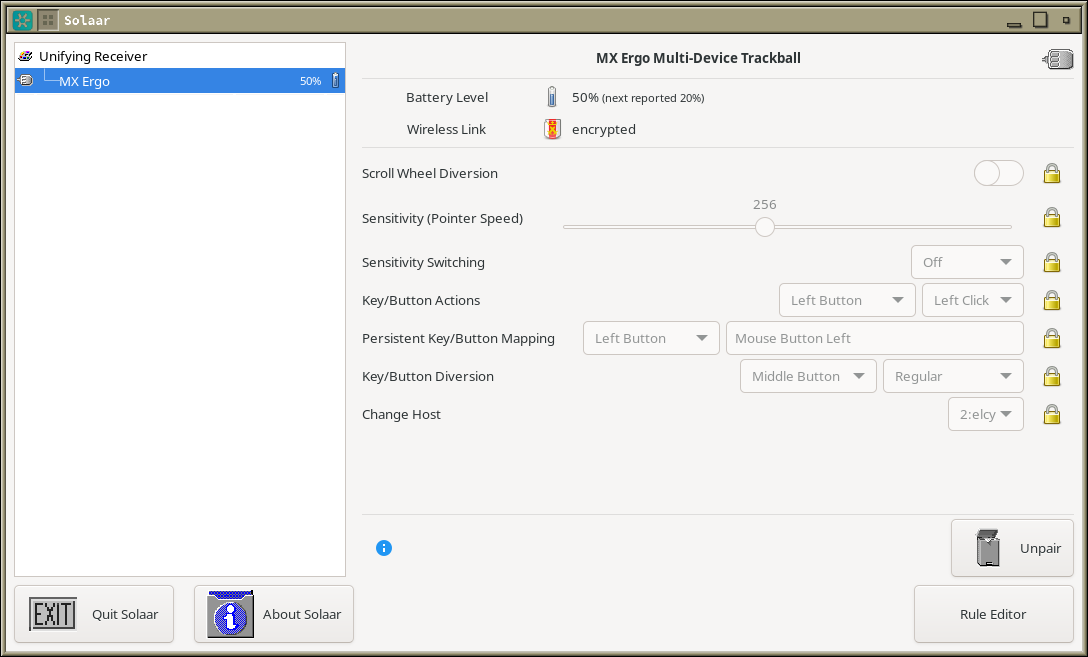
Consider this screenshot[1] of additional options on Logitech trackball + ofc pairing control
[1] https://usercontent.irccloud-cdn.com/file/2cZcZiNk/image.png