Live data from Hacker News

Vim clutch

github.com

111–120 of 227 posts

Re: Vim clutch

#111
post #91

Earlier quoted context omitted.

You can start thinking in vim by reading this answer on stack overflow: http://stackoverflow.com/a/1220118 Moving word wise,(w,e) is used a lot. Next occurrence of word under cursor is useful. *,# Learning effective macros is extremely useful. di" is one of my favorite commands. Delete everything inside the quotes not including the quotes. Put inoremap jj into your .vimrc so that you can press jj quickly in insert mo…

di" is one of my favorite commands. Delete everything inside the quotes not including the quotes. You usually want to replace what's inside the quotes, so hence use ci" cit is pretty nice for replacing a tag's inner html. And of course this works with parentheses - ci( - and brackets - ci[ - and curly braces and single quotes and angle brackets.. I love vim :)

Wow cit...I've been wondering if this exists for a year now. I remember reading about it when I first started learning vim but it somehow eluded me afterwards. Thanks!

I use ci{ all the time for functions and CSS. It's like magic. Whenever I'm using something like nano, I'll instinctively type what looks like a long string of gibberish: "jjjddo [oh crap] ..."

Once you really start getting used to the language, it makes it frustrating to use anything else.
Re: Vim clutch

#112

I'll be the one voicing a contrarian opinion here. vi and vim are holdbacks from the days of 300 to 9600 BAUD modems. A time when more sophisticated interfaces were prohibitive. Back in those days it wasn't too uncommon for people to actually write their own text editors. I wrote a few, mainly in Forth, as I would bring-up self-designed systems. While I use VIM today when I have to I continue to think that in today's…

I think you're missing the point that many developers choose vim over "modern" editors because of its highly efficient text-editing capabilities. The same points could be made about emacs.

As to "user friendly" - depends on who the user is. Yes, this text box is infinitely more user friendly than vim when your mom is using it.

That a foot-pedal might make vim more usable has nothing to do with vim being outdated or unusable. Is your operating system broken / outdated because one might find a food pedal driving "alt-tab" more usable or fun?

Re: Vim clutch

#113
post #101

I wonder if this would work better as a temporary mode (like how a real clutch works). For example, you stay in insert mode until you press the pedal, which escapes you to command mode, and then restoring insert mode after you depress the pedal?

You mean like holding down ctrl in emacs?

Re: Vim clutch

#114
post #65

I don't know how this would work out ergonomically. My dad is a cab driver and he often complains that pressing the clutch with his foot often giving him RSI kind of pain. But however I think this is purely subjective. From an experiment perspective, this is really cool! And this generally qualifies into what could one call a 'real hack'. This has a air of freshness to it. Now the real power of vim is in getting into…

You can start thinking in vim by reading this answer on stack overflow: http://stackoverflow.com/a/1220118 Moving word wise,(w,e) is used a lot. Next occurrence of word under cursor is useful. *,# Learning effective macros is extremely useful. di" is one of my favorite commands. Delete everything inside the quotes not including the quotes. Put inoremap jj into your .vimrc so that you can press jj quickly in insert mo…

I'm going to try this: inoremap jj

I normally use C-c. Is there a way to make the time between j...j to be really short? Like the delay for it to count as a double press? I'd like to reduce any chance of accidental typing (although I can't see any reason I'd type "jj" a lot).

Re: Vim clutch

#115
post #60
post #54

Interesting idea, I wonder about using it for the Ctrl key instead. I switched to vim some time ago and that's the bit I find most clumsy, especially given the placement on a Mac. I've remapped caps lock to Ctrl, which helps.

Just out of interest, how often are you really using the ctrl key in a Vim session? My CapsLock is mapped to ESC, which I hit at the end of every edit (so several times per minute), but I don't think I use ctrl much at all. OTOH I have heard Emacs users need Ctrl/Alt constantly while editing.

Ctrl+w for switching split windows.

Ctrl+u,d for page up and down.

Ctrl+e,y for shifting the screen up and down.

Ctrl+],t for moving in and out of tags (with ctags).

Ctrl+v for visual block mode.

Ctrl+[ instead of escape.

Ctrl+p,n for autocomplete.

Ctrl+r for redo.

Ctrl+o,i navigate location jump history.

...and probably more that I don't know about.

Additionally:

I have Ctrl+h,l mapped for tab switching.

Terminal multiplexers like tmux and screen use Ctrl for switching terminal sessions.

Re: Vim clutch

#116

Earlier quoted context omitted.

You can start thinking in vim by reading this answer on stack overflow: http://stackoverflow.com/a/1220118 Moving word wise,(w,e) is used a lot. Next occurrence of word under cursor is useful. *,# Learning effective macros is extremely useful. di" is one of my favorite commands. Delete everything inside the quotes not including the quotes. Put inoremap jj into your .vimrc so that you can press jj quickly in insert mo…

I'm going to try this: inoremap jj I normally use C-c. Is there a way to make the time between j...j to be really short? Like the delay for it to count as a double press? I'd like to reduce any chance of accidental typing (although I can't see any reason I'd type "jj" a lot).

The setting applies to all maps. :help timeoutlen

Re: Vim clutch

#117
post #65

I don't know how this would work out ergonomically. My dad is a cab driver and he often complains that pressing the clutch with his foot often giving him RSI kind of pain. But however I think this is purely subjective. From an experiment perspective, this is really cool! And this generally qualifies into what could one call a 'real hack'. This has a air of freshness to it. Now the real power of vim is in getting into…

You have to learn h,j,k,l are not just navigational keys but also can be combined with multipliers like 20h(Moves 20 positions to the left). You know, I've understood this for a while, but to this day I still don't use it. I can't count characters that fast! If you're going to lean forward and count out chars, you might as well count them out with presses of 'h'.

In my experience, if you are counting characters or lines in regular vim editing, you are doing it wrong. The smarter jump commands, text objects, and a high key repeat rate are all far superior to counting 20 characters. I do use counts a bit with w/W for words. The main advantage is making your edit in a single command so you can reuse it with dot.

Re: Vim clutch

#118

Earlier quoted context omitted.

You can start thinking in vim by reading this answer on stack overflow: http://stackoverflow.com/a/1220118 Moving word wise,(w,e) is used a lot. Next occurrence of word under cursor is useful. *,# Learning effective macros is extremely useful. di" is one of my favorite commands. Delete everything inside the quotes not including the quotes. Put inoremap jj into your .vimrc so that you can press jj quickly in insert mo…

I'm going to try this: inoremap jj I normally use C-c. Is there a way to make the time between j...j to be really short? Like the delay for it to count as a double press? I'd like to reduce any chance of accidental typing (although I can't see any reason I'd type "jj" a lot).

You could probably try setting timeoutlen to something like 500 milliseconds (or whatever feels comfortable). Bear in mind though that this is a global setting.

Re: Vim clutch

#119

I'll be the one voicing a contrarian opinion here. vi and vim are holdbacks from the days of 300 to 9600 BAUD modems. A time when more sophisticated interfaces were prohibitive. Back in those days it wasn't too uncommon for people to actually write their own text editors. I wrote a few, mainly in Forth, as I would bring-up self-designed systems. While I use VIM today when I have to I continue to think that in today's…

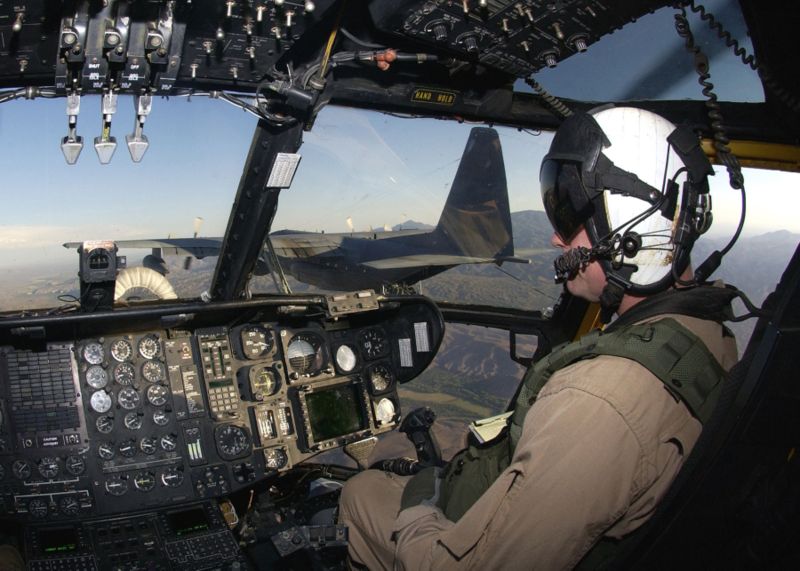
I don't think you'd find a military helicopter cockpit very "user friendly" either:

http://www.helis.com/h/h53ecab.jpg

We're talking about a general-purpose text editing tool used by experts for hours, days, and years on end. I understand that you like to click through your menus, but you'll have to excuse those of us who know what we're doing in vim and don't have the time or patience for that.

Re: Vim clutch

#120

Earlier quoted context omitted.

You can start thinking in vim by reading this answer on stack overflow: http://stackoverflow.com/a/1220118 Moving word wise,(w,e) is used a lot. Next occurrence of word under cursor is useful. *,# Learning effective macros is extremely useful. di" is one of my favorite commands. Delete everything inside the quotes not including the quotes. Put inoremap jj into your .vimrc so that you can press jj quickly in insert mo…

I'm going to try this: inoremap jj I normally use C-c. Is there a way to make the time between j...j to be really short? Like the delay for it to count as a double press? I'd like to reduce any chance of accidental typing (although I can't see any reason I'd type "jj" a lot).

yes you can set the timeout delay to be something very small see :help timeoutlen. It defaults to 1000ms but you are free to change it. If you are typing in insert mode and you press j it will delay but if you press another key that is not bound to anything after j it will just insert the j and the other key.
Post reply on HN