Live data from Hacker News

Show HN: LLM-aided OCR – Correcting Tesseract OCR errors with LLMs

github.com

1–10 of 178 posts

Show HN: LLM-aided OCR – Correcting Tesseract OCR errors with LLMs

#1
Almost exactly 1 year ago, I submitted something to HN about using Llama2 (which had just come out) to improve the output of Tesseract OCR by correcting obvious OCR errors [0]. That was exciting at the time because OpenAI's API calls were still quite expensive for GPT4, and the cost of running it on a book-length PDF would just be prohibitive. In contrast, you could run Llama2 locally on a machine with just a CPU, and it would be extremely slow, but "free" if you had a spare machine lying around.

Well, it's amazing how things have changed since then. Not only have models gotten a lot better, but the latest "low tier" offerings from OpenAI (GPT4o-mini) and Anthropic (Claude3-Haiku) are incredibly cheap and incredibly fast. So cheap and fast, in fact, that you can now break the document up into little chunks and submit them to the API concurrently (where each chunk can go through a multi-stage process, in which the output of the first stage is passed into another prompt for the next stage) and assemble it all in a shockingly short amount of time, and for basically a rounding error in terms of cost.

My original project had all sorts of complex stuff for detecting hallucinations and incorrect, spurious additions to the text (like "Here is the corrected text" preambles). But the newer models are already good enough to eliminate most of that stuff. And you can get very impressive results with the multi-stage approach. In this case, the first pass asks it to correct OCR errors and to remove line breaks in the middle of a word and things like that. The next stage takes that as the input and asks the model to do things like reformat the text using markdown, to suppress page numbers and repeated page headers, etc. Anyway, I think the samples (which take less than 1-2 minutes to generate) show the power of the approach:

Original PDF: https://github.com/Dicklesworthstone/llm_aided_ocr/blob/main...

Raw OCR Output: https://github.com/Dicklesworthstone/llm_aided_ocr/blob/main...

LLM-Corrected Markdown Output: https://github.com/Dicklesworthstone/llm_aided_ocr/blob/main...

One interesting thing I found was that almost all my attempts to fix/improve things using "classical" methods like regex and other rule based things made everything worse and more brittle, and the real improvements came from adjusting the prompts to make things clearer for the model, and not asking the model to do too much in a single pass (like fixing OCR mistakes AND converting to markdown format).

Anyway, this project is very handy if you have some old scanned books you want to read from Archive.org or Google Books on a Kindle or other ereader device and want things to be re-flowable and clear. It's still not perfect, but I bet within the next year the models will improve even more that it will get closer to 100%. Hope you like it!

[0] https://news.ycombinator.com/item?id=36976333

Show HN: LLM-aided OCR – Correcting Tesseract OCR errors with LLMs
github.com
Re: Show HN: LLM-aided OCR – Correcting Tesseract OCR errors with LLMs

#3
post #2

Very cool! I have a hotkey to grab a region and pipe a screenshot through tesseract and then pipe that into my clipboard. I'll have to add on to it to pipe it though Ollama too :)

Cool, I know there's a little Windows Power Toy for doing something similar:

https://learn.microsoft.com/en-us/windows/powertoys/text-ext...

But the built-in functionality for iOS has the best quality OCR of anything I've seem (much better than the Windows tool), and I constantly find myself screenshotting my phone screen and using that to extract the text. My project is really for longer scanned documents like old books and articles.

Re: Show HN: LLM-aided OCR – Correcting Tesseract OCR errors with LLMs

#4
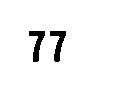
Have you tried using other OCR packages? I had to give up on Tesseract after every mode and model I tried read a quite plain image of "77" as "7" (and interestingly the javascript port reads it as "11"). Pic related: https://i.postimg.cc/W3QkkhCK/speed-roi-thresh.png

Re: Show HN: LLM-aided OCR – Correcting Tesseract OCR errors with LLMs

#5

Have you tried using other OCR packages? I had to give up on Tesseract after every mode and model I tried read a quite plain image of "77" as "7" (and interestingly the javascript port reads it as "11"). Pic related: https://i.postimg.cc/W3QkkhCK/speed-roi-thresh.png

You know, I’ve really looked hard at what’s out there and haven’t been able to find anything else that’s totally free/open, that runs well on CPU, and which has better quality output than Tesseract. I found a couple Chinese projects but had trouble getting them to work and the documentation wasn’t great. If you have any leads on others to try I’d love to hear about them.

One of the benefits of this project is that it doesn’t seem to matter that much that there are mistakes in the OCR output as long as you’re dealing with words, where the meaning would be clear to a smart human trying to make sense of it and knowing that there are probable OCR errors. For numbers it’s another story, though.

Re: Show HN: LLM-aided OCR – Correcting Tesseract OCR errors with LLMs

#7

Have you tried using other OCR packages? I had to give up on Tesseract after every mode and model I tried read a quite plain image of "77" as "7" (and interestingly the javascript port reads it as "11"). Pic related: https://i.postimg.cc/W3QkkhCK/speed-roi-thresh.png

You know, I’ve really looked hard at what’s out there and haven’t been able to find anything else that’s totally free/open, that runs well on CPU, and which has better quality output than Tesseract. I found a couple Chinese projects but had trouble getting them to work and the documentation wasn’t great. If you have any leads on others to try I’d love to hear about them. One of the benefits of this project is that it…

I ended up using EasyOCR. I assume it is too slow in CPU-only mode.

Re: Show HN: LLM-aided OCR – Correcting Tesseract OCR errors with LLMs

#8
It's a very interesting idea, but the potential for hallucinations reminds me of JBIG2, a compression format which would sometimes substitute digits in faxed documents: https://en.wikipedia.org/wiki/JBIG2#Character_substitution_e...

> In 2013, various substitutions (including replacing "6" with "8") were reported to happen on many Xerox Workcentre photocopier and printer machines. Numbers printed on scanned (but not OCR-ed) documents had potentially been altered. This has been demonstrated on construction blueprints and some tables of numbers; the potential impact of such substitution errors in documents such as medical prescriptions was briefly mentioned.

> In Germany the Federal Office for Information Security has issued a technical guideline that says the JBIG2 encoding "MUST NOT be used" for "replacement scanning".

I think the issue is that even if your compression explicitly notes that it's lossy, or if your OCR explicitly states that it uses an LLM to fix up errors, if the output looks like it could have been created by an non-lossy algorithm, users will just assume it that was. So in some sense it's better to have obvious OCR errors when there's any uncertainty.

Re: Show HN: LLM-aided OCR – Correcting Tesseract OCR errors with LLMs

#9
post #6

I'm curious if a multimodal model would be better at the OCR step than tesseract? Probably would increase the cost but I wonder if that would be offset by needing less post processing.

I have seen excellent performance with Florence-2 for OCR. I wrote https://blog.roboflow.com/florence-2-ocr/ that shows a few examples.

Florence-2 is On a T4 in Colab, you can run inference in < 1s per image.

Post reply on HN