Live data from Hacker News

Show HN: I made a split keyboard for large palms

jogmekeebs.com

51–60 of 86 posts

Re: Show HN: I made a split keyboard for large palms

#51
post #25

I've yet to wrap my mind around two things that are extremely common on "ergonomic" keyboards: ortholinear keys, and the positions of the C, X, and Z keys in the columns. I type those with my index, middle, and ring fingers, respectively, because when I pull my fingers back toward my wrists with my hands sitting at a neutral angle, those are the keys they pass. Moving from A to Z on a regular keyboard would be a disa…

> It's only from that horrible hand position that I can imagine "keys in a straight line" being an improvement.

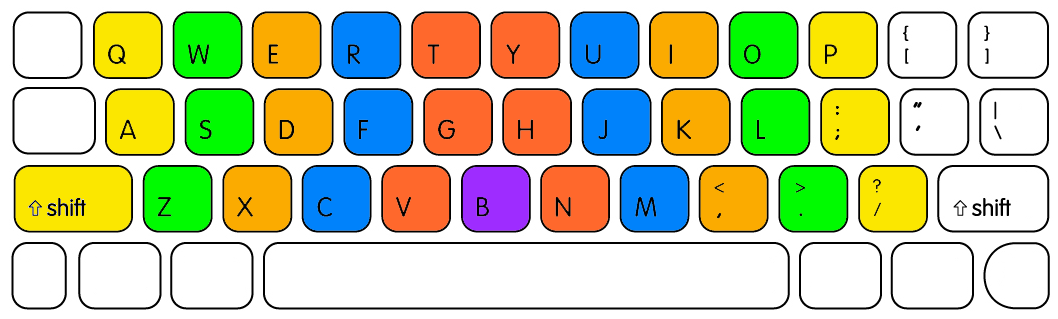
As long as you type comfortably, you're doing fine. But if you want to wrap your mind around it, that starts with grokking that not only do most touch typists type Z with the pinky, and so on in, that is how it's taught as well.

So if it's what you do already, ortho just straightens that out. Most ortho keebs (I think? Not all of them, but most) are also splits, so the keyboard is lined up with the palm, something which isn't possible with a straight keyboard.

So given all that, columned keys are great. It's 32 keys which I can type without any elbow movements at all. Add in some thumb keys and we're really cooking ^_^.
Re: Show HN: I made a split keyboard for large palms

#53
post #44

Earlier quoted context omitted.

Honestly I’ve never tried a 34-key layout, though I’ve seen loads in the keyboard layout DB. Are you using something like Seniply? Also in case it’s useful: much ink has been spilled about TRRS and its alternatives, but I haven’t found any references to folks using an I2C connector (4-pin JST) instead, which eliminates hotplugging risk without introducing the risks of USB/etc. I purchased a KB2040 (which has a female…

If you are interested you can always try it out on your current kb, right? > Seniply Yes, the idea is the same. I'm using Base layer + 3 other and using one shot for the function keys. Tap dance wouldn't be a problem either, I just prefer one shot. > trrs cable Interesting idea. Why would you like to avoid TRRS? What are the issues with it? I am thinking for the next version some BLE between the sides as it has low l…

Yep, I can just avoid using one of the keys, I just haven’t seen many key maps with the sort of popularity that Miryoku has, and I hate the analysis paralysis of trying to decide between 10 comparable keymaps (or trying to build my own from scratch).

The issue with TRRS is that you can easily damage your controller(s?) if they’re powered while the TRRS cable is either unplugged or left in a “not quite 100% plugged in” state, as the metal contacts in the connector create a short (between data and power IIRC?) when mid-way plugged in.

I recently fried a controller this way because I didn’t realize that the TRRS connector had gotten slightly yanked and was ~90% plugged in, creating a short, and the controller has been busted since.

In general the advice is “never plug/unplug TRRS while your keyboard is powered” and “always check to make sure TRRS is fully seated”, but in practice it’s easy to make a mistake that requires replacing your controller (and desoldering it if you didn’t socket it, oops).

Re: Show HN: I made a split keyboard for large palms

#54

I find it interesting that there was a time when everyone seemed to get overboard with thumb keys and that now things seem to settle at two per hand.

I would rather have the extra keys on the thumb as an alternative to today where the pinkies are overloaded. The thumb only has to hit the space bar.

Re: Show HN: I made a split keyboard for large palms

#55
post #25

I've yet to wrap my mind around two things that are extremely common on "ergonomic" keyboards: ortholinear keys, and the positions of the C, X, and Z keys in the columns. I type those with my index, middle, and ring fingers, respectively, because when I pull my fingers back toward my wrists with my hands sitting at a neutral angle, those are the keys they pass. Moving from A to Z on a regular keyboard would be a disa…

> I type those with my index, middle, and ring fingers I have never heard of anyone typing like this. I type those keys with my middle, ring, and pinky finger respectively. A quick google search of “qwerty finger map” shows that middle-ring-pinky seems to be the standard. I don’t see any disagreement across any of the results. I suspect that your typing class was the exception, or you just picked up doing it differen…

The second image in this article shows the typing position I'm talking about, and the article as a whole does a decent job explaining why it's better (though it's probably fairly obvious if you just look at the shape your hands make when you bring them together).

This was normal when I learned. Really wondering why anyone would change it.

https://www.onehandkeyboard.org/standard-qwerty-finger-place...

Re: Show HN: I made a split keyboard for large palms

#56
post #25

I've yet to wrap my mind around two things that are extremely common on "ergonomic" keyboards: ortholinear keys, and the positions of the C, X, and Z keys in the columns. I type those with my index, middle, and ring fingers, respectively, because when I pull my fingers back toward my wrists with my hands sitting at a neutral angle, those are the keys they pass. Moving from A to Z on a regular keyboard would be a disa…

I was taught touch typing with pinky on the Z and index on the V for the bottom row. I think that's how it's designed to work, and that in this context stagger is a historical accident that ergonomic keyboards fix.

This certainly lines up better with my actual fingers...

http://www.onehandkeyboard.org/wp-content/uploads/2012/04/Z_...

Re: Show HN: I made a split keyboard for large palms

#57
post #25

I've yet to wrap my mind around two things that are extremely common on "ergonomic" keyboards: ortholinear keys, and the positions of the C, X, and Z keys in the columns. I type those with my index, middle, and ring fingers, respectively, because when I pull my fingers back toward my wrists with my hands sitting at a neutral angle, those are the keys they pass. Moving from A to Z on a regular keyboard would be a disa…

> It's only from that horrible hand position that I can imagine "keys in a straight line" being an improvement. As long as you type comfortably, you're doing fine. But if you want to wrap your mind around it, that starts with grokking that not only do most touch typists type Z with the pinky, and so on in, that is how it's taught as well. So if it's what you do already, ortho just straightens that out. Most ortho kee…

It wasn't until I started seeing ortho keyboards that I realized anyone had ever been taught this, and I still can't figure out why.

This placement was normal when I learned to type, and it matches much more closely the shape my hands naturally make if I bring them together in front of me: http://www.onehandkeyboard.org/wp-content/uploads/2012/04/Z_...

Re: Show HN: I made a split keyboard for large palms

#58

Interesting. Back in the '80s, the ergonomic keyboard [0] designed as part of the Japanese TRON project was originally supposed to be produced in three different key pitches for differently sized hands, based on measurements of Japanese people [1]. Another aspect was that some key columns were splayed, being more apart further away. It has inspired many follow-ups in the DIY ergo-mech scene in more recent years. [0]…

[deleted]

Re: Show HN: I made a split keyboard for large palms

#59
post #10

I'm currently designing a board from actual traces of my finger movements on paper (I was mildly amused when I found that they are not symmetrical, like all human features) in combination with these: https://fkcaps.com/keycaps/hex . It's also my first attempt at using a MCU directly (kinda, MDB50Q). Probably not possible to make a product from my anthropometrics, but I could try average out a few hands.

[deleted]

Re: Show HN: I made a split keyboard for large palms

#60
post #25

I've yet to wrap my mind around two things that are extremely common on "ergonomic" keyboards: ortholinear keys, and the positions of the C, X, and Z keys in the columns. I type those with my index, middle, and ring fingers, respectively, because when I pull my fingers back toward my wrists with my hands sitting at a neutral angle, those are the keys they pass. Moving from A to Z on a regular keyboard would be a disa…

[deleted]
Post reply on HN