I'm a fan. I was looking for something a bit more like a vscode experience with kakoune/helix style keybindings, but everything seemed to be either 100% terminal or vim-style. I was quite interested in https://lapce.dev/ also written in rust, but as I say, vim-style rather than kakoune/helix style.
Have you looked at Neovide? It's very similar to this, a cross-platform Rust based GUI front end for neovim. Neovide is really quite nice; it's beautifully rendered. https://neovide.dev My primary use case for Neovide (vs neovim running in Wezterm/kitty/Alacritty) is simply so I can Alt/Cmd-TAB to it quickly as I usually run with many terminal windows open and it's somewhat of a chore to locate the one with nvim in i…
Helix-gpui: A simple GUI for the Helix editor
61–70 of 77 posts
Re: Helix-gpui: A simple GUI for the Helix editor
#62Re: Helix-gpui: A simple GUI for the Helix editor
#63Earlier quoted context omitted.
Tree-based finders allow you to explore a project. Fuzzy finders only work when you already know what files exist. Without a tree-based finder, you have no way to know which files exist in an unfamiliar project. Imagine being asked to change something in a project (e.g. add some extra space between two things on screen) without knowing what files existed. If you only rely on searching for names/terms that come to min…
For discovering files in an unknown codebase I use the grep feature in Helix (or just ripgrep CLI). Way faster than going through a tree in most cases.
How would it work if you don't know the names of all the files or directories?
Re: Helix-gpui: A simple GUI for the Helix editor
#64Earlier quoted context omitted.
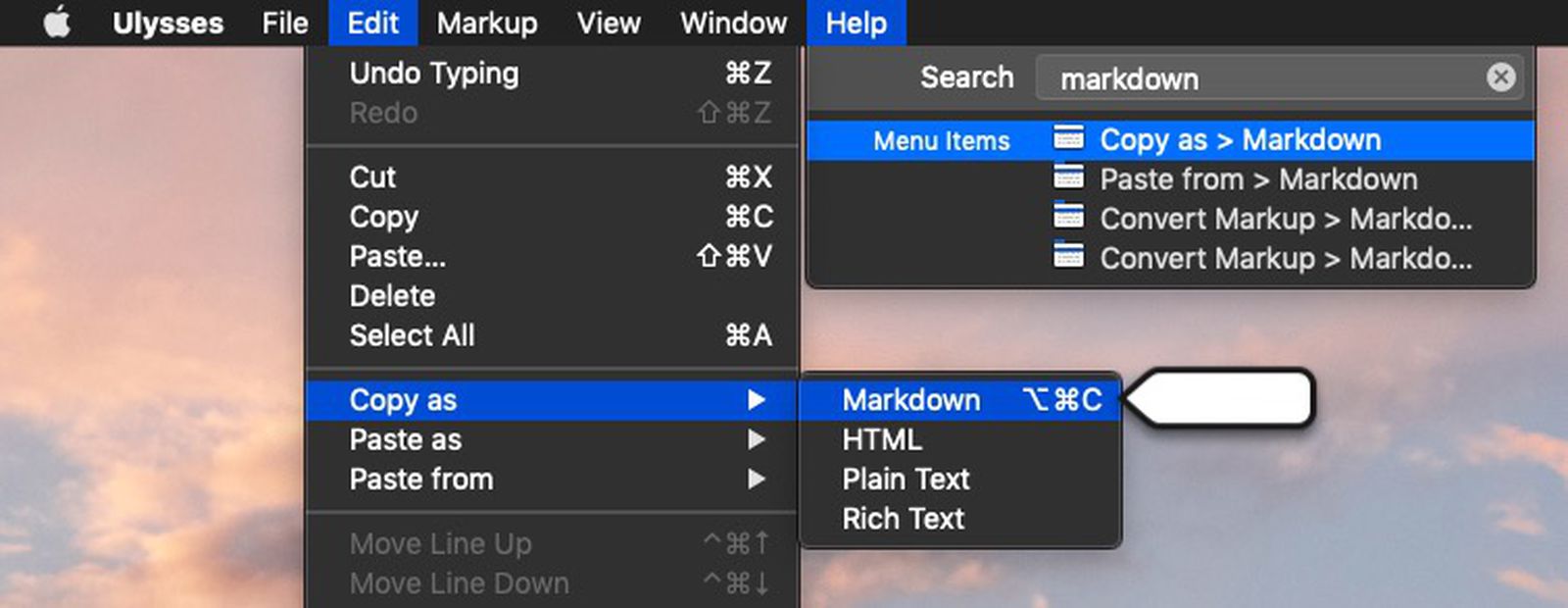
Another benefit that hasn't been mentioned yet is menu bars (e.g. File, Edit, View, Help, etc...) Having a visible menu bar helps with feature discoverability. While it's true that terminal-based editors can have menu bars (e.g. nano), they're more limited overall than what you'll find with native OS menu bars.
What's the limit over native?
But native menus can have buttons, dropdowns, and input boxes.
Also, native menus are more readily explorable by users which teaches them what's possible. It places related functions near each other so the user can be aware of a function that's more applicable to their task at hand rather than the function they would have picked otherwise.
The native menus also include keyboard shortcut indicators and command pallet features which speed up a user's transition into a power user. You can see both here, the user types something in the search box at the top right, and then the relevant menu opens to reveal itself, related features, and keyboard shortcuts: https://images.macrumors.com/t/1nSQeW8SNfCYItiL2GsvvDYL1w0=/...
Re: Helix-gpui: A simple GUI for the Helix editor
#65All we want is a tree explorer :'(
Funny how the maintainers preferred to build a plugin system instead of just the tree explorer, I suspect Helix will lose its biggest feature: no plugins and easy configuration :(
Re: Helix-gpui: A simple GUI for the Helix editor
#66All we want is a tree explorer :'(
That's probably not going to happen as part of the core editor (there's a long discussion about this somewhere on the bug tracker) but should be easy to add using the now work-in-progress plugin system. Scroll down to the Examples section. https://github.com/helix-editor/helix/pull/8675
Re: Helix-gpui: A simple GUI for the Helix editor
#67Earlier quoted context omitted.
What is app detection? Regarding poor key binding support, I think that's not really a problem in modern applications. Quoting https://gpanders.com/blog/state-of-the-terminal/ : > Sending key presses as escape sequences requires that terminal applications are able to recognize and parse those sequences, so it is not something that “just works” out of the box. However, the kitty keyboard protocol has been widely adopt…
App detection is being able to tell which app you're using, e.g., knowing that you're using Helix and not just WezTerm Poor key binding support is still a problem despite the optimistic quote (and might last for one more generation given the snail speed of progress). For example, the kitty protocol isn't "comprehensive" despite its dev's claims: it doesn't support left vs right modifiers and also some non-standard mo…
Re: Helix-gpui: A simple GUI for the Helix editor
#68Earlier quoted context omitted.
What's the limit over native?
To start, terminal editors are limited to text rendering. But native menus can have buttons, dropdowns, and input boxes. Also, native menus are more readily explorable by users which teaches them what's possible. It places related functions near each other so the user can be aware of a function that's more applicable to their task at hand rather than the function they would have picked otherwise. The native menus als…
And the image shows macos menu, you don't get that on Windows
(wondering, can a terminal app edit Mac menu via its terminal emulator gui app?)
Re: Helix-gpui: A simple GUI for the Helix editor
#69Earlier quoted context omitted.
App detection is being able to tell which app you're using, e.g., knowing that you're using Helix and not just WezTerm Poor key binding support is still a problem despite the optimistic quote (and might last for one more generation given the snail speed of progress). For example, the kitty protocol isn't "comprehensive" despite its dev's claims: it doesn't support left vs right modifiers and also some non-standard mo…
The kitty protocol not supporting your stupid made up usecase does not make it non-comprehensive, despite your claims.
Re: Helix-gpui: A simple GUI for the Helix editor
#70Earlier quoted context omitted.
The kitty protocol not supporting your stupid made up usecase does not make it non-comprehensive, despite your claims.
Instead of calling everything you don't understand stupid you could just make some effort to comprehend