Live data from Hacker News

CSS Hat translates Photoshop layer styles to CSS3

csshat.com

71–77 of 77 posts

Re: CSS Hat translates Photoshop layer styles to CSS3

#71
post #2

I wonder how many people still use Photoshop to create mocksups first and then move to HTML/CSS. Ever since CSS3 became popular I create my mockups directly in HTML/CSS3.

I prefer Illustrator, it's more "element-oriented" if you will. Easier to move things around. Even if it's lacking a good UI for styling.

Unfortunately, Illustrator is essentially abandonware at this point. It's so hobbled by design defects and other bugs that you're much better off with Corel Draw, even if you have to run it in a VM on a Mac.

This is just one example:

http://farm3.staticflickr.com/2362/1800773495_d1f776e335.jpg
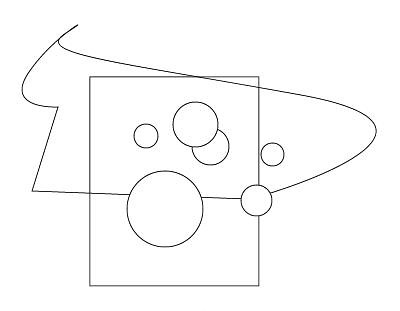
Many (most?) vector-drawing applications let you select only the items that are fully enclosed by a selection rectangle. So if you wanted to select only the circles in that image, you'd need only to draw a selection rectangle around them.

Illustrator gives you no way to do this. Every shape that comes into contact with the selection rectangle (or even the path of the lasso tool) is selected. You can fire up Windows and do the whole thing in Corel Draw in the time you'll waste tediously clicking on everything in Illustrator.

Re: CSS Hat translates Photoshop layer styles to CSS3

#72

Earlier quoted context omitted.

I prefer Illustrator, it's more "element-oriented" if you will. Easier to move things around. Even if it's lacking a good UI for styling.

Unfortunately, Illustrator is essentially abandonware at this point. It's so hobbled by design defects and other bugs that you're much better off with Corel Draw, even if you have to run it in a VM on a Mac. This is just one example: http://farm3.staticflickr.com/2362/1800773495_d1f776e335.jpg Many (most?) vector-drawing applications let you select only the items that are fully enclosed by a selection rectangle. So i…

In your example, why not select the non-circles with one rectangle select, then invert the selection by Shift-rectangle selecting everything?

As an aside, the lasso is a "direct selection" tool, operating on individual paths rather than shapes, not that this helps in your example. But it'd work well if I wanted to select, say, only the bottom side of your rectangle, for essentially the reason you dislike.

Re: CSS Hat translates Photoshop layer styles to CSS3

#74

Hi guys, I'm one of CSS Hat devs and I'd like to thank you for your interest and show a little bit more: This is the output of current version of CSS Hat: http://jsfiddle.net/tomaskafka/ZXgqN/

why '90deg'? using no direction, and otherwise 'to bottom' etc. for the non-prefixed and 'top', 'left' etc. for the prefixed gradients seems easier to understand.

Thanks for an idea - so far we just take the angle Photoshop gives us, but it is true that we could convert it to words when the angle is multiple of 90 degrees :)

Re: CSS Hat translates Photoshop layer styles to CSS3

#75

Hi guys, I'm one of CSS Hat devs and I'd like to thank you for your interest and show a little bit more: This is the output of current version of CSS Hat: http://jsfiddle.net/tomaskafka/ZXgqN/

Offtopic: can I have a Piffle invite? I'm very curious; we try out all these tools all the time at our company and none of them are really good. This looks promising, but that's the outside only for now of course.

Re: CSS Hat translates Photoshop layer styles to CSS3

#76

Hi guys, I'm one of CSS Hat devs and I'd like to thank you for your interest and show a little bit more: This is the output of current version of CSS Hat: http://jsfiddle.net/tomaskafka/ZXgqN/

Offtopic: can I have a Piffle invite? I'm very curious; we try out all these tools all the time at our company and none of them are really good. This looks promising, but that's the outside only for now of course.

Oops - I didn't expect a comment after the initial wave, so I stopped watching the thread. At this time, I cannot advise you anything better than signing up at http://csspiffle.com - you'll be then first to know our news :).

Re: CSS Hat translates Photoshop layer styles to CSS3

#77

Earlier quoted context omitted.

Unfortunately, Illustrator is essentially abandonware at this point. It's so hobbled by design defects and other bugs that you're much better off with Corel Draw, even if you have to run it in a VM on a Mac. This is just one example: http://farm3.staticflickr.com/2362/1800773495_d1f776e335.jpg Many (most?) vector-drawing applications let you select only the items that are fully enclosed by a selection rectangle. So i…

In your example, why not select the non-circles with one rectangle select, then invert the selection by Shift-rectangle selecting everything? As an aside, the lasso is a "direct selection" tool, operating on individual paths rather than shapes, not that this helps in your example. But it'd work well if I wanted to select, say, only the bottom side of your rectangle, for essentially the reason you dislike.

That works only in a simple example like this, where you can make contact with all of the undesired objects without making contact with the desired ones. This is almost never the case in a real-world illustration.
Post reply on HN