Live data from Hacker News

NotepadNext – a cross-platform reimplementation of Notepad++

github.com

151–160 of 317 posts

Re: NotepadNext – a cross-platform reimplementation of Notepad++

#151
Damn this app is so fast. It handles 24x War and Peace without sweating a bit. Much faster than Sublime as well. The only thing with equivalent performance (on macOS) is BBEdit. Does anyone know how they are able to load such large files so fast? I guess they lazy load from disk as well?

I'm writing a block editor in Qt C++ (Npp is also written in Qt) and QML[1], so I'm very curious. I load the entire text and then render it using a virtualized list (ListView). My app is currently the fastest block editor that I've tested. But I always want to take it up a notch and even compete in performance with Sublime and BBEdit, and now NotepadNext.

[1] https://www.get-plume.com/

EDIT: It's REALLY fast and very efficient (consumes low amount of memory). Seems to be faster than BBEdit (unscientific). If anyone has a clue about the architecture or can share a link, it will be appreciated.

Re: NotepadNext – a cross-platform reimplementation of Notepad++

#152

I very much miss Notepad++ for making quick notes, and then being able to close the window without being asked whether I'd like to save the document. This, and auto-save (so not losing documents if you forget to save) is one of the main reasons I replaced Notepad with ++. Rather quickly, I found that I had to completely remove Notepad so muscle memory would stop guiding me to it. Good times (and sad ones; I lost a lo…

You probably already know this. VSCode has both autosave and hot exit features.

If you quit the application when hot exit is enabled, it will restore all windows the next time you start it.

I don't see any way to close individual windows without prompting but you can do command+w and then command+d to "Don't Save".

Re: NotepadNext – a cross-platform reimplementation of Notepad++

#153

I very much miss Notepad++ for making quick notes, and then being able to close the window without being asked whether I'd like to save the document. This, and auto-save (so not losing documents if you forget to save) is one of the main reasons I replaced Notepad with ++. Rather quickly, I found that I had to completely remove Notepad so muscle memory would stop guiding me to it. Good times (and sad ones; I lost a lo…

You probably already know this. VSCode has both autosave and hot exit features. If you quit the application when hot exit is enabled, it will restore all windows the next time you start it. I don't see any way to close individual windows without prompting but you can do command+w and then command+d to "Don't Save".

Oh yeah, VSCode's autosave has saved me hours in otherwise-lost code. I do make frequent use of its hot-exit functionality, too.

While that's great, I wish the same thing existed for a lightweight Notepad-esque app, too: I used ++ a lot for quickly jotting down information while it was being read to me (so, on the phone); having to start a full-blown IDE for this seems wasteful, and not the right tool for the job.

Perhaps the solution is just to leave VSCode open all the time, but that wouldn't work either: whenever I switch workspaces, I'm asked whether I'd like to save the unsaved files (so, just like Kate), and it can be quite resource intensive. Grr.

Re: NotepadNext – a cross-platform reimplementation of Notepad++

#154
post #137

Earlier quoted context omitted.

It has been a suggested/encouraged default behavior on the Mac for many years at this point.

It’s just yet another thing Apple gets right: why would the default be to NOT keep what you just put into the computer?

It seems to be the modern way, and normal on mobile apps, and I can't stand it. Why would I want the computer to save what I wrote without asking? I like being asked. I dislike computers trying to be clever.

Re: NotepadNext – a cross-platform reimplementation of Notepad++

#155
Shameless plug: I'm working on a multi-platform code editor similar to NP++ and some new editors like Zed called ecode, that tries to be a fresh take on code editors using some modern tools and technologies like LSPs. I started working on it after using Geany for many years but finding Geany lacking some essential features for my needs. ecode is developed with speed in mind and has a very fast startup time.

[1] https://github.com/SpartanJ/ecode/

Re: NotepadNext – a cross-platform reimplementation of Notepad++

#156
post #5

Awesome. When I moved to linux a few years ago notepad++ was one of the harder apps to find a replacement for. I ended up sticking with Kate Edit: Kate is great, give it a shot!

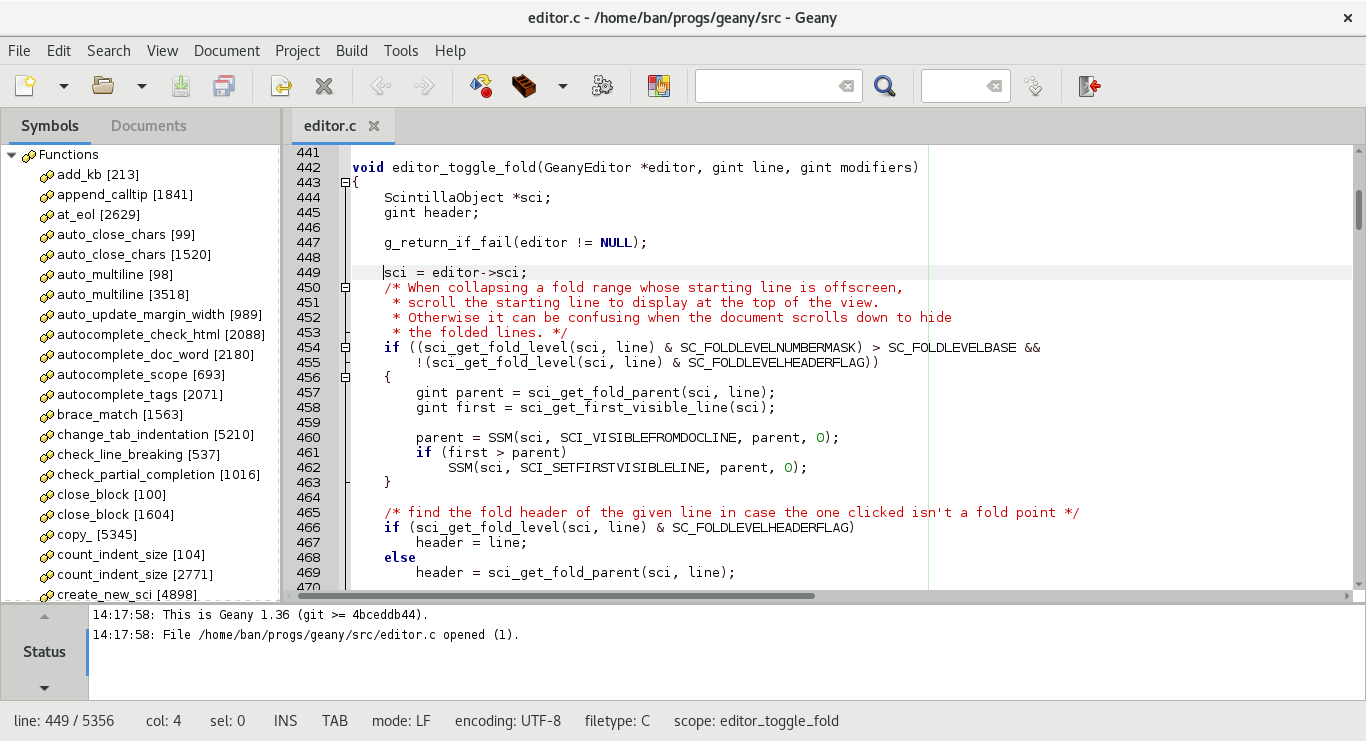
There is https://www.geany.org

Yeah, but Notepad++ is a Windows app, that is a GTK app.

As someone coming from Windows, it's crazy how bad GTK apps look for desktop. Crazy. Like I can't comprehend how did it get to this point.

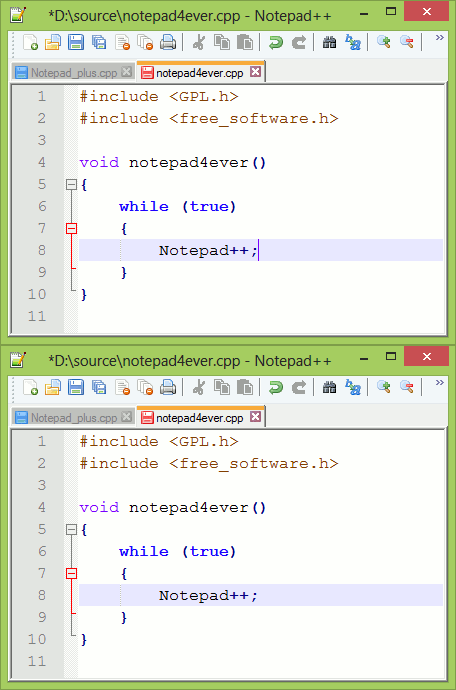
Just compare the screenshots

https://www.geany.org/media/uploads/screenshots/geany_light_...

https://notepad.plus/wp-content/uploads/2023/03/screen.gif

Notepad has 16 toolbar buttons in the same amount of width that GTK can only fit 10 toolbar buttons. The height of the tabs and status bars are also MUCH shorter. It's completely ridiculous and makes every GTK app look bad to me. Not just Geany, but Xed, Pluma, Gedit, the image viewers, the file managers, the system settings dialogs, etc. I have a mouse. I can point at things. I'm not using my thumbs or toes to operate a desktop app.

Qt's licensing sounded a bit weird. At first I thought your app HAD to be open source to use it. But once it was clear to me that you can sell apps made with Qt so long as you dynamically link without having to pay royalties or anything, the choice was clear. If I have to program an app for Linux, I'm using Qt.

And so far the only problem I found in Qt is that it uses the system's "native" GUI by default (i.e. it uses Gtk on Linux). This means that the Ok-Cancel buttons are Cancel-Ok instead of the correct order. Who puts Ok buttons at the right side? Now if I want to quickly close something, I'm clicking at the corner of the window which is the easiest point to click at, and on the top right I have close (which cancels) and at the bottom right I don't have cancel but Ok which COMMITS which is the opposite of what a thoughtless rash speedy click is supposed to do. Ok should be at the left so you can't commit things by accident. The only reason to put it on the right is if you're designing for tablets so the ok button is closer for right-handed users. This isn't how a decision for a desktop-oriented design.
Re: NotepadNext – a cross-platform reimplementation of Notepad++

#157

Just to provide a diversity of opinion: I've heard basically nothing but positive feedback about Notepad++ over the years. However, I tried it out for about 10 seconds before closing it and never looked back. The, what I call "millions of tiny buttons" interface is ugly and distracting. I've never liked IDEs or other apps with this UI style. I use a JetBrains IDE now that has just as many features but the UI is not c…

Takes one second to disable all that. I've used notepad++ forever and not once have I used those buttons, indeed they are useless. Your opinion is valid but I never understand using a tool with options and acting like the defaults are the only option.

That is true, but it takes more than 1 second to find out about it.

Re: NotepadNext – a cross-platform reimplementation of Notepad++

#158

Earlier quoted context omitted.

The new Jetbrains ui is hard to like. It’s form over function. The old ui (thankfully still available). Having to hover over a hamburger button just to cause it to draw the menu bar options then slide the mouse across to what you want is annoying. The new commit window alt+0 is better, the old modal always felt tacked on when everything else is a docked panel.

I tried it. The first week I shared your opinion. But then something flipped. I configured and learned hotkeys to hide the file/services/... pane and ended up with something I can only describe as 'calm'. Only 1 or 2 panes of code visible, and all functions hidden but available. The main detractor is indeed the hamburger menu. Vscode had ctrl-p, emacs has alt-x, and both provide a way to search for some function to e…

Interestingly in the JetBrains emacs keybindings set, alt-x does exactly what you want. So, it's bindable, and you can use it in ANY keybinding, emacs or not.

Re: NotepadNext – a cross-platform reimplementation of Notepad++

#160

The startup speed for this app is really good. From my quick testing it seems like it is as fast or slightly faster than npp. I am surprised that QT can be that fast. I recall this line from the Sumatra PDF developer on why he chose win32 only: >The only way for one person to even attempt cross-platform app is to use a UI abstraction layer like Qt, WxWidgets or Gtk. >The problem is that Gtk is ugly, Qt is extremely b…

Sumatra is such an awesome piece of software, small, fast, almost entirely bug-free, incredible load speeds for large pdfs... my Linux alternative is Evince, which does about the same
Post reply on HN