The SpaceFN concept – setting up your space key as a layer switch
1–10 of 17 posts
Re: The SpaceFN concept – setting up your space key as a layer switch
#2[deleted]
Re: The SpaceFN concept – setting up your space key as a layer switch
#3Yeah, this isn't for me. I'm one of the degenerates the article mentions that often uses autorepeat on the spacebar (in fact, I usually only use autorepeat for three things: spaces, '-', and '=').
The article briefly addresses this, but only says that you're a terrible person if you do this, without explaining why. I'm curious about why I shouldn't, and what I should do instead.
Re: The SpaceFN concept – setting up your space key as a layer switch
#4This reminds me of the NeXT ADB keyboard that has 'Command' as a bar under the spacebar[1]. I appreciate the utility of remapping 'space' as a layer switch, but I would prefer not to have to unlearn 40 years of spacebar usage. I could see enjoying implementing this on a separate key that I can still whack with my thumb-- just not a key that falls within the standard ANSI PC layout.
1. https://deskthority.net/wiki/images/8/87/NeXT_ADB_keyboard.j...
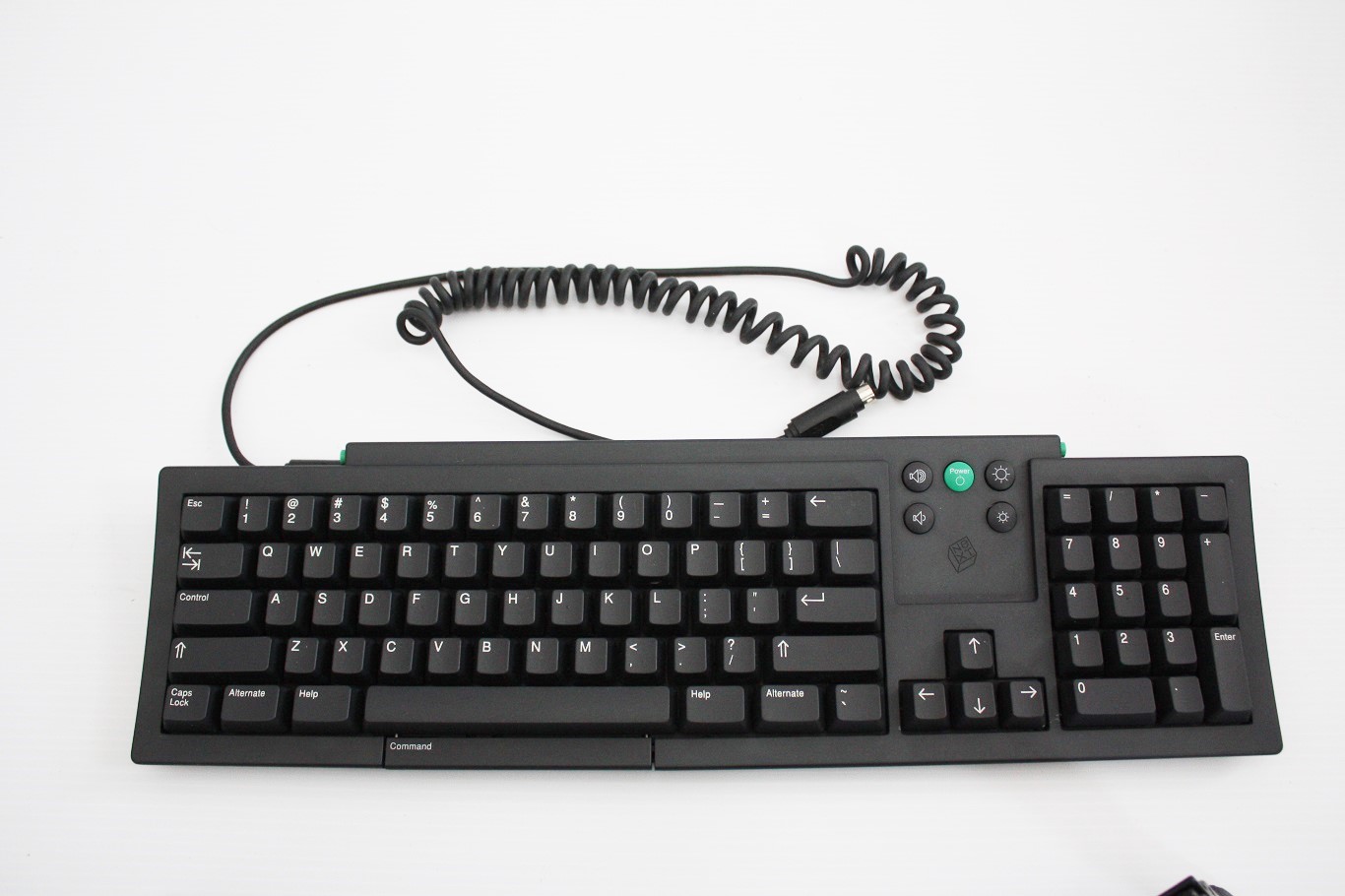
Re: The SpaceFN concept – setting up your space key as a layer switch
#5Yeah, this isn't for me. I'm one of the degenerates the article mentions that often uses autorepeat on the spacebar (in fact, I usually only use autorepeat for three things: spaces, '-', and '='). The article briefly addresses this, but only says that you're a terrible person if you do this, without explaining why. I'm curious about why I shouldn't, and what I should do instead.
What is the case where you need to type lots of spaces? Usually tab is a better fit for this (not the tab character, but the tab button on the keyboard).
Re: The SpaceFN concept – setting up your space key as a layer switch
#6Yeah, this isn't for me. I'm one of the degenerates the article mentions that often uses autorepeat on the spacebar (in fact, I usually only use autorepeat for three things: spaces, '-', and '='). The article briefly addresses this, but only says that you're a terrible person if you do this, without explaining why. I'm curious about why I shouldn't, and what I should do instead.
What is the case where you need to type lots of spaces? Usually tab is a better fit for this (not the tab character, but the tab button on the keyboard).
Typically, formatting plain text documents that aren't source code. I also want to use the tab key to make a tab character, though. I suppose that I could reprogram the tab key so that holding it down repeats spaces, but that's straying too far afield for my tastes.
I can see how this scheme would be excellent for some, but for me, I'm pretty sure that I'd be happier making the fn key something else.
Re: The SpaceFN concept – setting up your space key as a layer switch
#7Yeah, this isn't for me. I'm one of the degenerates the article mentions that often uses autorepeat on the spacebar (in fact, I usually only use autorepeat for three things: spaces, '-', and '='). The article briefly addresses this, but only says that you're a terrible person if you do this, without explaining why. I'm curious about why I shouldn't, and what I should do instead.
I've tried SpaceFn on a standard 65% keyboard with one spacebar, and I'm not a big fan of the experience. I found it difficult to get the timing right between registering press vs hold.
However, on a board with two spacebars — like Keebio's Quefrency or Sinc, or an Alice/Arisu board — I love it. I use my right thumb for space most of the time, so it's just a regular space key, and my left space is set up in SpaceFn style. Fn-B is a repeatable space key if I need it on that side but I hardly do.
I'm also weird in that I like to have the same modifiers on both sides, especially on keebs split in two. On a 65% with one spacebar, I use the Caps Lock key for left Function, and the bottom key of the rightmost nav column is End on press and Function on hold.
Control on Caps Lock is what gives me Emacs pinky for whatever reason. I keep two Control on the corners.
Re: The SpaceFN concept – setting up your space key as a layer switch
#8Yeah, this isn't for me. I'm one of the degenerates the article mentions that often uses autorepeat on the spacebar (in fact, I usually only use autorepeat for three things: spaces, '-', and '='). The article briefly addresses this, but only says that you're a terrible person if you do this, without explaining why. I'm curious about why I shouldn't, and what I should do instead.
QMK, one of the keyboard configuration tools referenced by the article, has the "quick tap term" feature that handles this:
> When the user holds a key after tapping it, the tapping function is repeated by default, rather than activating the hold function. This allows keeping the ability to auto-repeat the tapping function of a dual-role key.
ref. https://github.com/qmk/qmk_firmware/blob/master/docs/tap_hol...
I use both space and backspace (in the caps lock position) as dual-function keys and find it very usable when I occasionally want to repeat-tap them.
Re: The SpaceFN concept – setting up your space key as a layer switch
#9This reminds me of the NeXT ADB keyboard that has 'Command' as a bar under the spacebar[1]. I appreciate the utility of remapping 'space' as a layer switch, but I would prefer not to have to unlearn 40 years of spacebar usage. I could see enjoying implementing this on a separate key that I can still whack with my thumb-- just not a key that falls within the standard ANSI PC layout. 1. https://deskthority.net/wiki/ima…
I never had the pleasure of trying one of those keyboards. The 6–7u-long spacebar is a trapping of its typewriter heritage just like QWERTY and staggered keys.
Even on their full-size keyboards with numpads, Apple spacebars are only 5 keys wide. Thumbs are for Command!
Even better: split spacebar! On my daily driver I only have a 1.25u key for my primary space. On the left I have a luxuriously large 2.25u SpaceFn key.
Re: The SpaceFN concept – setting up your space key as a layer switch
#10Yeah, this isn't for me. I'm one of the degenerates the article mentions that often uses autorepeat on the spacebar (in fact, I usually only use autorepeat for three things: spaces, '-', and '='). The article briefly addresses this, but only says that you're a terrible person if you do this, without explaining why. I'm curious about why I shouldn't, and what I should do instead.
You can still use it to make it as easy - add a space mode key to add 4 spaces and another one for 8 spaces, which is more precise for indent vs holding spacebar, and also as precise for non-multiple alignment with a backspace or two (also within space mode)