I’m trying to come up with the best 3/2/1 solution for me. Two forms of storage seems bizzare, are people really backing up to tapes? What does that workflow even look like? What about your offsite? Backblaze b2 seems expensive compared to backing up on a big external drive off site at my desk at work.
Home Lab Beginners guide
131–140 of 400 posts
Re: Home Lab Beginners guide
#132A bit of a tangent but I want to sing the praises of Proxmox for home servers. I've run some sort of Linux server in my home for 25 years now, always hand-managing a single Ubuntu (or whatever) system. It's a huge pain. Proxmox makes it very easy to have multiple containers and VMs on a single hardware device. I started by just virtualizing the one big Ubuntu system. Even that has advantages: backups, high availabili…
>Proxmox makes it very easy to have multiple containers and VMs on a single hardware device I just wish there was something like Unraid's Docker support but in a FOSS distro. Proxmox with LXC is just not the same. Unraid is good, love the UI and easyness too but the proprietary paid Linux is just something I don't like.
FWIW https://tteck.github.io/Proxmox/ has a docker LXC container. A bit meta but works fine for my use cases. But I agree with your general point.
Re: Home Lab Beginners guide
#133The article is good, but it is intimidating buy its size and scope. A homelab could be a single NUC on a desk. I have one with 64GB RAM and it could fit so so many things. NUCs are very efficient to run 24/7, but become noisy with sustained CPU load. For that one could grow the setup with OptiPlex or Precision Tower (can haz ECC) SFF from eBay. These Dell SFFs are very good, quite small yet proper desktops/servers wi…
In addition to that, I don't think people should overthink the rack as an essential component. I like racks as much as the next guy and homelab racks look really cool but for usability and learning, just go with whatever you like. I personally have 4 boxes stacked in a corner that are connected to a "rack", which is just two rack side panels bolted to the back of a workbench that I screw components into, connected to…
In the spirit of "your setup, should be your setup. As traditional or as custom as you’d like!" as mentioned in article, I went with a vertical mount rack. It's not enclosed so it has enough ventilation.
The advantage with a vertical rack for me was space savings. Key parts of my home lab are near the low voltage panel (lucky to have in newer house) which does have foot traffic from other household members. Much less risk of someone bumping into the rack.
Re: Home Lab Beginners guide
#134This looks really cool, but the title has to be a joke right? This is not 'beginner'.
I have a beginner setup: a single NUC and a cheap NAS with NFS.
I have yet to come across something that this setup cannot handle.
Re: Home Lab Beginners guide
#135A bit of a tangent but I want to sing the praises of Proxmox for home servers. I've run some sort of Linux server in my home for 25 years now, always hand-managing a single Ubuntu (or whatever) system. It's a huge pain. Proxmox makes it very easy to have multiple containers and VMs on a single hardware device. I started by just virtualizing the one big Ubuntu system. Even that has advantages: backups, high availabili…
>Proxmox makes it very easy to have multiple containers and VMs on a single hardware device I just wish there was something like Unraid's Docker support but in a FOSS distro. Proxmox with LXC is just not the same. Unraid is good, love the UI and easyness too but the proprietary paid Linux is just something I don't like.
Especially now with the rumors of Unraid moving from pay-once to an annual subscription model.
Re: Home Lab Beginners guide
#136A bit of a tangent but I want to sing the praises of Proxmox for home servers. I've run some sort of Linux server in my home for 25 years now, always hand-managing a single Ubuntu (or whatever) system. It's a huge pain. Proxmox makes it very easy to have multiple containers and VMs on a single hardware device. I started by just virtualizing the one big Ubuntu system. Even that has advantages: backups, high availabili…
Proxmox is incredibly helpful especially for homelab beginners familiar with Linux. You can easily create and destroy various things as you learn. Only thing that's not so easy to use is storage in general : it's very difficult to truly understand the consequences of various choices and therefore it's kinda difficult to properly set up the backbone of a NAS unless you're fairly comfortable with zfs, lvm, lvm-thin, re-partitioning things, etc..
Re: Home Lab Beginners guide
#137The article is good, but it is intimidating buy its size and scope. A homelab could be a single NUC on a desk. I have one with 64GB RAM and it could fit so so many things. NUCs are very efficient to run 24/7, but become noisy with sustained CPU load. For that one could grow the setup with OptiPlex or Precision Tower (can haz ECC) SFF from eBay. These Dell SFFs are very good, quite small yet proper desktops/servers wi…
My first homelab thing was a laptop with a broken monitor. It wasn't terribly hard to get Ubuntu server working on there, it had a gigabit ethernet port built in, and it had USB 3.0 so it wasn't too hard to get reasonably good hard drive speeds to use as a NAS.
You can buy old used laptops (especially with broken monitors) for basically nothing (or maybe literally nothing if you already have one, or you have a friend of family member who has one they're willing to donate). If your goal is just to use it for Plex, it will work fine, and the power draw on laptops (particularly when idle) isn't that much more than a NUC.
I use a proper rack mount server now largely because I thought they were neat, but I think for most people an old laptop is fine.
Re: Home Lab Beginners guide
#138I have a lab, and I had a lot of configuration state that was annoying to maintain and fragile. I switched to vmug because it has a semi decent terraform provider and I now put most things in TF.
TF to bootstrap vms + rke cluster. TF to deploy helm charts. Still some per app config/backups to mange but I just copy container volumes to all the machines in the cluster with the csi plugin and then back everything up to zfs nas via truenas on NFS.
Runs primarily on 3 dell rx30 series, and then my desktop and htpc are also in vsphere running gpu centric things when I'm not gaming with them.
Vmug is pretty perfect for this -> $180/yr = 16 or 36 physcial sockets.
Re: Home Lab Beginners guide
#139The article is good, but it is intimidating buy its size and scope. A homelab could be a single NUC on a desk. I have one with 64GB RAM and it could fit so so many things. NUCs are very efficient to run 24/7, but become noisy with sustained CPU load. For that one could grow the setup with OptiPlex or Precision Tower (can haz ECC) SFF from eBay. These Dell SFFs are very good, quite small yet proper desktops/servers wi…
[dead]
Re: Home Lab Beginners guide
#140The notion of a homelab is really, more of a suggestion. I have, what you might call, a "homeprod."
"Be aware, the video server and sync server will be offline between the hours of 8PM and 10PM on Friday, March 8th for hardware upgrades. Expected downtime should not be more than 20 minutes but please plan around this disruption to essential services. Other services should not be affected during this work."
Like someone else mentioned in this thread: It was really best described as a "home network with more than one computer." But you can't really put that on your C.V. under "experience."
"Improved SLA uptime on client's network to five nines. Upgraded storage controllers in a live environment without disruption to established services. Deployed k8s cluster into a production environment serving thousands of hours of compressed video files with real-time format transcoding."
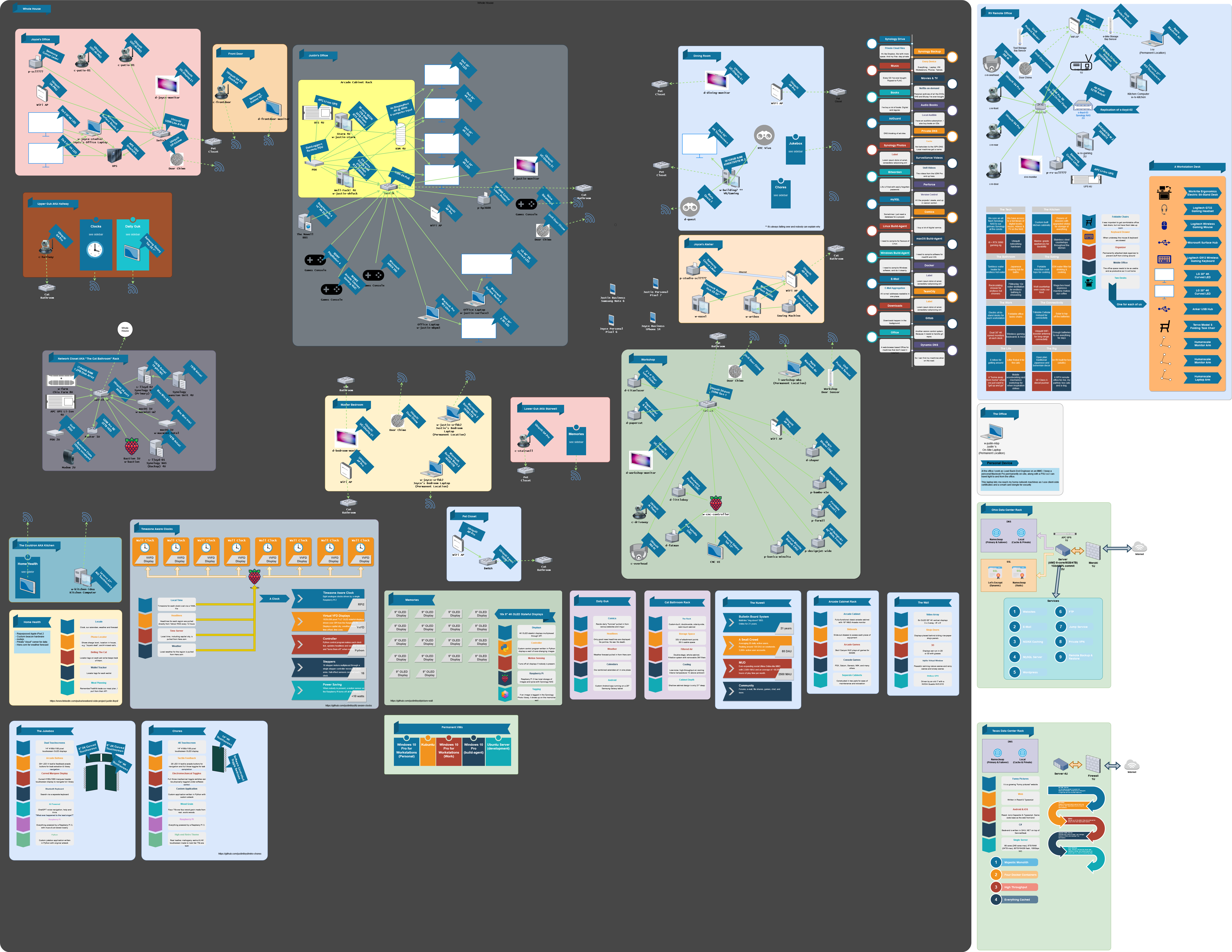
I will freely admit, my home network probably needs to be pared down a bit. The problem is the salvaged hardware and good deals at the liquidation auctions accumulates faster than I can cart it off to the street corner. There's also far too many laptops floating around the house doing nothing useful that could be donated away. A lot of the homelab is salvage or bought at (in-person) liquidation auctions. There's some new stuff, but I rarely need the latest and greatest for my setup. In my home network diagram I try to document everything that touches the network so I can stay on top of the security patches, and what has access to the outside world and in what way.
https://justinlloyd.li/wp-content/uploads/2023/11/home-netwo...