Live data from Hacker News

Home Lab Beginners guide

linuxblog.io

121–130 of 400 posts

Re: Home Lab Beginners guide

#121

I have two 4GB rockpro64 with the NAS case on my closet. Each with an SSD raid. There are no fans in this setup and the SBCs don’t take much space. No heat either. More than happy with these, good uptime too. Tow-boot gives me an UEFI environment so I can use some normal distros so I use the latest Fedora server.

Whats your raid setup with the ssds? I see 4tb ssd have marched down to $200. Would be nice to never hear spinning rust again.

Re: Home Lab Beginners guide

#122
post #83

Earlier quoted context omitted.

The big problem with off-lease enterprise hardware is the power usage can quickly outrun the original costs - but that may not be an issue for everyone. The nice thing about off-lease enterprise hardware is there is so much of it, and it's enterprise. You can easily find replacement parts, and working on that stuff is a joy, everything is easily replaceable with no tools.

For the price of an 8th gen off lease pc on ebay you can buy a new alder lake N minipc with 6 tdp.

[deleted]

Re: Home Lab Beginners guide

#123
post #3

what would be the typical use of such a lab? Why are so many different components needed?

For me, mostly for experimentation with networking. For a practical example: most of my complaints and gripes with IPv6 stem from trying to actually run an IPv6 network. And realizing that folks proclaiming that IPv6 is ready for everyone probably hasn't tried to administer a non-trivial network. Or they're getting enterprise vendor help.

Looks like the author of the story is also dabbling into reliability engineering as well; having hardware can be a little helpful for that too since there's often vendor quirks as well.

Re: Home Lab Beginners guide

#124
post #39

The article is good, but it is intimidating buy its size and scope. A homelab could be a single NUC on a desk. I have one with 64GB RAM and it could fit so so many things. NUCs are very efficient to run 24/7, but become noisy with sustained CPU load. For that one could grow the setup with OptiPlex or Precision Tower (can haz ECC) SFF from eBay. These Dell SFFs are very good, quite small yet proper desktops/servers wi…

In addition to that, I don't think people should overthink the rack as an essential component. I like racks as much as the next guy and homelab racks look really cool but for usability and learning, just go with whatever you like. I personally have 4 boxes stacked in a corner that are connected to a "rack", which is just two rack side panels bolted to the back of a workbench that I screw components into, connected to…

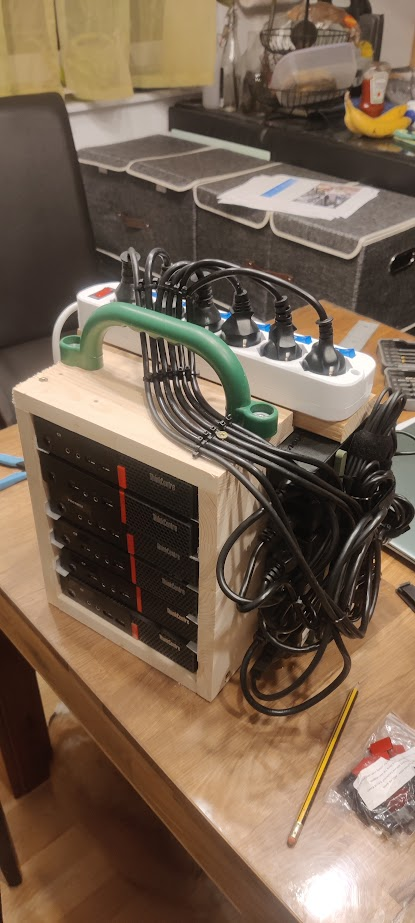
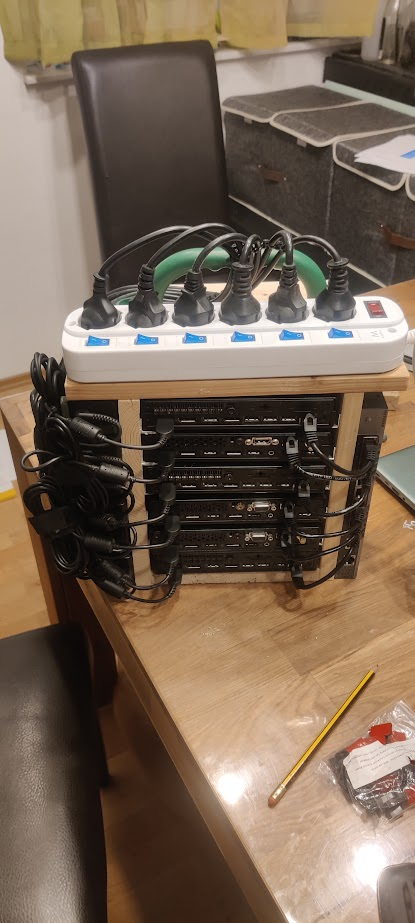
I did just the same. Built myself a little movable 6 node rack out of wood.

With 3d printed powerbrick holders on the sides and a switch with a 10g uplink so all servers can use the full 1g nic.

Warms my home office in the colder months and can be put in the garage on the warmer months.

Photo front: https://pictshare.net/qi7zv2.png

Photo back: https://pictshare.net/llloiw.png

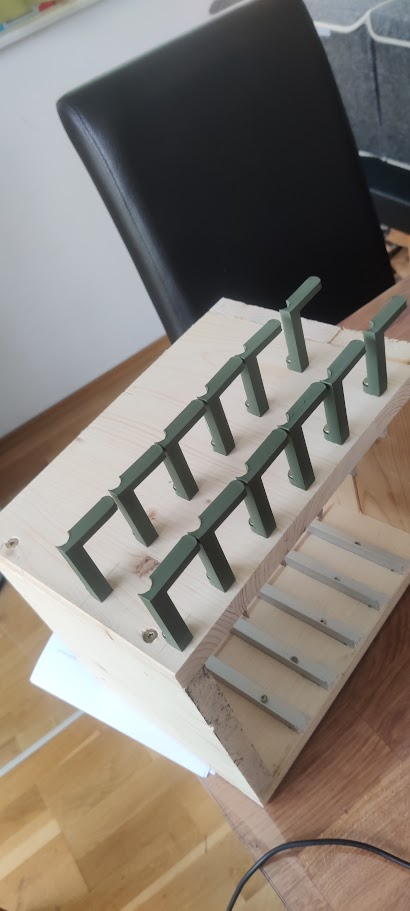
Photo of the 3d printed power brick holders: https://pictshare.net/kgffy6.png

[edit] Specs:

- 80 Watts during normal load

- 50 cores

- 9TB nvme storage

- 300GB RAM

- 3 of them are running proxmox

- 3 of them Docker swarm

Re: Home Lab Beginners guide

#125
post #3

what would be the typical use of such a lab? Why are so many different components needed?

I'll dogpile on here with my uses:

- AdGuard / PiHole - Plex server (plus the whole suite of *arr -- I gave up Netflix during the password sharing debacle) - Home Assistant (I'm on a huge data-ownership crusade this year) - Stats tracking for my car (TeslaMate -- this is such an amazing piece of software cannot recommend it enough if you've got a Tesla) - general tinkering

I'm currently building a house as well and I plan on deploying a way more complicated networking setup (full-ubiquiti) so I can get rid of all my internet-connected security devices (cams and doorbell for example).

Honestly... I used to build PCs (I still do when I need one) and now this fills that gap for me. I spend way too much money on it and it makes me happy 'cause I'm having fun. I get to tinker and break things in the privacy of my home. I get to learn about Linux administration (this is honestly the least fun part) and networking.
Re: Home Lab Beginners guide

#126
post #3

what would be the typical use of such a lab? Why are so many different components needed?

Personally I run frigate, gitea, jellyfin, file storage, and a bunch of other minor test environments. I find it highly convenient personally, I have a data cap so moving large stuff files around happens over 10gbe locally instead of over the internet to aws or whatever. It's also all mine so from a security and privacy perspective it has a lot of advantages.

Do you do any offsite backup?

Re: Home Lab Beginners guide

#127

Earlier quoted context omitted.

This could almost be me. The main difference is my "server" is an off-lease Dell Micro PC that I maxed out the RAM on running ProxMox with a mix of VMs with everything stored on a Synology NAS all sitting in my basement office closet. I have tailscale setup so I can access it remotely.

I see this a lot with certain home labs. A ton of ram for vms. Why not just run on the metal?

Easier to mess with or reinstall OS remotely if you're not sitting in front of it, I'd imagine. Also can be easier to back up the whole system or take a snapshot of the system state, or nuke it and start over if you really screw it up.

I've dabbled with VMs for test environments but generally just install on bare metal.

Re: Home Lab Beginners guide

#128
post #83

Earlier quoted context omitted.

The big problem with off-lease enterprise hardware is the power usage can quickly outrun the original costs - but that may not be an issue for everyone. The nice thing about off-lease enterprise hardware is there is so much of it, and it's enterprise. You can easily find replacement parts, and working on that stuff is a joy, everything is easily replaceable with no tools.

For the price of an 8th gen off lease pc on ebay you can buy a new alder lake N minipc with 6 tdp.

Some people even use an Alder-Lake-N miniPC as a "user-facing machine" (i.e., as the only computer in the room). I do, and I love it so far (after about 45 days of using it) because it doesn't have a fan to make noise and gradually become noisier as the machine ages.

My guess is that if I was used to a much faster machine, then the machine's slowness would bother me, but it in fact does not bother me. (The machine has an NVMe interface, and I have a fast SSD in there. I have the N100 CPU because I couldn't find the N200 or the i3-N305 for immediate delivery from a non-Chinese manufacturer.)

Re: Home Lab Beginners guide

#130
At the risk of yucking others' yum; I wish there was more of an effort to get people to do this sort of thing without buying new equipment (including perhaps the reduction of of the idea that you need/want a "rack")

There are just SO MANY perfectly good computers that are bound to be e-waste that would be good for this.

Post reply on HN