Nice. I often use pgf tikz but the syntax is very convoluted. I like how Penrose separate substance from the rest.
Penrose – Create diagrams by typing notation in plain text
101–110 of 124 posts
Re: Penrose – Create diagrams by typing notation in plain text
#102This is the type of thing I want to use AI for. Beautiful tool, but this looks daunting.
Yeah, definitely a fair critique. Actually, we have been researching the usage of LLMs to generate Penrose diagrams! We presented a poster on this at SPLASH 2023 in October: https://2023.splashcon.org/details/splash-2023-Posters/14/Ge... I'm not sure if Rijul updated his poster before the conference, but here's a photo of it from a different poster session in August (hopefully this Discord media link works): https://cdn.discordapp.com/attachments/1136758988751503381/1...

Re: Penrose – Create diagrams by typing notation in plain text
#103I have always found "diagrams as code" tools to be limiting. There will be that scenario where the generated diagram is not what you expected. The flexibility you get by using code is outweighed by these limiting scenarios. I switched to Mermaid.js but ended up switching back to normal diagramming tools because of these limitations.
Right; there seem to be cross-cutting benefits and drawbacks for declarative text-based specification of diagrams vs direct manipulation. One research project exploring this tension is Sketch-n-Sketch https://ravichugh.github.io/sketch-n-sketch/ which tries to combine both together in a single system via bidirectional programming. We've been wanting to explore similar ideas more in Penrose, but it's definitely challenging.
Barring bidirectionality, another possibility could just be to make it easier to integrate Penrose into existing workflows; for instance, if you're writing a LaTeX document then it'd be nice to have a package for Penrose diagrams rather than having to switch back and forth between your LaTeX editing environment and the Penrose editor.
But then, let's say you make a Penrose diagram and you want to tweak it in Illustrator to make it look better, because as you mentioned, the text-based input modality of Penrose is limited. So we could try to make it smoother to export Penrose diagrams to put in Illustrator. You edit the diagram and add it to your LaTeX document. But now, you decide you want to make a tweak to the original diagram by modifying the Penrose source code. This obliterates any changes you made in Illustrator, so now you have to manually repeat the tweaks you already made.
I'm not really sure what the best solution is... it seems hard to have a good workflow story without either being entirely text-based, supporting bidirectionality, or forcing a lot of repetitive manual rework when edits are made.
Re: Penrose – Create diagrams by typing notation in plain text
#104Is this actually affiliated with Roger Penrose? Seems extraordinarily rude to use his name otherwise. Was his permission sought? In fact, this may be seen as "passing off" in English law.
Not affiliated with Roger Penrose; we often hear this question about our project name: https://news.ycombinator.com/item?id=36749211 As Nimo mentioned in a response to that linked thread, we're open to suggestions for alternate names if a different one would better suit the project!
Re: Penrose – Create diagrams by typing notation in plain text
#105My MetaPost-ed head hurts a bit while looking at three different files to generate one drawing - can't help it, MetaPost feels like writing in prose. Can't tell if they share the same syntax, but it's interesting that most of it looks like CSS with superpowers
True! Splitting every single diagram into three files feels quite heavy. For Penrose version 4.0, we're planning to combine all our DSLs into one so that they can be mixed together in one file.
Re: Penrose – Create diagrams by typing notation in plain text
#106Thats pretty cool. Ran out of memory on my browser though.
Yeah, this is unfortunately a big pain point right now. Every time you click "compile" we allocate a new Wasm memory to use for running the optimizer. But garbage collectors in current browsers get confused when there are lots of these large Wasm memories floating around; I'm not entirely sure why, but I think it's because the GC engine doesn't correctly conceptualize how big the Wasm memories actually are, so they don't try to collect them as aggressively as they should. We're currently seeing if we can alleviate this issue by reusing the Wasm memory from compile to compile, but that's a bit tricky in the presence of concurrency (we're also trying to move computation from the main thread into a web worker). In future versions, we might try to sidestep this issue by just using the new Wasm GC that landed in Chrome recently, but for that we'd probably have to wait a bit longer until it's also supported in, e.g., mobile Safari.
Re: Penrose – Create diagrams by typing notation in plain text
#107[deleted]
Re: Penrose – Create diagrams by typing notation in plain text
#108A lot of replies here are missing the key idea behind Penrose: that the "substance" and "style" of any mathematical diagram are separable. For example, the "substance" of a diagram might be a collection of sets with known subset relationships: Set A, B, C IsSubset(B, A) IsSubset(C, A) That same substance can then be rendered in many different styles, e.g. as a Venn diagram or as a tree diagram (substance vs. style is…
This makes sense! However, as I've commented on other software like this, why are none of the examples style-free Venn diagrams? That is, black on white 3 circle overlapping each other in pairs with a single shared triangle intersection at center? I apologize if one of these is already present. Style has little value there since it may obscure reality.
I think upset diagram would be even better. https://upset.app/
Re: Penrose – Create diagrams by typing notation in plain text
#109The caffeine example is laughable. https://penrose.cs.cmu.edu/try/?examples=structural-formula/...
Yeah :( To be honest, I think we got a bit overeager about this one, since none of us on the project are chemistry experts. At least for the front page, we should probably replace that with a different diagram from our registry.
I think this is actually a fairly deep issue with our approach where we try to express everything in terms of numerical optimization, pairwise energies on shapes, etc. Especially since Style is not a Turing-complete programming language and also doesn't support calling out to existing libraries written in, e.g., JavaScript, there isn't a way to do actually-correct layout of the caffeine molecule, so instead we do the "lazy" thing and just try to make the atoms not overlap. To anyone who actually knows what a caffeine molecule looks like, obviously this looks ridiculous.
In the same vein as the other HN comment about separation of substance and style, I think we could do a much better job on chemistry diagrams by actually placing the atoms where they should be in 3D space, then projecting onto a 2D SVG diagram. To illustrate what I mean, consider this other diagram in our registry, showing a methane combustion reaction: https://penrose.cs.cmu.edu/try/?examples=structural-formula/...
As you can see on that example, the methane molecule looks weird because all the bonds are drawn "below" the carbon atom, and the carbon dioxide molecule is all bent out of shape. In contrast, by just writing a bit of Python code, you can make the diagram both easier to specify https://github.com/samestep/diagrams/blob/3d7fe855b3a9634d17... (compared to the 70-line Penrose Substance file) and also more correct: https://raw.githubusercontent.com/samestep/diagrams/2c8fb334...
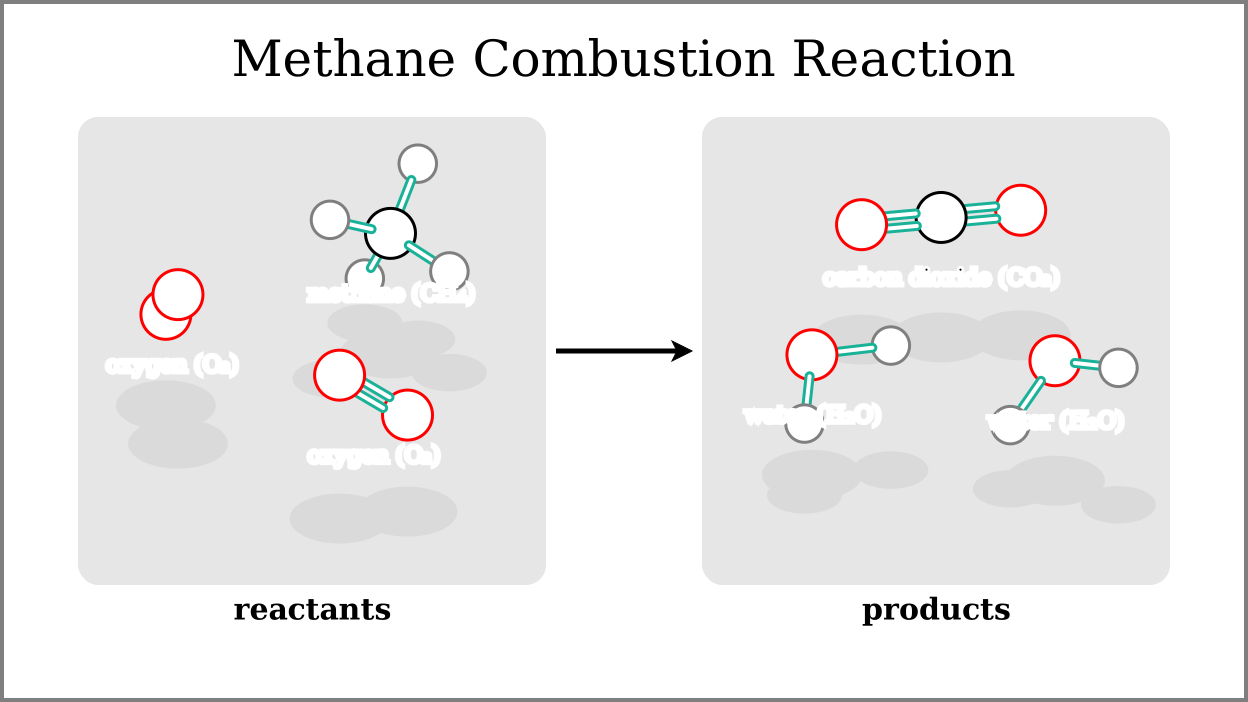
I think that a general-purpose text-based diagramming tool needs to support a variety of different layout engines.
Re: Penrose – Create diagrams by typing notation in plain text
#110Earlier quoted context omitted.
Mermaid has been nice to use. It's very much in a beta phase still, with some odd quirks and missing documentation. I'm excited to see where it will be in a year's time.
The fact it's supported natively by GitHub gives it a huge advantage over the others.
In GitLab too