Live data from Hacker News

Ask HN: What lesser-known accessories do you use with your computer?

news.ycombinator.com

331–340 of 853 posts

Re: Ask HN: What lesser-known accessories do you use with your computer?

#331

Portable screen. Didn't know that such exists, till about few weeks ago. Have a small apartment and sometimes have to work at the dining table. Using a big screen is not an option. Portable screen is light, size of the laptop and charges/sends data through one cable. Perfect!

Wow. Nice! Didn't know this exists. Planning to get one. Do you have any recommendations?
Re: Ask HN: What lesser-known accessories do you use with your computer?

#332
post #90

Earlier quoted context omitted.

There’s essentially no lag in a dedicated wireless receiver mouse - the additional latency is dwarfed by the baseline latency of the hardware and software. https://www.rtings.com/mouse/tests/control/latency Yes connectivity issues can be a problem in certain environments but luckily this has usually not been a problem with receivers not in close proximity to interference, including USB3. Battery wise I have had cheap…

I use wired mice because I like the feeling more. Difficult to explain.

I prefer wired because no batteries, no lost mouse, no lost usb receiver.

Re: Ask HN: What lesser-known accessories do you use with your computer?

#333
post #172

Earlier quoted context omitted.

Wireless headphones. Because sometimes I really have to go and it's literally no problem to walk to the bathroom. Or to go make tea. Or to do whatever. Freedom to not be chained up is amazing. Try it. I too don't feel like I've had to mess with audio settings. I have some SteelSeries Actis Pro's I bought a long time ago. They have bluetooth, but there's also a nice usb-based head-unit I use with higher quality, lower…

Good to have both for different reasons. A good wired headset can be superior to wireless mic audio when presenting or interacting. If merely consuming, and hanging around wireless is good too.

I got a Sony that is both wired and wireless, really nice!

Re: Ask HN: What lesser-known accessories do you use with your computer?

#334
post #15

I wouldn't have thought they were lesser-known, but I've been surprised how many people don't know about today's cheap portable external monitors. They're essentially laptop panels with a USB-C+HDMI board. $100-$150-ish and easily found in 15.6" and 13-14", 1080p or 2K. All the ones I've tried have 2 USB-C ports, mini-HDMI, and speakers. This all depends on what USB-C ports your machine actually has and the right USB…

I think the reason why is that not many mainstream manufacturers are creating them. From the top of my head, I only know ASUS.

Dell has some too

Re: Ask HN: What lesser-known accessories do you use with your computer?

#335

Portable screen. Didn't know that such exists, till about few weeks ago. Have a small apartment and sometimes have to work at the dining table. Using a big screen is not an option. Portable screen is light, size of the laptop and charges/sends data through one cable. Perfect!

Wow. Nice! Didn't know this exists. Planning to get one. Do you have any recommendations?

Not OP, but I've been using the Asus ZenScreen and been happy with it.

Right now I'm at a co-working space and I have: - My MacBook on a stand to the left - My Asus ZenScreen to the right - The monitor the coworking space provides at some desks (If you get there in time before it's taken, lol) in the middle

Pretty great setup to know I'll have 3 screens and barely need to pack anything when I come in.

Re: Ask HN: What lesser-known accessories do you use with your computer?

#336

Gaming wireless headphones, not for gaming but for videoconferencing. Bluetooth headphones are universally terrible for videoconferencing because the Bluetooth standard sucks and requires downgrading to telephone audio quality whenever the mic is enabled. Plus terrible latency. Gaming wireless headphones that come with their own dongle completely fix these issues and are perfect for videoconferencing. Someday the Blu…

I've been thinking of buying a wireless gaming headset too. How good is the Linux support on the dongles?

Re: Ask HN: What lesser-known accessories do you use with your computer?

#337

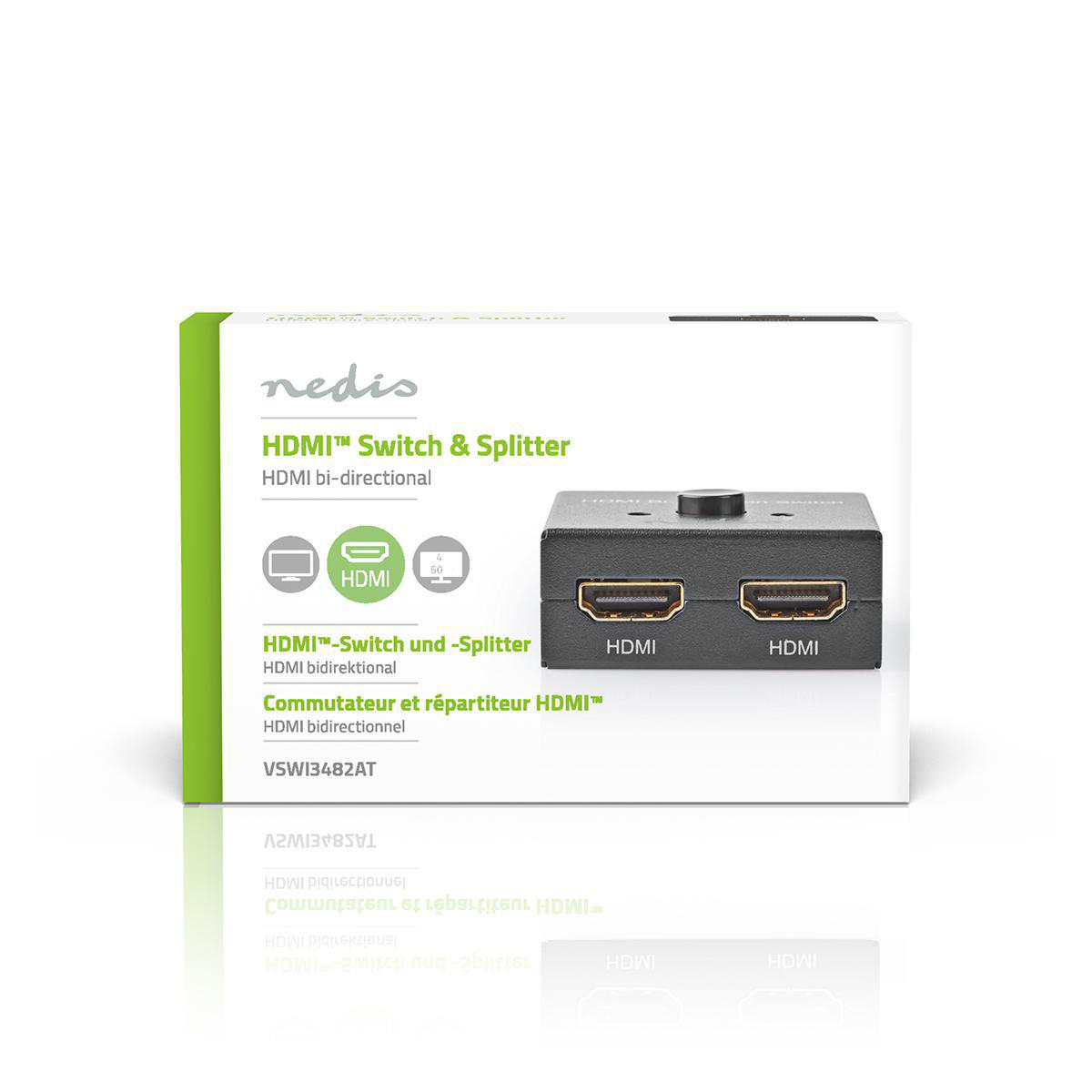
A 2-1 HDMI connector so you can hook up 2 computers to 1 monitor without having to wait while switching from one computer to the other

How do you switch then, is there a toggle? Mind sharing the link?

As an example, this bi-directional HDMI switch allows you to either connect 2 devices to 1 monitor, or 1 device to 2 monitors and switch with a button on top. https://cdn.nedis.com/images/products_high_res/VSWI3482AT_P6...

Re: Ask HN: What lesser-known accessories do you use with your computer?

#338
post #239

Earlier quoted context omitted.

Highly doubtful

https://prosettings.net/games/cs-go/ Logitech X Pro Superlight seems pretty popular and sadly doesn’t work via cable but only Logitechs lightning receiver. I’ve played with the Superlight for a year or so and and couldn’t notice the difference to the mouse is used before and am using now, both with a cable.

Ah, interesting. I haven't heard of these yet.

Re: Ask HN: What lesser-known accessories do you use with your computer?

#339
I have USB footpedals.

https://shkspr.mobi/blog/2022/01/review-usb-foot-pedals-fs3_...

I joke that I have them programmed for select all, copy, and paste. But, really, it is for microphone mute, camera toggle, and boss key.

Takes up a small amount of under desk space, but worth it.

Re: Ask HN: What lesser-known accessories do you use with your computer?

#340
post #312
post #79

A document camera. Just an ordinary webcam, but pointed straight down at a blotter. It's much nicer than all of the "whiteboard" options I've tried.

What is the camera mounted on? Do you have a picture of the setup?

Most document cameras come with their own stand. I have an IPEVO VZ-R [1], which you can route through your capture card with an HDMI switch if you already have that kind of setup. Being able to draw on a piece of paper to explain a concept feels amazing compared to whatever drawing tools one otherwise would have in software.

[1]: https://www.ipevo.com/products/vz-r

Post reply on HN