Live data from Hacker News

Facebook Container Extension

addons.mozilla.org

91–100 of 107 posts

Re: Facebook Container Extension

#91

Earlier quoted context omitted.

I love these two, but I actually have a third, even more paranoid option for you to ponder: LibreWolf with default settings. It has total cookie protection (meaning tabs don't co-mingle) and u-block origin is on by default. Finally, history is wiped on browser close. This, IMO, is on par with the aforementioned plug ins, but is more "uniform" in the sense that every librewolf install is identical. Additionally, libre…

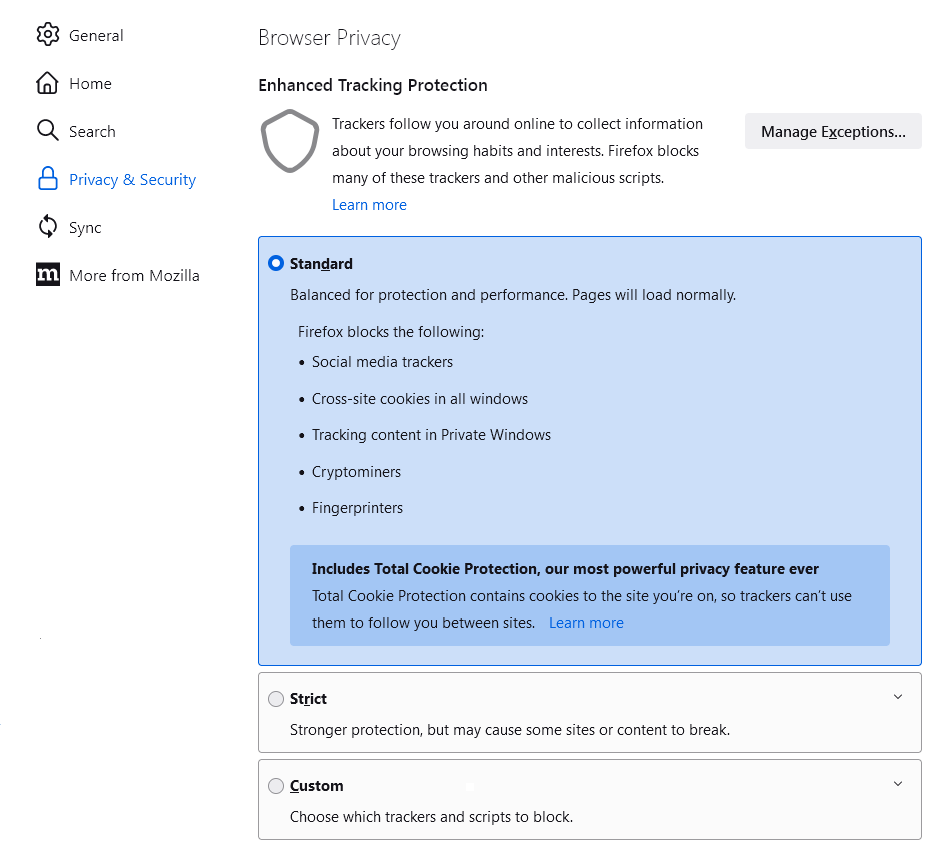
Truth is the first time I check this, but theoretically it was also deployed by default to Firefox some months ago (and I see it activated in my Nightly install). Have any of you seen/noticed a difference when TCP is enabled? I wasn't paying attention when it was deployed. The history (and other stuff) wiping is something I'm thinking about doing, but just for "health". I tend to accumulate open tabs to review later.…

You're right, TCP is enabled by default for regular Firefox too, as can be seen in the callout in the "Standard" entry here: https://assets-prod.sumo.prod.webservices.mozgcp.net/media/u...
Re: Facebook Container Extension

#92

Earlier quoted context omitted.

These extensions are killer, and are the primary reason I use Firefox. No other browsers have similar functionality at all that I've found. For me, it's the best setup I've found in terms of cookie/session management. By default, I do want every new tab I open to come with a clean slate of no cookies, local storage, SQLite, or whatever other storage/tracking mechanisms are invented. If I need to open up a Google serv…

> I do want every new tab I open to come with a clean slate I'd like that too, how can you do that? I've been using Firefox containers for a while. When I open a new tab it opens in the default non-container which carries it's own storage cesspit.

The answer is using Temporary Contains with "Automatic Mode" enabled in the preferences.

I just opened a new tab normally, with no shortcut, and it automatically created a fresh temp container "tmp2". I logged into HN and replied to this comment. I will close the tab now, and in 5 minutes, due to another Temp Containers setting, everything in the temp container will be wiped.

The whole silly "No Container" business goes away entirely.

See https://github.com/stoically/temporary-containers/wiki/Autom...

Re: Facebook Container Extension

#93
post #72

Earlier quoted context omitted.

It is a privacy feature, specially when paired with Cookie Auto Delete. I have CAD setup to always delete cookies when I close all tabs of a website. But I can add exceptions per website and per container. So I have a Google container that is the only place where I allow Google to leave cookies on my browser. I do the same for a several other websites. Sure, Google can always track you somehow, like IP address, but i…

do you realize CAD is unnecessary because Firefox has site isolation for a few years already? anyways, it's CAD the one providing you that sense of privacy, not the container.

Well that's strange as I still get hits on the facebook containers block, to tell me it's blocking tracking.

Re: Facebook Container Extension

#94

Related: Multi Account Containers - Same thing as the facebook container but more generi - https://addons.mozilla.org/en-US/firefox/addon/multi-account... Temporary Containers - Same container concept but you can create and destroy them on the fly - https://addons.mozilla.org/en-US/firefox/addon/temporary-con...

Note that Temporary containers is NOT by Mozilla.

Just saying...

Re: Facebook Container Extension

#95
post #31

Another question is: do you prefer ads that are useless to you, or ads that actually show you stuff you might want?

Do you prefer your door-to-door salesman to know the sexual habits of your household and call you by the nickname only your spouse knows about, or not?

Re: Facebook Container Extension

#96
post #47

This is redundant now that Firefox has Total Cookie Protection (AKA Dynamic First-Party Isolation) on by default[1]. [1] https://blog.mozilla.org/en/mozilla/firefox-rolls-out-total-...

Ive switched to Firefox for my browning on desktop and phone. But I am still unable to use it for web development, local host won't store third party cookies.

I've tried switching off different settings with no luck. Does anyone know if anything can be done? I am trying to use Firefox developer edition

Re: Facebook Container Extension

#97
As mentioned in the other comments, the multi account container extension is more generic and is also one of the reasons I prefer to use Firefox. Chrome is unlikely to reproduce the feature anytime soon.

Re: Facebook Container Extension

#98
post #56

Earlier quoted context omitted.

Oh really? I find them excellent. I don't know how you're trying to use them - but I have a "work" window, which opens new containers in the "work" container (which has all my work accounts). It's a great way to keep accounts separate and it's one of my favorite parts of Firefox.

The last time I tried, which was a while back, two things that bothered me: - there was no way to make CMD/CTRL+T open a new tab in the same container context as the one you were currently in. To me, this seems like an obvious UX flaw. If you’re browsing in a container, the actions you’re doing should keep you in that container unless you consciously want to switch. - building on that, there was no option to right cl…

My flow is window-centric - there's a "new container tab" option that will give you a tab in the selected container. Any new tab opened while looking at that tab will be in the same container. That's how I maintain my "work window" - but the specific feature you want (which seems sensible) isn't possible as far as I know.

As others have said, you can right click -> open in container!

Re: Facebook Container Extension

#99

Earlier quoted context omitted.

It would seem its again the interest of one of the biggest contributors to the open source code base of chromium...

For discussion about it. https://groups.google.com/a/chromium.org/g/chromium-dev/c/IZ... In response to asking about supporting multiple profiles between different tabs. >Extraordinarily difficult. I would expect person-years of effort for this, as the link between profile and window is deeply ingrained throughout the code. Chrome doesn't support containers because it would take a big investment that no one is curren…

It is a lie when we know ghost browsers essentially do the same. I think it is just not in the best interest of Google because it might hurt their bottom line i.e. ads.

Re: Facebook Container Extension

#100
post #51
post #9

Earlier quoted context omitted.

I was wondering about it, why the hell they develop 2 different container extensions ?

There is the internal container system in Firefox, and you need an extension to use it. At my work, we use this functionality to login into multiple accounts at once, for the same site.

you actually don't need an extension. You can enable container from about:config.
Post reply on HN