One feature at a time. I didn't use M-y to cycle through my kill ring in emacs until 2022 after a decade of use!
Ask HN: How to become good at Emacs/Vim?
21–30 of 84 posts
Re: Ask HN: How to become good at Emacs/Vim?
#22> Even after 1-2 weeks it's still not close to what it was with VScode. That's frustrating.
Emacs is a lifelong journey. Expecting to be great at it in a few weeks is very unrealistic.
To answer your question I spent a week reading a book on Emacs and forced myself to figure out any task rather than reaching for another editor. This was for the editing part.
For the IDE, my default is to use another IDE and as time permits I try to replicate features in Emacs - but I never have an obsession to completely replace an IDE.
Watching the system crafters YouTube channel will teach you about a lot of cool features and packages. Highly recommend it.
Monitoring the Emacs subreddit is a good source of inspiration as well.
Ultimately people use Emacs because they enjoy it - not because it is a superior IDE. If you're frustrated with Emacs, consider that it's not for you.
Re: Ask HN: How to become good at Emacs/Vim?
#23I started by using vimium so that I'd navigate the browser with vim key-bindings, since I spend so much time in there. https://vimium.github.io/
Then after that, I just started using vim and keeping with it. To me, the biggest hurdle was switching between modes. Hitting esc was too far for me. So I found some post that helped me configure vim that bound "ii" to command mode. So to switch between insert mode and command mode was just "i" and "ii".
Nowadays, I use the escape key. It's second nature by now. But I'm still trying to make navigation with 't' and 'f' more natural. I think it's just persisting, honestly.
Re: Ask HN: How to become good at Emacs/Vim?
#24 i found this map https://rawgit.com/darcyparker/1886716/raw/vimModeStateDiagr... , and kept hammering at it
also started using vim everywhere
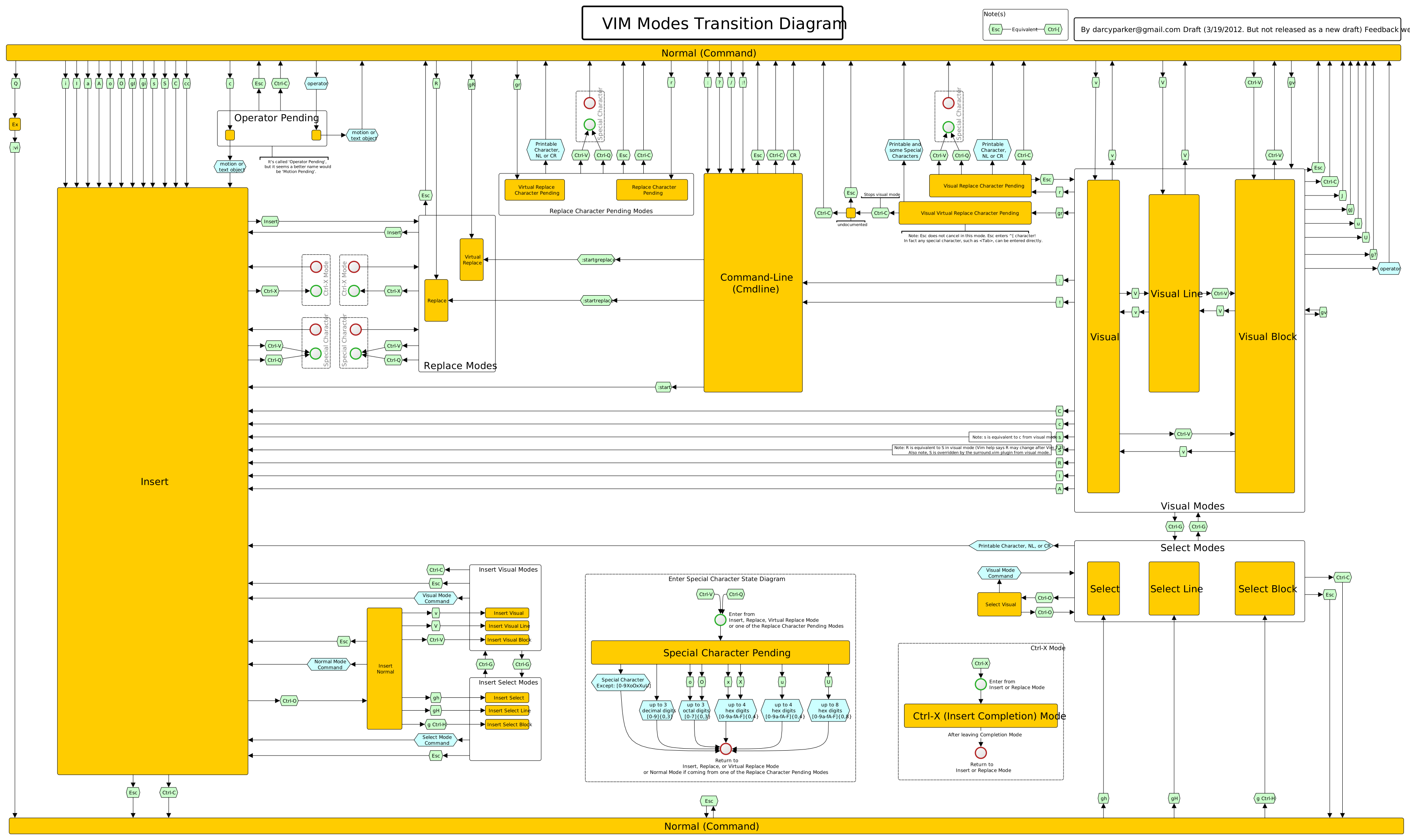
Re: Ask HN: How to become good at Emacs/Vim?
#25Why?
No, seriously, why do you think you have to switch if you are productive with VSCode?
I used to be all in with Vim and then Emacs many years ago. I can manage pretty well with both to this day. But I moved onto VSCode a few years ago and… it’s very nice. It just works out of the box. I have tried to move back to Emacs for example, but the lack of trivial and good remoting features and the lack of great LSP integration are hard to overcome.
Nowadays I still use vim for quick or repetitive edits (learn how to record and replay macros; they are a game changer), but otherwise spend all of my time in VSCode with its Vim mode enabled.
And to be fair, I only use the Vim mode in VSCode because I moved from macOS to Windows and I could not stand the Windows native shortcuts.
Re: Ask HN: How to become good at Emacs/Vim?
#26VSCode/IDEs and Vim need not be mutually exclusive. I tend to rely on vim emulation within my vscode, chrome and in other applications. Usually, all I need are the basic vim modalities with the nicer amenities provided by modern editors.
The well known “Vim mode paradox”: if you like the Vim mode provided by another editor, it means you don’t know Vim well enough to justify using Vim nor Vim mode. Vim modes don’t approach even 10% of the Vim features you need to reach the bare minimum of efficient editing.
Re: Ask HN: How to become good at Emacs/Vim?
#27One feature at a time. I didn't use M-y to cycle through my kill ring in emacs until 2022 after a decade of use!
ouch ;)
Re: Ask HN: How to become good at Emacs/Vim?
#28Just use it. When you get stuck Google how do something. Also join r/vim or something to have a community to get inspiration from.
Re: Ask HN: How to become good at Emacs/Vim?
#29A couple of suggestions (in no particular order, and from an ex-Emacs/Xcode/Jetbrains/VSCode and current nvim user): 1. Don't. There's no need to 'switch'. There are marvellously 'productive' developers using every editor under the sun, and neither the quality nor quantity of their work is strongly related to their choice of editor. There are world-class developers who do everything in a vanilla Sublime Text. Others…
Reinforcing #1: It's amazing how productive you can be if you're creating things instead of endlessly trying, configuring, and comparing editors.
Re: Ask HN: How to become good at Emacs/Vim?
#30VSCode/IDEs and Vim need not be mutually exclusive. I tend to rely on vim emulation within my vscode, chrome and in other applications. Usually, all I need are the basic vim modalities with the nicer amenities provided by modern editors.
The well known “Vim mode paradox”: if you like the Vim mode provided by another editor, it means you don’t know Vim well enough to justify using Vim nor Vim mode. Vim modes don’t approach even 10% of the Vim features you need to reach the bare minimum of efficient editing.
> Vim modes don’t approach even 10% of the Vim features you need to reach the bare minimum of efficient editing.
What's the 90% that's not available in VSCode with the Vim extension?