Live data from Hacker News

ThinkPad’s 30th Anniversary: An Insider’s Perspective

forbes.com

21–30 of 164 posts

Re: ThinkPad’s 30th Anniversary: An Insider’s Perspective

#21
post #4

IBM's ThinkPads lasted to this day without having issues. My Lenovo ThinkPad T14s AMD has multiple dead pixels, enter and backspace keys not working at all and completely fucked up USB bridge, resetting devices all the time which results in unsolicited clicks and drag'n'drop or screen selection being unavailable both using mouse and touchpad. "Business laptop" my ass. It's a disgrace to the ThinkPad brand what Lenovo…

>My Lenovo ThinkPad T14s AMD has multiple dead pixels, enter and backspace keys not working at all

Sounds like valid reasons to RMA it. Why haven't you done that yet?
Re: ThinkPad’s 30th Anniversary: An Insider’s Perspective

#22

I’ve been a bit of a Thinkpad fanatic ever since my dad got a T42p somewhere in 2004. I have been on Thinkpads since 2006. I bought old ones on eBay and now have a collection of about 15 machines. The 700c, two butterfly keyboard 701cs, the 240 and a lot more. I’m currently on a T495s. From my experience I can say that the “old IBM machines were reliable and well constructed” is not true. They were bulky and over tim…

Same experience. The old ones made creaky noises when held with one hand. My latest is a X1 Carbon and it's a much better machine. Zero nostalgia from me.

Re: ThinkPad’s 30th Anniversary: An Insider’s Perspective

#23

My Thinkpad X220 still going strong, and I miss a computer I can open up, replace or upgrade what's needed in an easy way. The form factor is good enough and I don't need or want this inch thin laptops just because one company decided it's suits them and fashionable. Unfortunately Lenovo doesn't really keep the brand and in the gazillion models they have on stock, there isn't one that can replace my X220 in convenien…

I have an x220 in my line up of older machines. My newest is an X1 Carbon gen6 aka x1c6. I was surprised how quickly I was able to open the bottom of it up install a new wifi6 card. About 5 screws and the back is off and another screw holding in the wifi card. I dont think the x220 is that fast.

Re: ThinkPad’s 30th Anniversary: An Insider’s Perspective

#24
Sadly they don't make them like they used to. Keyboards and repairability comes to mind.

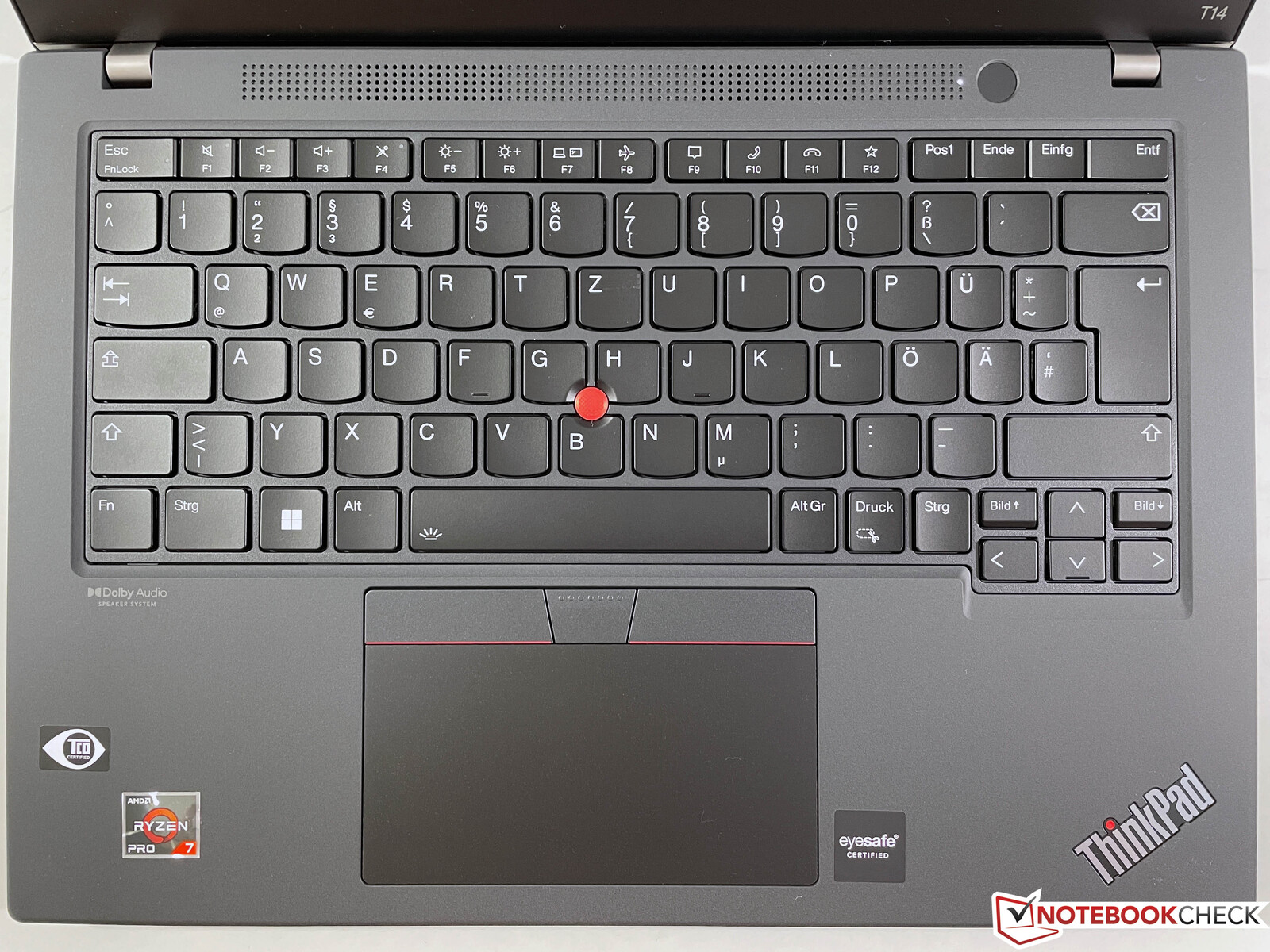
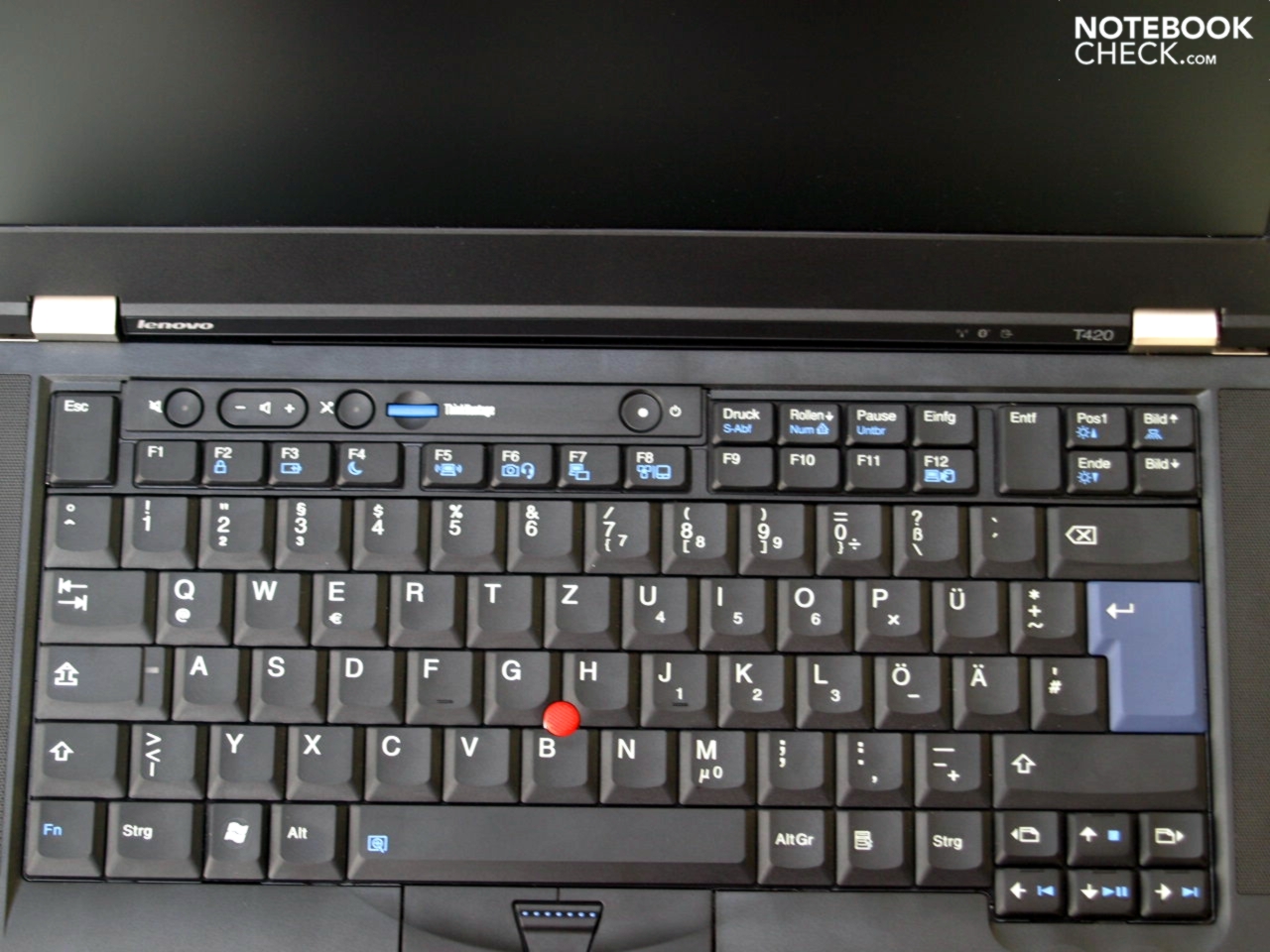
I don't mind the chiclet keycaps, but Lenovo really ruined the keyboard when they went from the 7 row layout [0] to the current 6 row layout [1].

Each new generation of ThinkPad reduces the travel distance of the keyboard - they've gone from 2.5 mm in the T420 (2011) to 1.5 mm in the T14 G3 (2022). 1 mm doesn't sound like on paper, but you immediately notice the difference if you switch between them. I don't understand why Lenovo doesn't add an extra 1 mm to the thickness of their laptops, at least it would restore the reputation for typing feel on ThinkPads.

For repairability: soldered WLAN cards, 1 SO-DIMM slot or soldered RAM on T/X series machines (HP offers 2x SO-DIMM slots on most EliteBooks) are a step backwards.

USB-C charging sounds good at first, but the ports start to wear out after 2 years and become loose. They are soldered to the motherboard, so good luck repairing them if you aren't good at micro soldering.

[0] https://www.notebookcheck.net/fileadmin/_migrated/pics/t420_...

[1] https://www.notebookcheck.net/fileadmin/_processed_/f/5/csm_...

Re: ThinkPad’s 30th Anniversary: An Insider’s Perspective

#25

My Thinkpad X220 still going strong, and I miss a computer I can open up, replace or upgrade what's needed in an easy way. The form factor is good enough and I don't need or want this inch thin laptops just because one company decided it's suits them and fashionable. Unfortunately Lenovo doesn't really keep the brand and in the gazillion models they have on stock, there isn't one that can replace my X220 in convenien…

If the frame.work laptops get trackpoint Ill say goodbye to Lenovo. Until then I see no replacement.

We'll see how long my x260 lasts.

Re: ThinkPad’s 30th Anniversary: An Insider’s Perspective

#26

My Thinkpad X220 still going strong, and I miss a computer I can open up, replace or upgrade what's needed in an easy way. The form factor is good enough and I don't need or want this inch thin laptops just because one company decided it's suits them and fashionable. Unfortunately Lenovo doesn't really keep the brand and in the gazillion models they have on stock, there isn't one that can replace my X220 in convenien…

Lenovo ruined the ThinkPad reputation. They try so hard with unwanted features from Apple. If I need those features, I will get MacBook Air or Pro. The legendary brand, once known for reliability, now comes with RAM stuck to the motherboard. Not to mention overheating and a weird bug for Linux power management. The best ThinkPads are older ones. You can get them from eBay and install Linux on them. The newer ones are not worth my money and time. YMMV.

Re: ThinkPad’s 30th Anniversary: An Insider’s Perspective

#27
Just got a new T14 (3. gen Intel, 14'') for my personal computing needs, while also using a 16'' Macbook Pro M1 for work. I have to say the T14 is a really nice machine and feels quite modern. The variant with the 4k screen is comparable in quality to the Macbook screen, though it only has 60 Hz (which isn't very noticeable I find). The 16:10 ratio is also quite nice, glad this came back into fashion. The touchscreen is a nice gimmick but mostly useful in Windows, Linux supports it but without multi-touch it seems (or maybe I didn't look in the right place), so it's not very useful. The only thing that's disappointing is the runtime, even with the larger 50Wh battery I only get 3-4 hours of usage out of it, while my Macbook seems to last forever. I think the Macbook uses less than 7W when idling, whereas the Thinkpad's value is in the 14W range it seems. So yeah, Lenovo has still some catching up to do but it seems they're going in the right direction again.

Re: ThinkPad’s 30th Anniversary: An Insider’s Perspective

#28
I have a W550s that I've been using for work since 2015. Still going strong! In that time, I have:

- replaced the battery - upgraded to 1TB SSD - upgraded from 8GB to 16GB of RAM

Never had a laptop from Dell or Asus that was this rugged. It's huge, but the screen, touchpad and keyboard are all rock solid.

Of course, it's old enough that it has no USB-C host ports. VGA available for your convenience though!

https://www.laptopmag.com/reviews/laptops/lenovo-thinkpad-w5...

Re: ThinkPad’s 30th Anniversary: An Insider’s Perspective

#29
post #12

My Thinkpad X220 still going strong, and I miss a computer I can open up, replace or upgrade what's needed in an easy way. The form factor is good enough and I don't need or want this inch thin laptops just because one company decided it's suits them and fashionable. Unfortunately Lenovo doesn't really keep the brand and in the gazillion models they have on stock, there isn't one that can replace my X220 in convenien…

Same here. My blood pressure rises every time I have to type on a laptop that isn't my x220. Please give us laptops with real keyboards.

Yes I have used the old usb sk-8855 and even bought the Tex Shinobi mechanical keyboard. I still prefer the feel of typing and using an x220 over anything else. When a client sends me a dedicated machine to work on I still get round this by installing VNC server and controlling it on a X220 keyboard

Re: ThinkPad’s 30th Anniversary: An Insider’s Perspective

#30
Today's ThinkPads may not have all the same features as the classic ThinkPads, but they are still, by far, the best laptops you can buy. Dell and HP might be made of the same components but they pale in quality when you compare the whole package, case, keyboard, build quality...
Post reply on HN